Does Threads Show Who Viewed Your Profile? (2026)
Spybroski Team
No. Threads doesn't show who viewed your profile. There's no visitor list, no "seen by" on posts and no notification when someone opens your page. Looking at someone else's profile doesn't tell them either. If you'd rather not be logged in at all while you look, an anonymous Threads viewer shows public profiles, posts and replies without an account.
There is one 2026 change that confuses people. Some Threads profiles now show a public recent views number next to their follower count. That's a total, not a list of names, and the owner can turn it off. This guide explains what that number means, what Threads does show you about your audience, and why "who viewed my Threads" apps can't work. We checked each point against Meta's help pages, Meta's developer docs and press reports on November 24, 2026.
Key Takeaways
- Threads has no list of profile visitors. Viewing a profile or post doesn't notify anyone.
- Since March 2026, profiles with more than 10,000 views in the last 30 days can show a public recent views count. It's a number, never names, and it can be turned off.
- You can see view counts on your own posts and totals in Insights. You can also see who liked, reposted or quoted a post.
- Your likes aren't secret. They show up by name in the post owner's activity list.
- On a private profile, your name, photo, username and bio are still public.
Does Threads show who viewed your profile?
No. Threads doesn't show visitors anywhere: not on your profile, not in Activity, not in Insights. Meta hasn't published a help page saying so in so many words, but its own developer documentation points the same way. In the Threads API, profile "views" is defined only as "The number of times your profile was viewed" (Meta for Developers). It's a count. There's no field for who.
People do ask. "Does Threads show who viewed your profile" gets about 1,000 US Google searches a month, and "does Threads tell you who viewed your profile" another 390, according to DataForSEO keyword data we pulled through OpenSEO in November 2026. The bigger term, "threads views," gets 8,100, because the views on Threads are easy to misread.
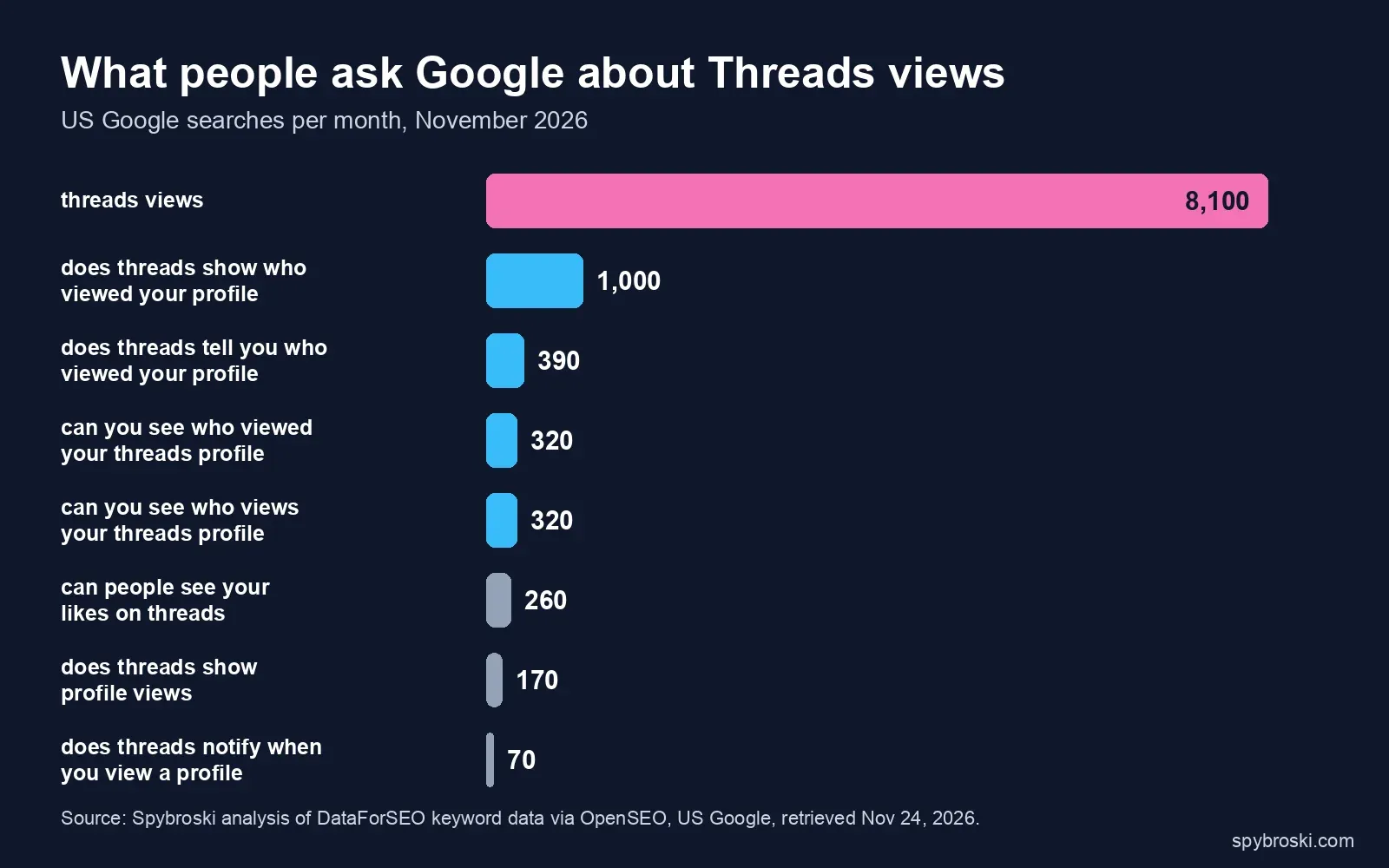 Source: Spybroski analysis of DataForSEO keyword data via OpenSEO, US Google, retrieved November 24, 2026.
The new "recent views" count on Threads profiles
In March 2026, Threads started showing "the number of recent views you've received directly on your profile," as social media analyst Lindsey Gamble reported. It appears once an account passes 10,000 views over the last 30 days, and there's an "option to turn it off in settings" (Lindsey Gamble on Threads, March 23, 2026).
What it is, based on that report and later coverage:
- A public number next to your follower count. Anyone visiting your profile can see it (Lindsey Gamble).
- A 30-day total. It's one number. It doesn't say whose views they were.
- Optional. German marketing site OnlineMarketing.de reported in April 2026 that creators switch it off with a slider in the edit-profile settings, and can share their 30-day views as "View Count Cards" (OnlineMarketing.de, April 21, 2026).
What it isn't: a list of who looked. Seeing "52K recent views" on someone's profile is a total, not a list of who looked. And your own visit to their page isn't named anywhere in that number.
A caveat on sources: we couldn't find a Meta help page or announcement for this feature. When we opened the official @threads profile logged out on November 24, 2026, it showed a follower count but no views count. That fits a feature that's optional or still rolling out.
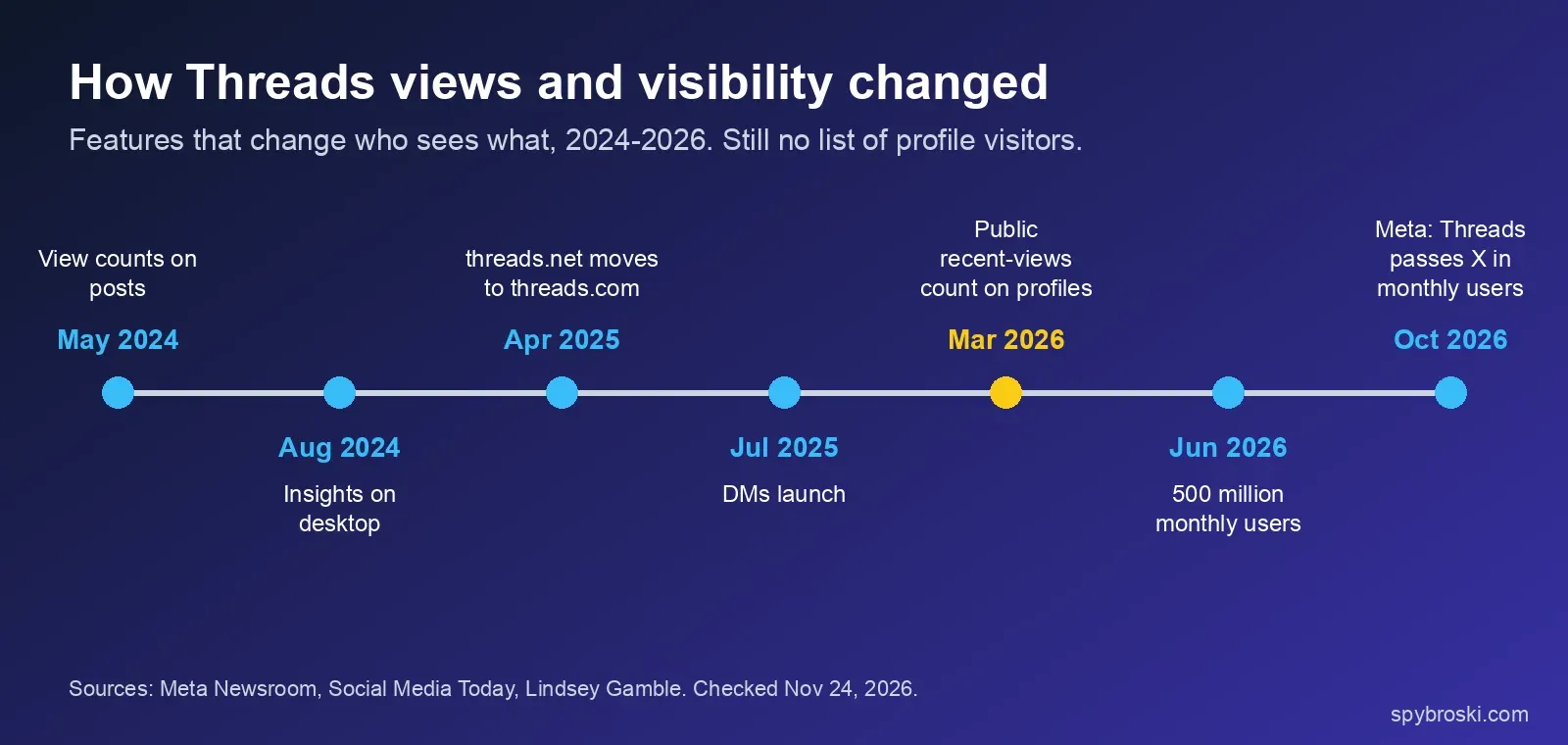 Sources: Meta Newsroom, Social Media Today, Lindsey Gamble. Checked November 24, 2026.
What Threads does show you
Threads gives you plenty of numbers about your audience. Only one place has names.
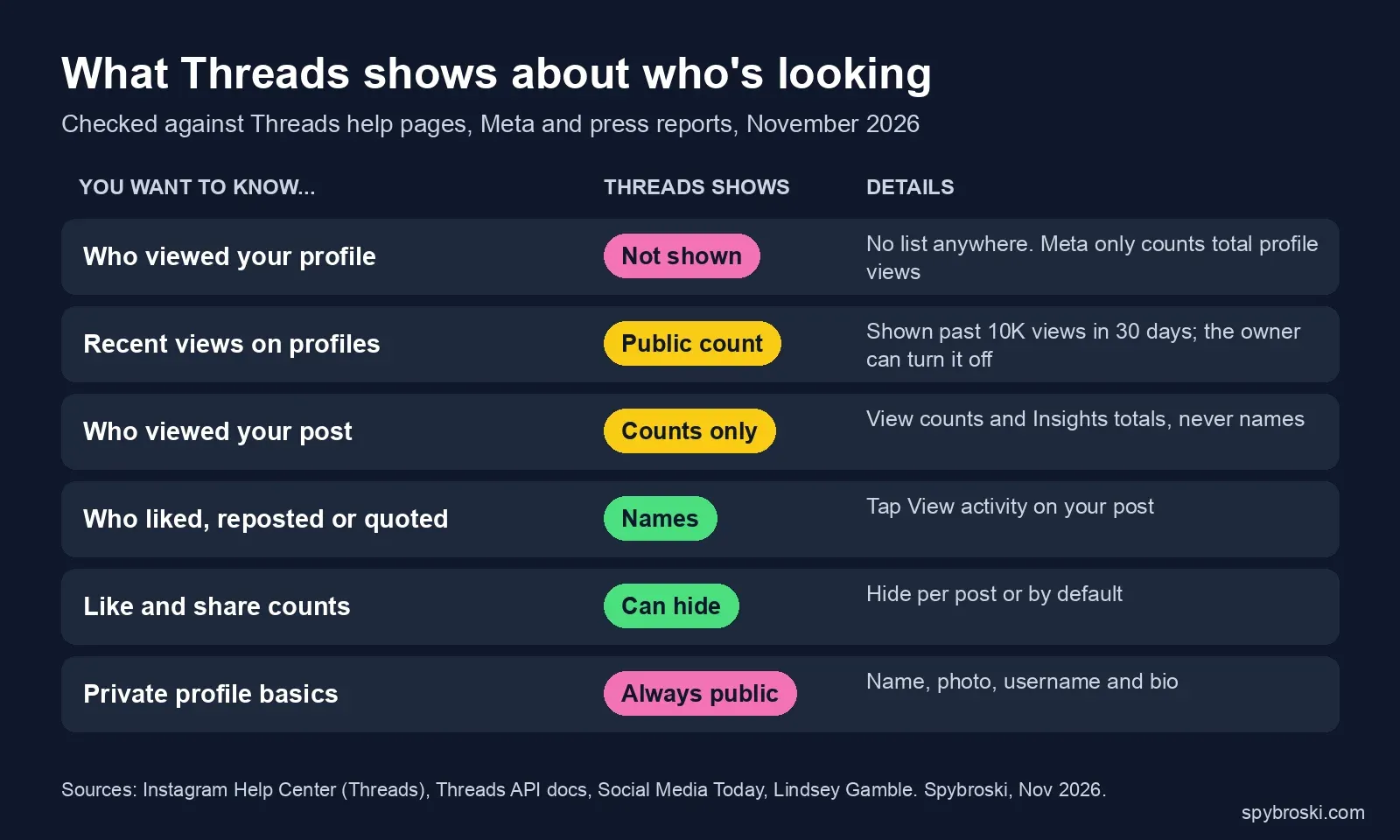 Sources: Instagram Help Center (Threads), Threads API docs, Social Media Today, Lindsey Gamble. Checked November 24, 2026.
Post views: a count, not a list
Threads added view counts to posts in May 2024, so people could "see how many times their posts have been viewed" (Social Media Today, May 9, 2024). Meta's help page says "The view count shows how many times a post has been viewed on Threads and Instagram," and notes that some metrics, including views, "are still in development" (Instagram Help Center).
It's a reach number. It never turns into names.
Insights: totals and trends
Threads Insights gives you views, interactions from followers and non-followers, and follower growth. Insights came to the web version in August 2024 (Social Media Today, August 13, 2024). Accounts with "at least 100 followers" also get follower demographics, per Meta's API docs (Meta for Developers). None of it is broken down by person.
Likes, reposts and quotes: names
This is the one place Threads shows you who. On your own post, Meta's help page says to "Tap View activity to see a list of who liked, reposted, and quoted your post" (Instagram Help Center).
So if you're trying to work out who's paying attention, the people who interact are visible. The people who only read aren't.
Can someone see that you viewed their Threads profile?
No. Opening a profile, reading posts and scrolling replies leaves nothing the owner can see. They won't get a notification, and your name won't appear in any list. "Does Threads notify when you view a profile" gets only about 70 US searches a month, and the answer is no.
Here's what does leave a trace:
- Liking, reposting or quoting. Your name shows up in that post's activity list.
- Replying. Replies are public on public profiles.
- Following. The person gets a follow notification.
- Messaging. Threads added DMs in July 2025. Messages from people someone doesn't follow now land in a Message Requests folder (Meta Newsroom, updated October 15, 2025).
Can people see your likes on Threads?
Yes, the post owner can. Your like puts your name in their View activity list. You can hide like and share counts, either on a single post or as a default in your privacy settings (Social Media Today, January 16, 2024). Hiding counts hides the numbers from other people. It doesn't make your own likes on other people's posts anonymous.
What a private profile still shows
Making your Threads profile private limits your posts to approved followers. But Meta's help page says your name, profile photo, username and bio "are always public." Going private also turns off fediverse sharing. Meta will "request that other servers on the fediverse delete" your content, which "may remain publicly visible," and you have to "wait 30 days" before turning sharing back on (Instagram Help Center).
How to look at Threads without being logged in
Threads moved its web address from threads.net to threads.com in April 2025. Meta said, "Today, we're moving from Threads.net to Threads.com" (Meta Newsroom, April 24, 2025).
You can open a public profile on threads.com without logging in, but you don't get far. We tested exactly what loads in our guide on how to view Threads without an account. When we checked on November 24, 2026, a logged-out visit to the official @threads profile showed the profile header and follower count, then "Log in to see more from threads."
Since profile visits are invisible anyway, logging in won't reveal you to the profile owner. It's a convenience problem: you need an account to scroll a profile properly. That's the gap our Threads viewer fills. Enter a username to browse a public profile's posts, replies and media without an account. To save something you find, the Threads video downloader and Threads photo downloader work from a post link. Private profiles stay private with any tool.
Why "who viewed my Threads profile" apps don't work
There's no visitor data to read. Threads doesn't show it to you, and Meta's API only gives developers a total count of profile views. Any app that promises a list of your Threads profile visitors is making it up.
Some are also after your login. Many Threads accounts are linked to Instagram, so giving your Threads login to a third-party app can expose both. In 2022, Meta reported more than 400 Android and iOS apps designed to steal Facebook logins, disguised as photo editors, VPNs and games. Its advice: ask yourself, "Is the app unusable if you don't provide your Facebook information?" (Meta Newsroom, October 7, 2022). The same test works for Threads and Instagram.
How Threads compares with Instagram and TikTok
Threads is part of Meta's family, and it follows Instagram's rules on profile visits: no visitor list.
- Instagram doesn't show who viewed your profile either. Its closest thing is your story viewer list, visible for 48 hours. We explain the details, including the 2026 Instagram Plus change, in can you see who views your Instagram profile.
- TikTok is the exception. It has an opt-in profile view history, and turning it on shows others that you viewed them too. See our guide to TikTok profile views.
A note for marketers
Threads is now big enough to plan for. Meta said in June 2026 that "Threads has reached 500 million monthly active users" (Meta Newsroom, June 16, 2026). On Meta's October 2026 earnings call, Mark Zuckerberg said Threads "has now overtaken X in monthly active users" (Social Media Today, October 22, 2026).
For brand accounts, the public recent-views count is social proof. If you're past 10,000 views a month, leaving it on tells new visitors your posts get read. If you're just past the threshold, you might hide it until the number grows. For audience research, rely on the activity list (who interacts) and Insights (how many see), since a visitor list doesn't exist.
Frequently asked questions
Can anyone see a list of my Threads profile visitors?
No. Threads has no list of profile visitors. Some profiles show a public recent-views count, but it's a 30-day total, not names.
Can you see who viewed your Threads post?
No. You see how many views a post got, and who liked, reposted or quoted it. Threads doesn't show who only read it.
Does Threads notify someone when you view their profile?
No. Viewing a profile or post sends no notification. Liking, replying, reposting, quoting and following do.
What does "recent views" on a Threads profile mean?
It's a count of the views an account received over the last 30 days. According to press reports, it appears on profiles past 10,000 views in that window, and the owner can switch it off.
Can people see what you like on Threads?
The post's owner can. Your name appears in the list of people who liked their post. You can hide like counts on your own posts, but not your likes on other people's.
Is there an app that shows who viewed my Threads profile?
No. Threads doesn't give visitor names to anyone, including app developers, so those apps can only guess, and handing them your login puts your Threads and Instagram accounts at risk.
Sources
- Meta for Developers: Threads Insights API, checked November 24, 2026
- Instagram Help Center: See information about your posts on Threads, checked November 24, 2026
- Instagram Help Center: Switch your Threads profile to public or private, checked November 24, 2026
- Lindsey Gamble on Threads: Threads is starting to show the number of recent views on your profile, March 23, 2026
- Lindsey Gamble: Threads Is Starting to Publicly Display Recent Views an Account Has Received on Their Profile, March 2026
- OnlineMarketing.de: View Count Cards und öffentliche Aufrufansicht auf Threads, April 21, 2026
- Social Media Today: Threads adds view counts on posts, May 9, 2024
- Social Media Today: Threads launches Insights on desktop, August 13, 2024
- Social Media Today: Threads Now Lets You Hide Both Like and Share Counts, January 16, 2024
- Social Media Today: Meta offers insights on individual platform growth, October 22, 2026
- Meta Newsroom: New Features for the Threads Web Experience, April 24, 2025
- Meta Newsroom: Introducing Messaging and Highlighted Perspectives on Threads, updated October 15, 2025
- Meta Newsroom: New Features to Celebrate 500 Million Monthly Users on Threads, June 16, 2026
- Meta Newsroom: Protecting People From Malicious Account Compromise Apps, October 7, 2022
- Keyword data: DataForSEO via OpenSEO, US Google, retrieved November 24, 2026