How to View Threads Without an Account (2026, Tested)
Spybroski Team
Yes, you can view Threads without an account, up to a point. Open threads.com in a desktop browser and you can read public profiles, single posts, replies and search results without logging in. What you can't do is scroll far. A profile shows about five recent posts before Threads asks you to log in. To read a whole public profile without an account, use a Threads viewer instead.
We tested threads.com logged out on November 24, 2026, in a fresh browser with no Threads or Instagram login. Below is exactly what loads, where the login wall kicks in, three other ways to read Threads without signing up, and what no tool can do: show a private profile's posts.
Key Takeaways
- On threads.com, logged out, you can open a public profile, its Replies and Media tabs, a single post with its replies, and search results.
- A profile shows about five recent posts, then "Log in to see more." A "Continue with Instagram" pop-up covers each page, but clicking outside it closes it.
- You can't like, reply or follow without an account. Meta says you can "browse content, but won't be able to post, interact, or see recommendations."
- Mastodon and other fediverse apps can follow Threads profiles that turned on fediverse sharing.
- Private Threads profiles show only a name, photo, username and bio. No app or website can show their posts.
Can you view Threads without an account?
Yes. Meta's own Threads page says that "If you use Threads without a profile, you will be able to browse content, but won't be able to post, interact, or see recommendations for you" (Instagram). Public posts are visible to "Anyone on or off Threads," according to the same page.
Plenty of people want to. "View threads without account" gets about 720 US Google searches a month, and "view threads anonymously" another 480, according to DataForSEO keyword data we pulled through OpenSEO in November 2026.
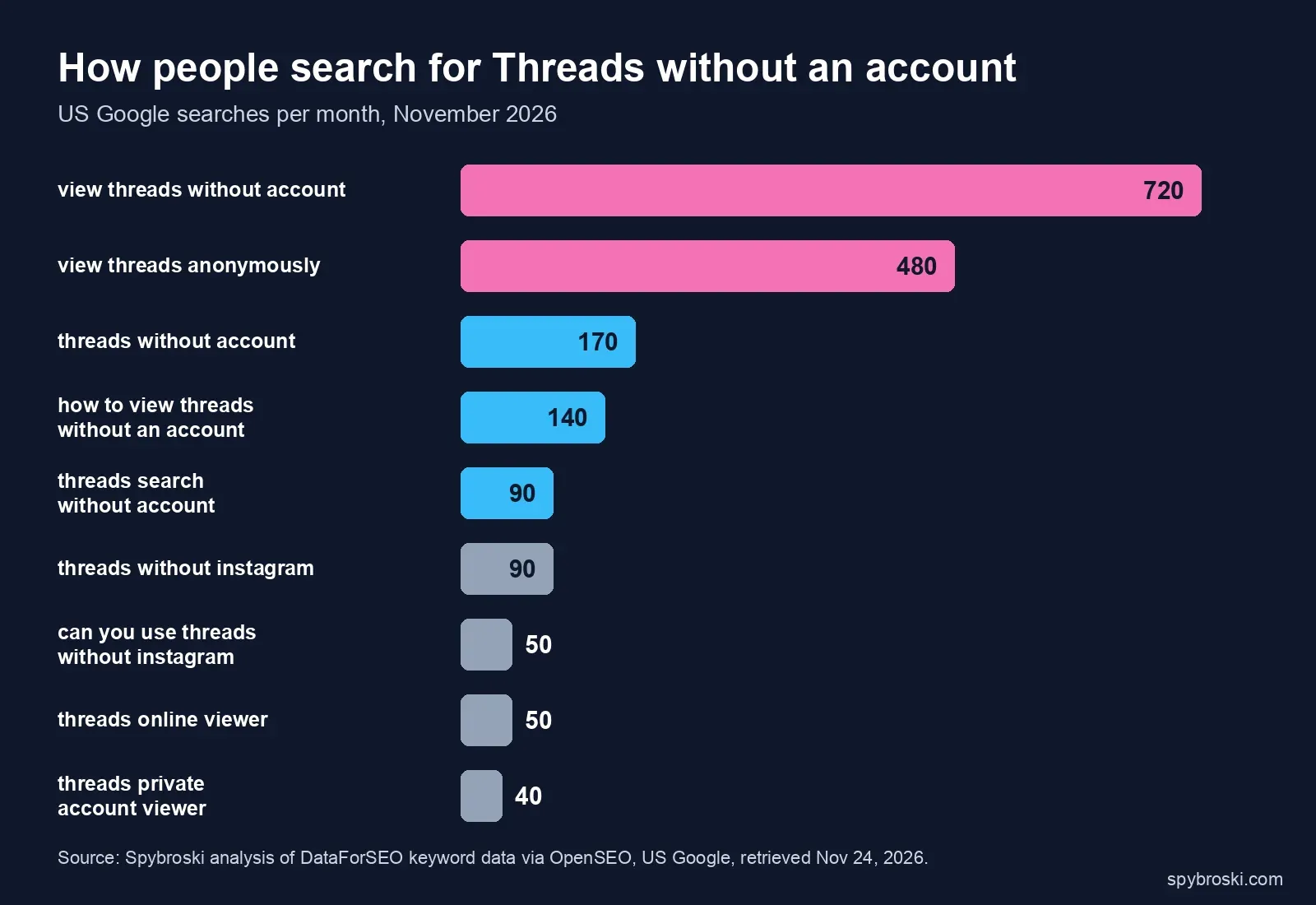 Source: Spybroski analysis of DataForSEO keyword data via OpenSEO, US Google, retrieved November 24, 2026.
What threads.com shows when you're logged out (our test)
Here's what we saw on threads.com on a desktop browser with no account, on November 24, 2026.
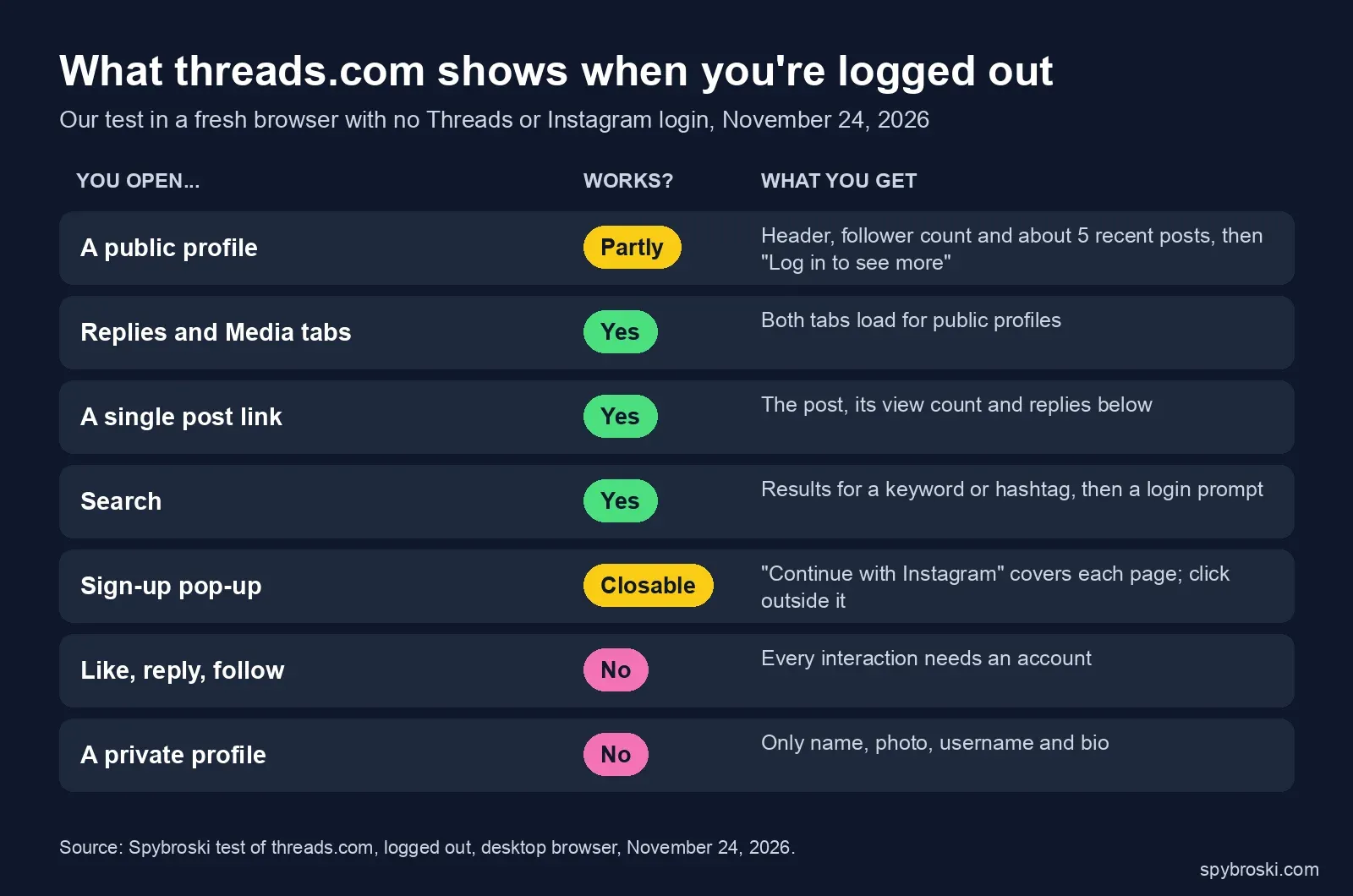 Source: Spybroski test of threads.com, logged out, desktop browser, November 24, 2026.
| You open... | Works logged out? | What you get |
|---|---|---|
| A public profile | Partly | Header, follower count and about 5 recent posts, then "Log in to see more" |
| Replies and Media tabs | Yes | Both tabs load for public profiles |
| A single post link | Yes | The post, its view count and the replies below |
| Search | Yes | Results for a keyword or hashtag, then a login prompt |
| The sign-up pop-up | Closable | "Continue with Instagram" covers each page; click outside it |
| Like, reply, follow | No | Every interaction needs an account |
| A private profile | No | Only name, photo, username and bio |
Public profiles: about five posts, then a wall
Go to threads.com/@username. You'll see the profile header, bio, follower count and the latest posts. On the official @threads profile, we got a pinned post plus four more, then the line "Log in to see more from threads."
The Replies and Media tabs both loaded for us without an account. That's handy when you want to see what someone has been saying in other people's conversations, or just their photos and videos.
Single posts: the most open part of Threads
A direct post link (threads.com/@username/post/...) loads the full post, its view count and the replies under it. If someone sends you a Threads link, you don't need an account to read it.
Search works too
Logged out, threads.com/search?q= plus a keyword or hashtag returned a full page of matching posts before a login prompt. That covers the roughly 90 US searches a month for "threads search without account."
The pop-up you can close
Every page we opened showed a "Say more with Threads" box with a Continue with Instagram button. It looks like a wall, but it isn't one. Click anywhere outside the box and it closes, leaving the page readable behind it.
What you can't do
You can't like, reply, repost, follow or send messages without an account. You also don't get a feed of recommendations, so you need to know which profile or post you're looking for.
4 ways to read Threads without a Threads account
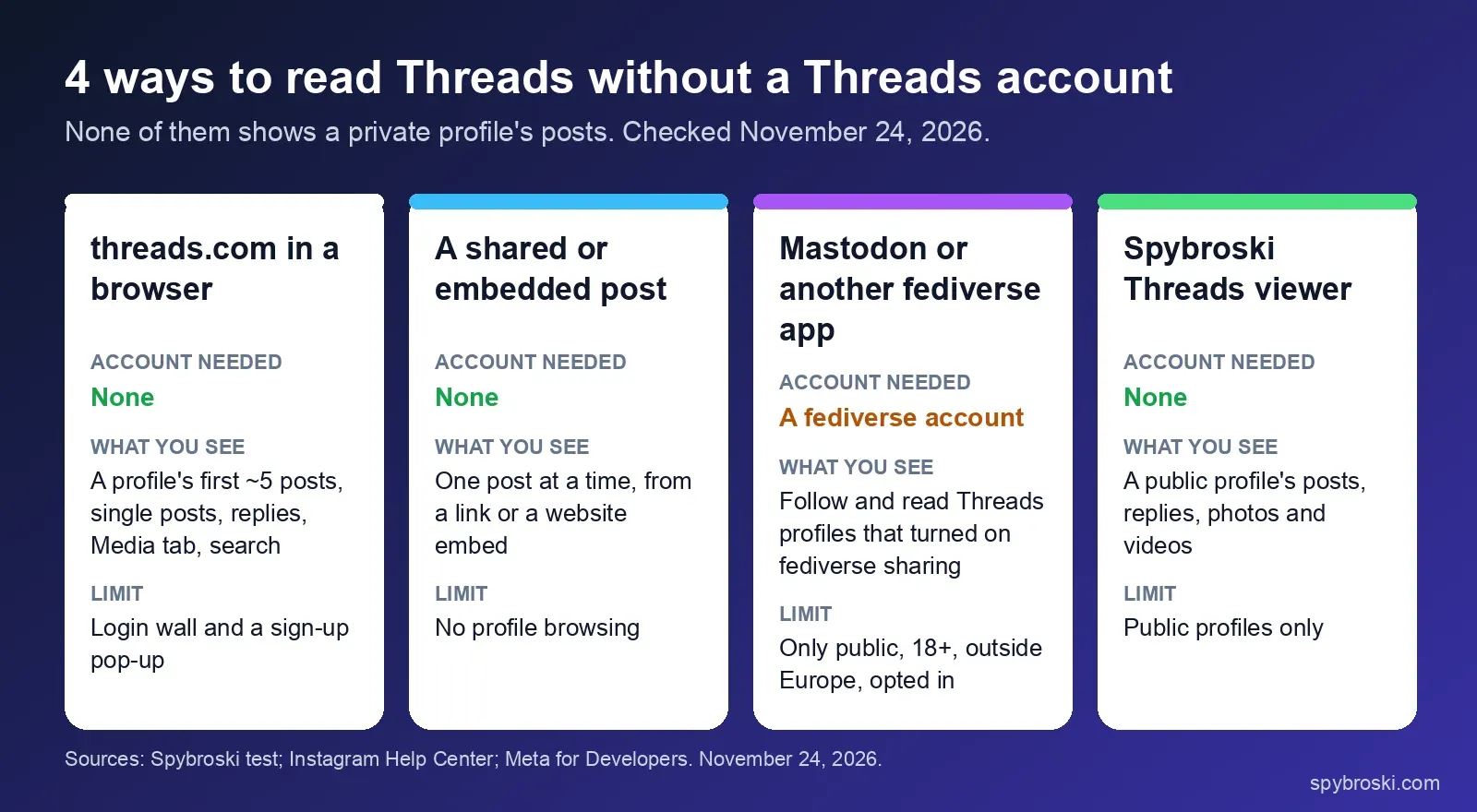 Sources: Spybroski test; Instagram Help Center; Meta for Developers. Checked November 24, 2026.
| Way | Account needed | What you see | Limit |
|---|---|---|---|
| threads.com in a browser | None | A profile's first ~5 posts, single posts, replies, Media tab, search | Login wall and a sign-up pop-up |
| A shared or embedded post | None | One post at a time | No profile browsing |
| Mastodon or another fediverse app | A fediverse account | Profiles that turned on fediverse sharing | Only public, 18+, outside Europe, opted in |
| Spybroski Threads viewer | None | A public profile's posts, replies, photos and videos | Public profiles only |
1. threads.com in any browser
Best for a quick look at a profile, a post someone shared, or a search. It needs nothing, but stops after about five posts per profile.
2. Shared links and embedded posts
Many news sites and blogs embed Threads posts. Meta lets anyone grab one with Get embed code from the three-dot menu on a post. Posts from "private, inactive, and age-restricted accounts as well as geo-gated posts are not supported" (Meta for Developers). Since April 2026, developers can embed public Threads posts without an access token or app review (Meta for Developers blog, April 14, 2026).
3. Mastodon and other fediverse apps
Threads connects to the fediverse, the network behind Mastodon and similar apps. When a Threads user turns on fediverse sharing, people on other servers "can search for and follow your profile, view your posts, interact with your content" (Instagram Help Center).
The catch is that only some profiles take part. According to the same page, a Threads user has to be 18 or older, have a public profile, be outside the European Region, and switch the setting on. So this works for following people who opted in, not for looking up anyone you like. You also need an account on a fediverse app, just not a Threads one.
4. A Threads viewer
A viewer tool shows a public profile's posts, replies, photos and videos without the five-post cut-off and without any account. Our Threads viewer works this way: enter a username and browse. To keep a post, use the Threads video downloader or the Threads photo downloader with the post's link.
How do viewers get the data? Some use Meta's own Threads API. Its profile lookup "Only returns public profiles with at least 100 followers," and its keyword search covers public posts once an app is approved (Meta for Developers). Others read the same public pages you see on threads.com. Either way, everything a viewer shows is already public.
Can you view a private Threads profile without an account?
No, and not with an account either unless they approve you. On a private profile, posts are visible only to "Your followers on Threads and individual people you reply to" (Instagram). Logged out, you'll see what Meta says stays public on every profile: name, profile photo, username and bio, which "are always public" (Instagram Help Center).
Meta's API doesn't return private profiles or their posts. So any site or app that claims to be a "private Threads viewer" is either showing you nothing new or may be trying to get your login. Don't give it one. Our guide to what "private" on Instagram actually means explains the same rule for Instagram.
Does the person know you looked?
No. Viewing a Threads profile or post, logged in or not, doesn't notify anyone and doesn't put your name on a list. Liking, replying, reposting, quoting and following do. We cover what Threads does and doesn't show in does Threads show who viewed your profile.
Posts do show a public view count (one we opened showed 3.5K views). It's a number, not a list of names.
Do you need Instagram to make a Threads account?
Not anymore, if you decide you want one after all. Meta's Threads page now says, "Alternatively, you can sign up to Threads with your email or phone number" (Instagram). Open Terms Archive recorded Threads dropping the Instagram requirement from its privacy policy on May 14, 2025 (Open Terms Archive). In July 2025, Threads also tested sign-ups with a Facebook account (Engadget, July 2025).
One limit worth knowing: Meta's fediverse page lists creating your Threads profile with an Instagram account among the requirements for fediverse sharing, so profiles made with only an email may not get that feature.
A note for marketers
Logged-out visitors are a real audience. Anyone you send a post link to can read it in full, and search works without an account. So treat the first five posts on your profile as your public storefront: that's all a logged-out visitor sees before the wall. If you want reach beyond Threads, turning on fediverse sharing puts your posts in front of Mastodon users too.
Frequently asked questions
Can you see Threads without logging in?
Yes. On threads.com you can read public profiles, single posts, replies and search results without logging in. A profile stops after about five recent posts and asks you to log in.
How do you view Threads anonymously?
Viewing Threads never notifies the person, so opening threads.com logged out already keeps you off their radar, though Meta can still log your visit like any website. For more than five posts per profile without an account, use a Threads viewer tool.
Can I search Threads without an account?
Yes. In our test, threads.com/search returned results for keywords and hashtags without a login, before asking us to sign in.
Can you view a private Threads account without following it?
No. Only approved followers can see a private profile's posts. Everyone else sees the name, photo, username and bio.
Can you use Threads without Instagram?
Yes. Meta says you can sign up with an email or phone number. Some features, like fediverse sharing, still list an Instagram-made profile as a requirement.
Why does Threads keep asking me to continue with Instagram?
It's a sign-up pop-up shown to logged-out visitors. Click outside the box to close it and keep reading.
Sources
- Instagram: Threads, checked November 24, 2026
- Instagram Help Center: Turn on sharing to the fediverse on Threads, checked November 24, 2026
- Instagram Help Center: Switch your Threads profile to public or private, checked November 24, 2026
- Meta for Developers: Embed a Threads Post, checked November 24, 2026
- Meta for Developers: Threads Profiles, checked November 24, 2026
- Meta for Developers blog: What's new in the Threads API, April 14, 2026
- Open Terms Archive: Threads expands profile creation beyond Instagram users, May 2025
- Engadget: Threads is testing Facebook account sign-ups, July 2025
- Spybroski test of threads.com while logged out, desktop browser, November 24, 2026
- Keyword data: DataForSEO via OpenSEO, US Google, retrieved November 24, 2026