Instagram Unfollow Checker
See Who Unfollowed You & Who Doesn't Follow Back
Free Instagram unfollow checker. Drop your Instagram data export to check your Instagram unfollowers: who doesn't follow you back, your fans and mutuals — and who unfollowed you since your last check. No login, no password: the file is read in your browser and never uploaded.
Unfollow Checker
Runs in your browser
Drop your Instagram ZIP here
or the followers & following .json / .html files from it
Choose fileHow to See Who Unfollowed You on Instagram
Download your data
Request your Instagram export with only Followers and following ticked, All time and JSON. The guide below shows every click.
Drop the ZIP above
The unfollow checker opens the ZIP in your browser and shows who doesn't follow you back, your fans and your mutuals.
Check again later
Upload a newer export next week or next month and the checker lists exactly who unfollowed you in between.
How to Download Your Instagram Data (Followers and Following)
Instagram's “Export your information” tool gives you a ZIP with your full followers and following lists. It takes about two minutes to request. Use these settings so the export is small and arrives fast:
- InformationFollowers and following only
- Date rangeAll time
- FormatJSON (HTML also works)
- DestinationExport to device
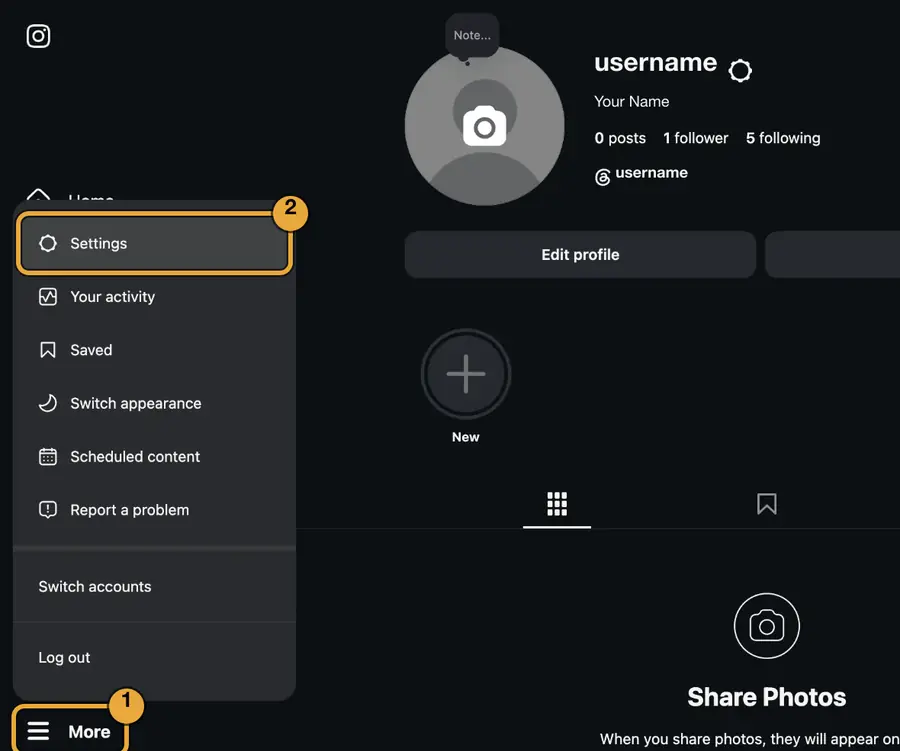
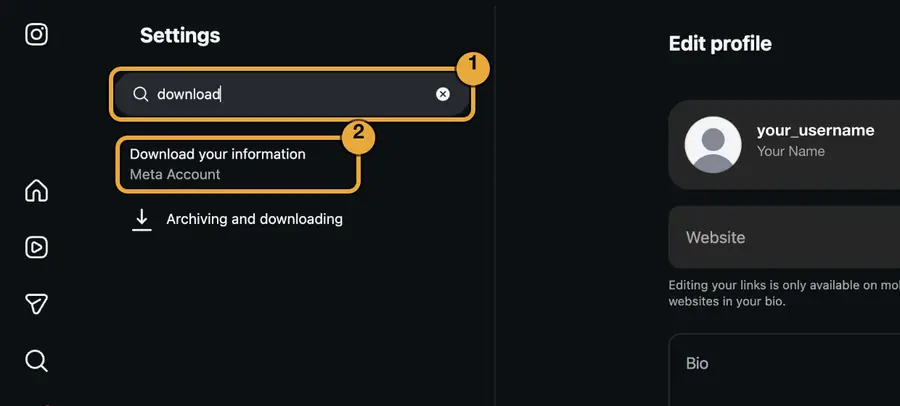
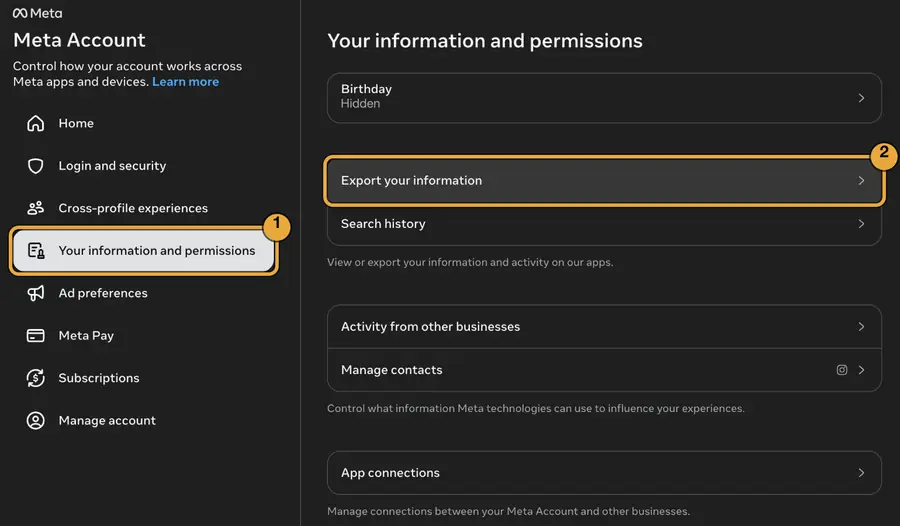
Screenshots from instagram.com on a computer, updated November 2026. Personal details are blurred. Amber boxes show what to click, in order.
- 1
Open Settings
On instagram.com, open your profile, click More (☰) at the bottom left, then Settings.
- 2
Search “download”
Type download in the settings search and choose Download your information (Meta Account).
- 3
Export your information
Accounts Center opens. Click Your information and permissions, then Export your information.
- 4
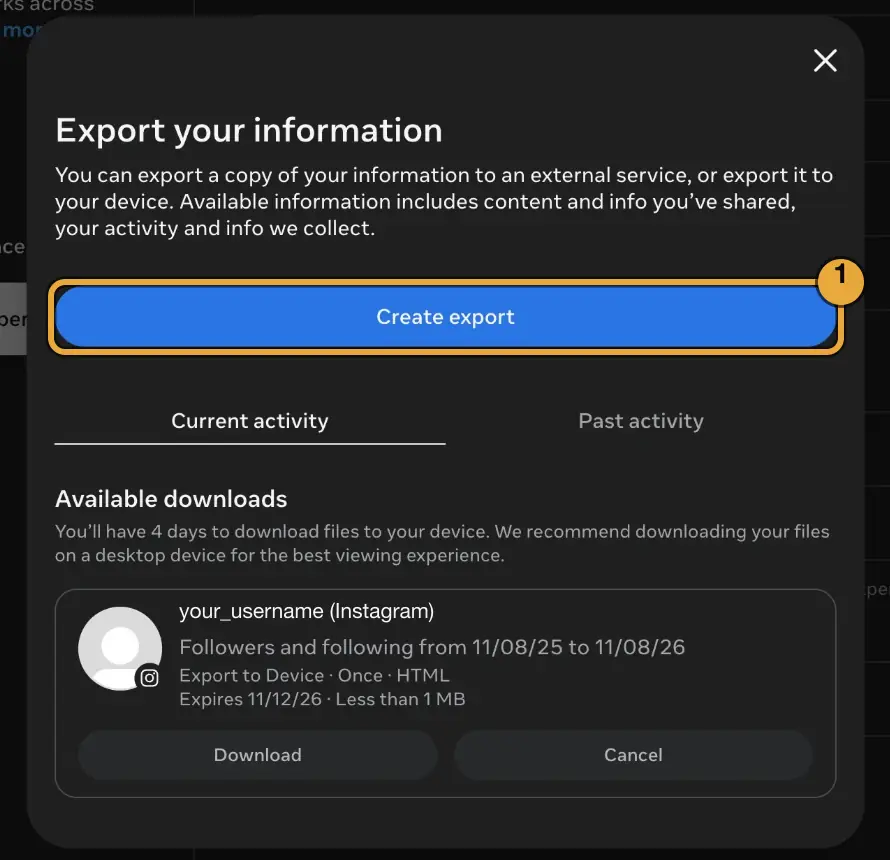
Create export
Click Create export. Finished exports show up under Available downloads on this same screen later.
- 5
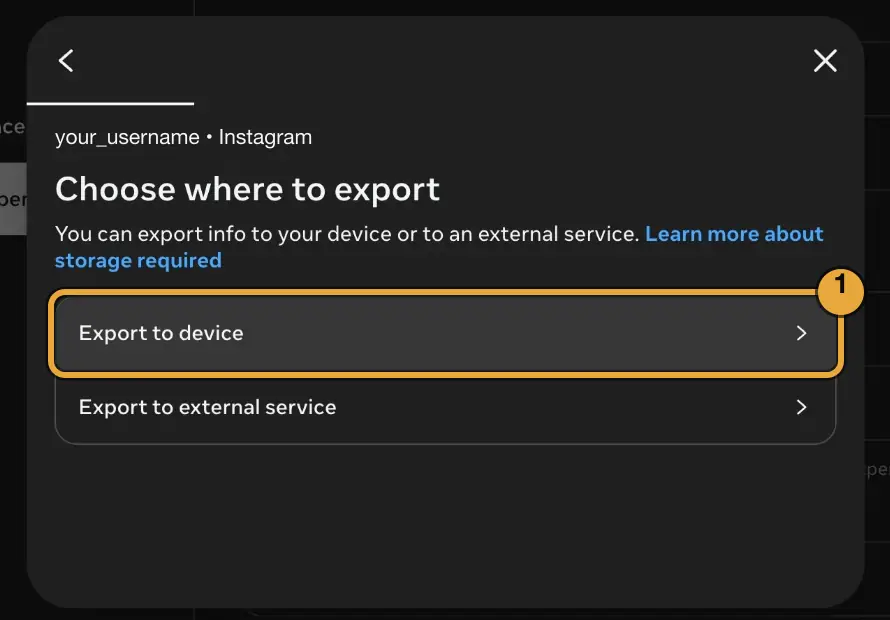
Export to device
Pick your Instagram profile if asked, then choose Export to device.
- 6
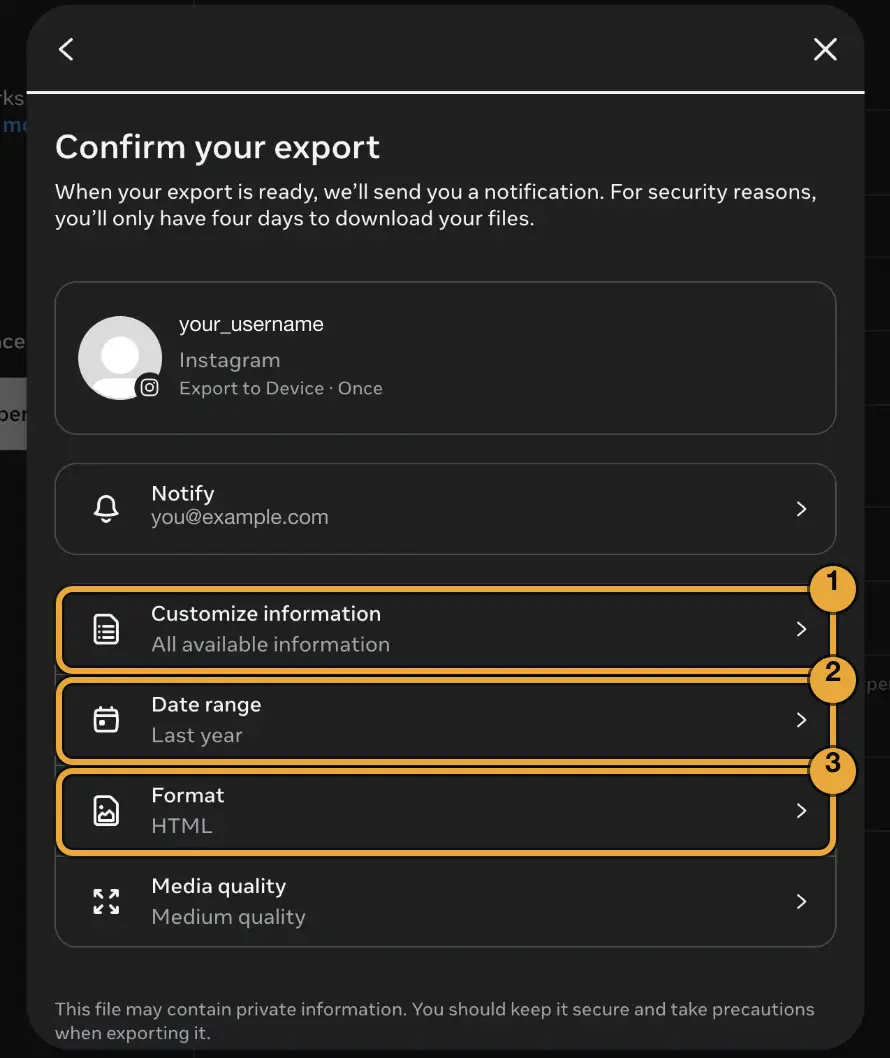
Change three settings
On Confirm your export, open Customize information, set Date range to All time and set Format to JSON. Leave Media quality as it is.
- 7
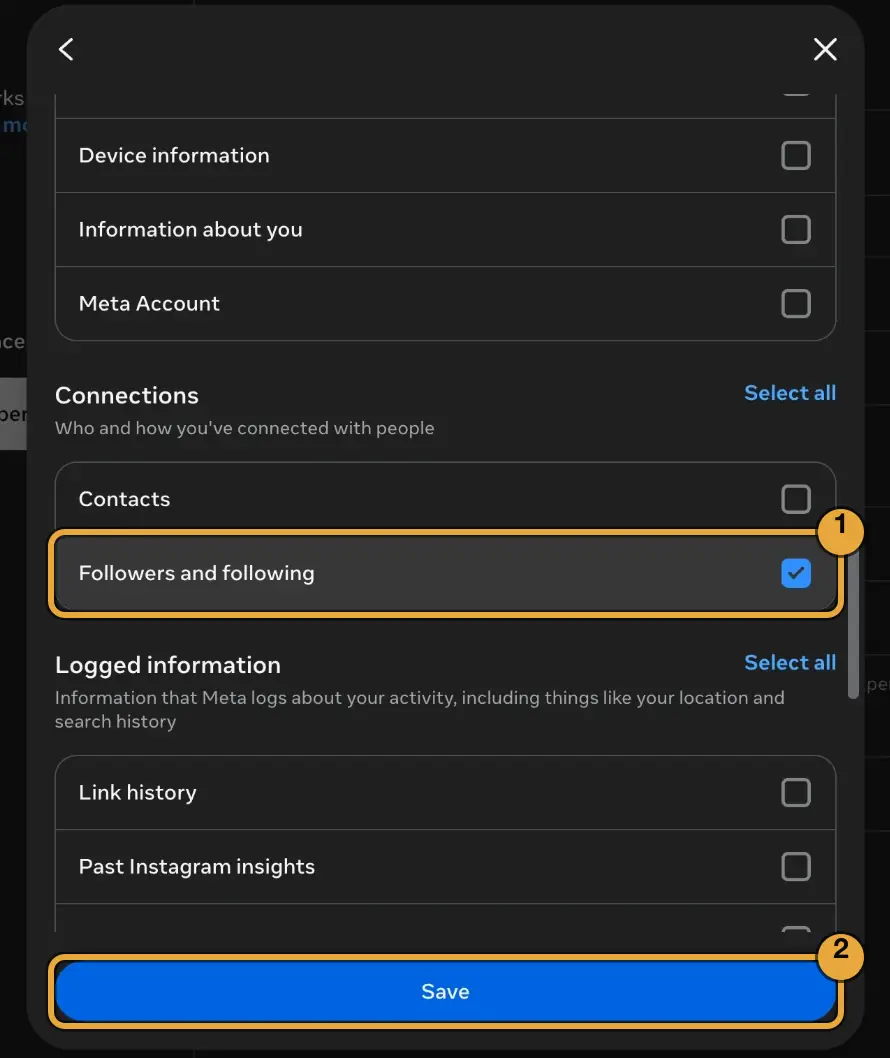
Tick only “Followers and following”
Clear every box, then tick Followers and following under Connections and click Save. A small export arrives in minutes instead of days.
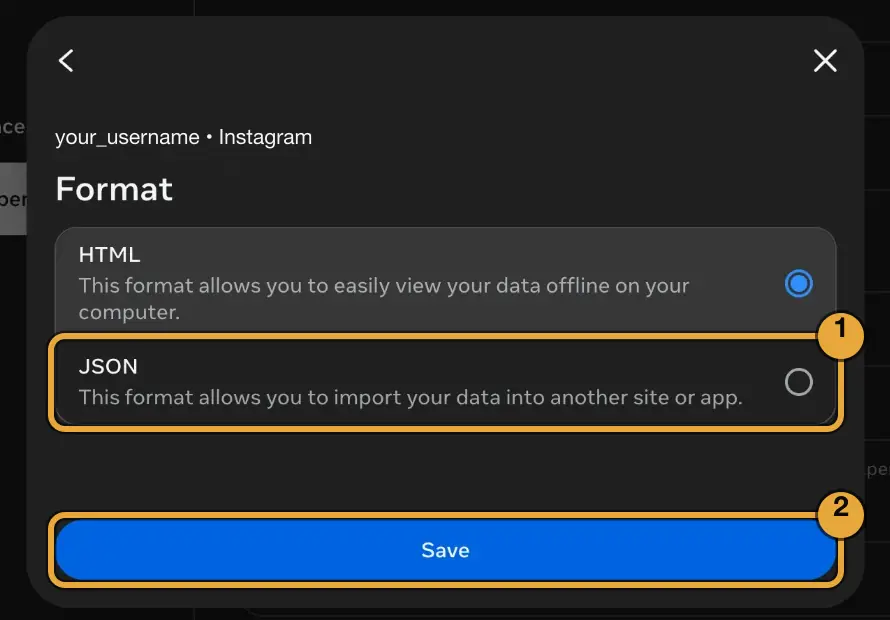
- 8
Choose JSON
Under Format, pick JSON and click Save. HTML works too, but JSON includes the exact date you followed each account.
- 9
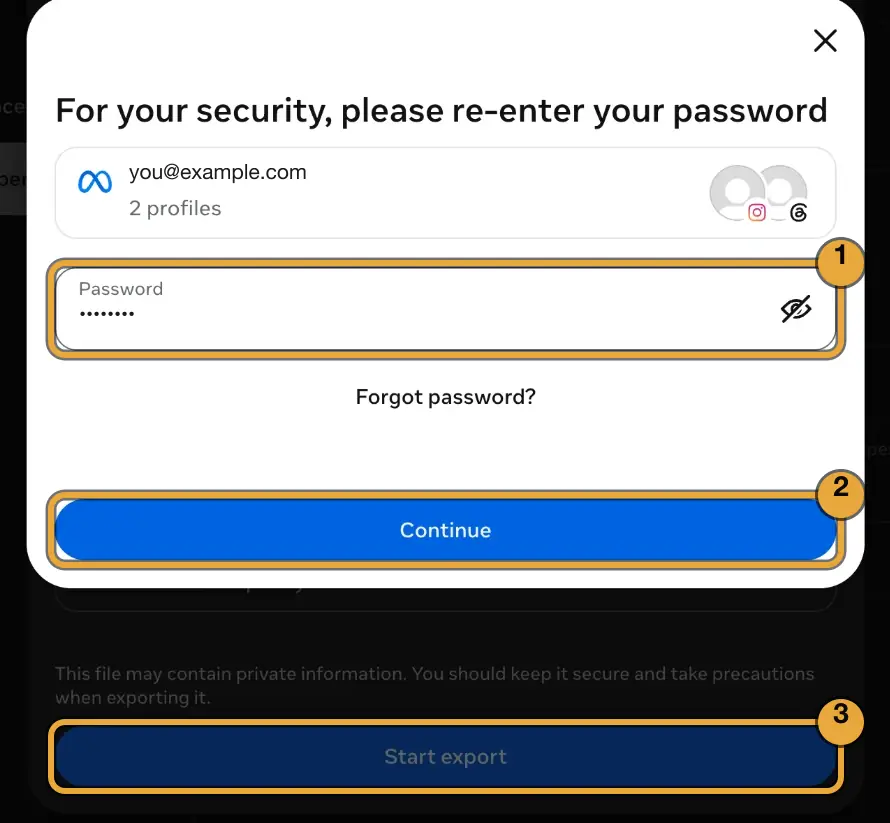
Start export
Click Start export and re-enter your Instagram password in Meta's own window. You never type it on SpyBroski.
- 10
Download the ZIP and check it
Instagram emails you when the file is ready, usually within minutes for a followers-only export. Go back to Export your information, click Download under Available downloads (you have 4 days), then drop the ZIP into the unfollow checker. No need to unzip it.
On the Instagram app: Profile → ☰ → Accounts Center → Your information and permissions → Export your information, then follow the same steps from step 4.
See Who Doesn't Follow You Back on Instagram
Not following back
Everyone you follow who doesn't follow you, with the date you followed them.
Who unfollowed you
Compare with your last saved check to see exactly who unfollowed you and who's new.
Fans & mutuals
Fans follow you but you don't follow them. Mutuals follow each other.
Requests you sent
Pending follow requests to private accounts that never accepted.
Search, sort & copy
Search any username, sort by newest or oldest follow, copy the whole list in one tap.
Export to CSV
Save any list as a spreadsheet for Excel, Google Sheets or Numbers.
Frequently Asked Questions
Free Instagram Unfollowers Tracker: No Login, No App
An Instagram unfollow checker tells you who stopped following you and who never followed you back. Used regularly, it becomes an Instagram unfollowers tracker: every new export is compared with the last one. Instagram itself shows neither, and most unfollower apps want your Instagram password to find out. SpyBroski works differently: it reads the data export Instagram already gives you, right in your browser.
Why you shouldn't give unfollower apps your password
Apps that log in to your account to track unfollowers break Instagram's terms. Instagram often locks, restricts or bans accounts that use them, and handing your password to a third party is a security risk in itself. With the export method, the only place you type your password is Meta's own confirmation window.
Who doesn't follow me back on Instagram?
The Not following back list is every account in your following list that isn't in your followers list. Brands and celebrities will show up there, and that's normal. Sort it oldest first to find people you followed years ago who never followed you back, then unfollow them by hand in the app. Unfollowing a few dozen at a time helps you avoid Instagram's action blocks.
How to see who stopped following you on Instagram
An export is a snapshot of one moment, so finding unfollowers needs two of them. When you tick “Track unfollowers”, the checker keeps the usernames of your followers in this browser only. Upload a newer export later and it lists everyone who was there before but is gone now. Renamed and deactivated accounts also count as gone, so check the profile before you react.
Private by design
The ZIP never leaves your device: the page opens it with JavaScript, finds the followers and following files and ignores everything else. There is no account to create and no list stored on our servers. Spybroski is not affiliated with Instagram or Meta.
More free Instagram tools
Want to look at someone's public profile instead? Try the Instagram profile viewer, watch stories without being seen with the Instagram story viewer, or read and export post comments with the Instagram comment viewer.
Disclaimer
Spybroski.com is not affiliated with or sponsored by Instagram™, Meta or any social media platform.
Your export file is processed only in your browser and is never uploaded. Saved follower lists stay in your browser's local storage until you clear them.
Use it for your own account. We never log in to Instagram or follow / unfollow anyone for you.
Explore More Free Tools
More free viewers and tools — no login, instant.
Instagram Story Viewer
View Instagram stories anonymously without an accountInstagram Highlight Viewer
View Instagram highlights anonymouslyInstagram Comment Viewer
Read, search and export Instagram comments anonymouslyInstagram Profile Viewer
View any Instagram profile and posts anonymously
TikTok Story Viewer
View and download TikTok stories anonymously by username
Snapchat Story Viewer
View Snapchat stories anonymously without them knowing
Explore Our Blog
Discover expert insights on digital marketing, social media trends, and tips to enhance your online experience.
How to Know If Someone Blocked You on Instagram (and When It's Something Else)
Not sure if someone blocked you on Instagram? Learn the signs, three quick checks, and how a block differs from restrict, mute, or a deactivated account.
8 Best Instagram Proxies in 2026
Compare 8 best Instagram proxies in 2026 by network type, geo-targeting, session stability, account workflow fit, and pricing.Oct 124 min read
How Instagram Followers Fit Into Your Social Media Strategy
Building a powerful digital presence on Instagram requires a number of critical components, including posting on a continuous basis, thinking visually, and…Sep 304 min read
Snapchat vs Instagram: Generational stats & key differences
When comparing these two massive visual platforms, age is the biggest deciding factor. Millennials lean heavily toward the polished, curated grids of…Aug 1211 min read
What "Private" on Instagram Actually Means
Think a private Instagram account hides everything? Learn what does private Instagram mean, what people can still see, and how privacy on Instagram really…Jul 156 min read
What the Latest Update Means for Private Instagram Chats
Have you noticed a little lock icon in your messages? Instagram is changing how we talk to each other. The company is rolling out end to end encryption for…May 108 min read
The Importance of Instagram Likes and Proven Ways to Increase Them
Want more Instagram likes? Learn proven strategies to increase Instagram engagement, grow your reach, and build a loyal audience without buying fake followers.May 110 min read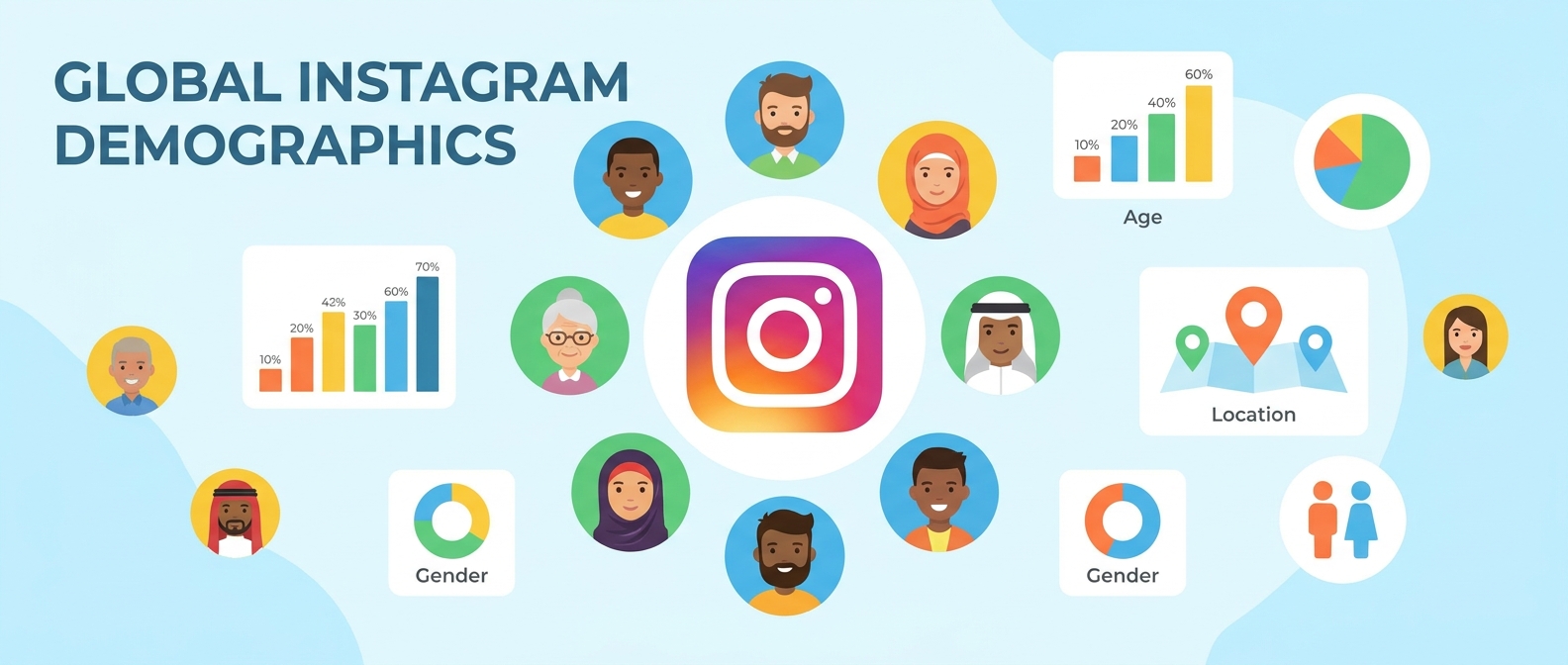
Top Instagram Accounts: 20 Demographics Every Marketer Should Know
Discover 20 key demographics behind the top Instagram accounts. Learn who follows the biggest profiles and how marketers can use this data to build better…May 19 min read
How to View Instagram Highlights Anonymously in 2026 (Full Guide)
Want to view Instagram highlights anonymously? This guide covers every method, what actually works, and how to watch private highlights without an account.Apr 156 min read