TikTok Profile Views: How They Work and How to Turn Them Off in 2026

Spybroski Team
You open your TikTok inbox and there it is: someone "viewed your profile." Wait. TikTok tells people that? Sometimes, yes. And if it can show you who stopped by, it can show other people when you stop by too. That's the whole deal with TikTok profile views, and a lot of people only find out after they've tapped on a profile they didn't want to be caught looking at.
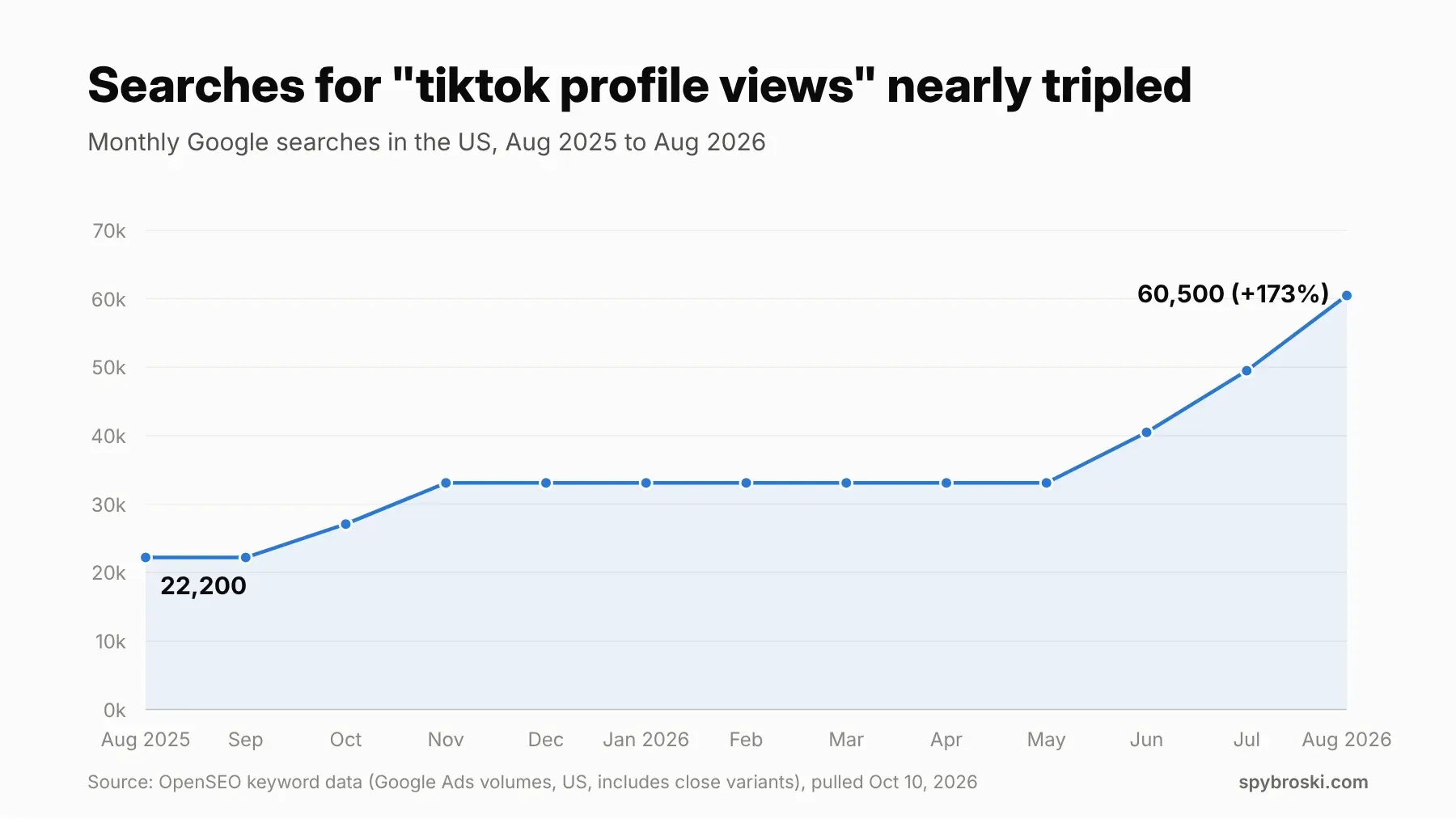
You're in good company if this has you curious. US searches for "tiktok profile views" (and close variants) jumped from about 22,200 a month in August 2025 to 60,500 in August 2026. That's nearly three times as many people asking the same question in a single year.
So here's the plan. This guide covers what profile views are, who can see your visits, how to turn profile views off (and back on), what happens with video views, and how to browse TikTok without leaving a trail. Plain answers, no guesswork.
What are TikTok profile views, anyway?
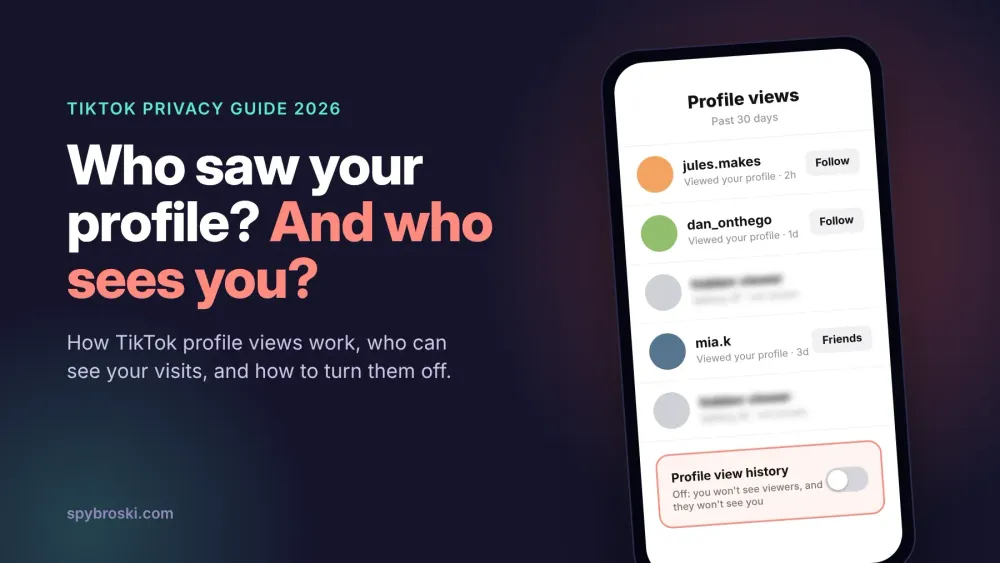
Profile view history is a TikTok setting that shows you a list of accounts that looked at your profile in the past 30 days. TikTok rolled it out to everyone in June 2023, according to TechCrunch, after people spotted it hiding in the app's code more than a year earlier.
A few rules decide whether you even get the feature. TikTok's help center lists them:
- You have to be 16 or older.
- You need fewer than 5,000 followers.
- The setting is off by default, so you have to switch it on yourself.
When it's on, you'll find your viewers in two places. Tap Inbox, then Activities, and look for the profile view notices. Or go to your own profile and tap the Profile views button.
Simple enough, right? Well, almost. The part that trips people up is the next one.
Does TikTok show who viewed your profile?
Yes. And also no. Both answers are true, and the difference comes down to one switch on two phones.
TikTok only shows a visit when both people have Profile view history turned on. If you visit someone and you both have it on, your name lands in their list. If either one of you has it off, the visit stays invisible. Think of it like a handshake. It only happens when both people put a hand out.
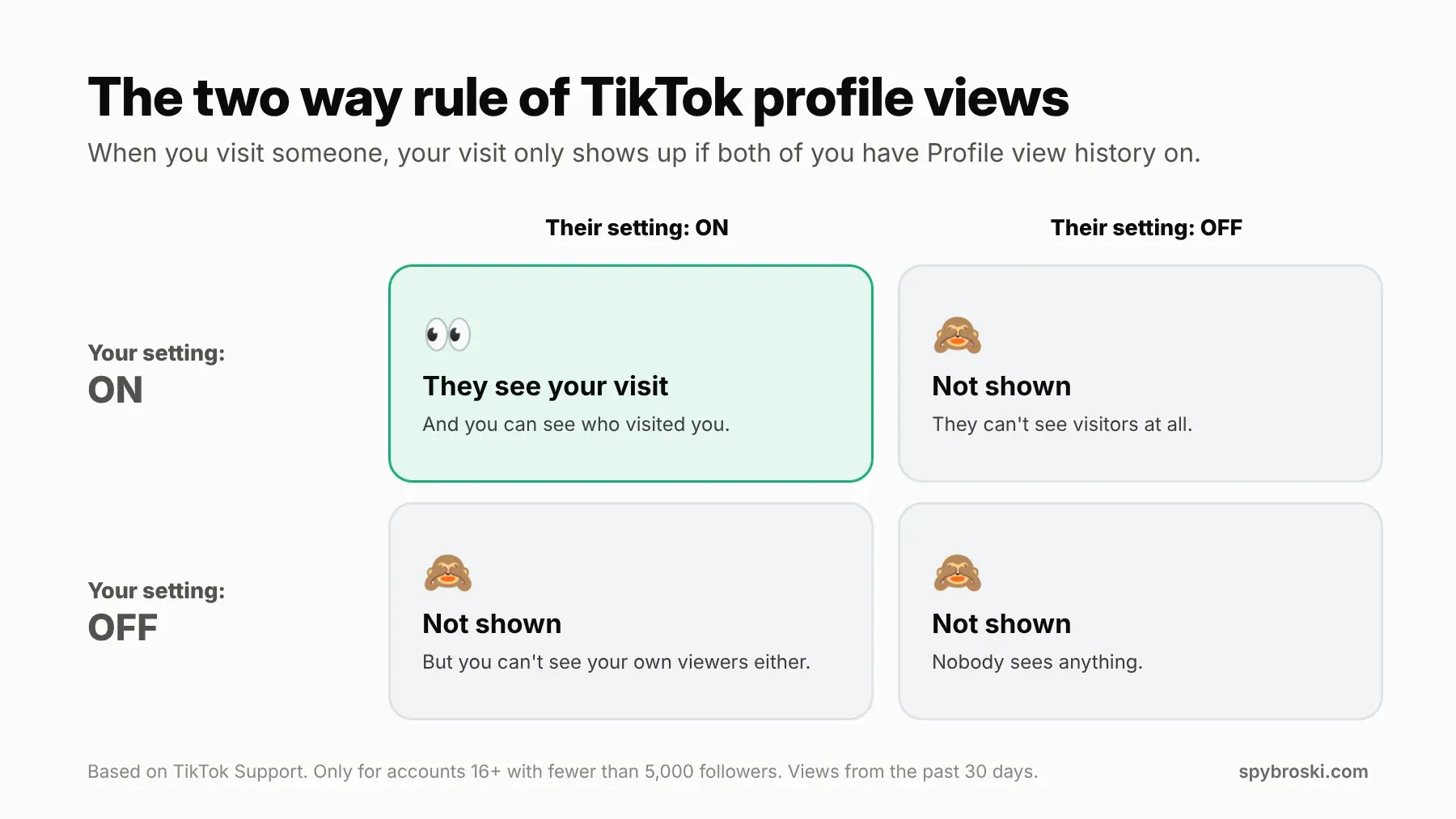
There's a fair trade built into this. You can't spy on your viewers while hiding your own visits. If you want to see who checked you out, you have to accept that other people can see when you check them out. TikTok designed it that way on purpose, and it's one of the fairer privacy rules on any big app.
The 5,000 follower cutoff
Here's a detail most guides skip. Once your account hits 5,000 followers, the feature isn't available to you anymore. That has two effects. You can't see who viewed your profile, and since your setting can't be on, your visits don't show up in anyone else's list either.
So if you've ever wondered why a big creator never appears in your profile views, that's why. They can look around all they want and you'll never know.
What if you're under 16?
Same story. Accounts under 16 can't use profile view history at all, so they can't see viewers and their visits don't show up.
Does TikTok notify someone when you view their profile?
Yes, in a quiet way. Profile visits show up as an activity in the other person's Inbox, in the same Activities feed where likes and new followers land. So if the two way rule lines up, they'll see your name there the next time they check their notifications. If it doesn't line up, nothing shows at all.
Why your profile views list looks empty
Turned the feature on and your list looks like a ghost town? That doesn't mean nobody's looking. A visit only lands in your list when the visitor meets every rule above, and lots of people don't. Here's who you'll never see:
- Anyone who has Profile view history turned off.
- Anyone under 16.
- Creators with 5,000 or more followers.
- People who visited more than 30 days ago.
- People browsing your profile while logged out, or through a viewer tool.
So your list is a sample, not a full headcount. Think of it as the people who were willing to be seen, not everyone who stopped by. Your real audience is bigger than that list, and your video analytics will give you a much better picture of it.
How to turn off profile views on TikTok
If you'd rather browse without your name popping up in someone's inbox, turning off profile views takes about ten seconds. Here's the path TikTok gives on its help center:
- Tap Profile in the bottom right corner of the app.
- Tap the Menu button (the three lines) at the top.
- Pick Settings and privacy.
- Tap Privacy, then tap Profile views.
- Switch Profile view history off.
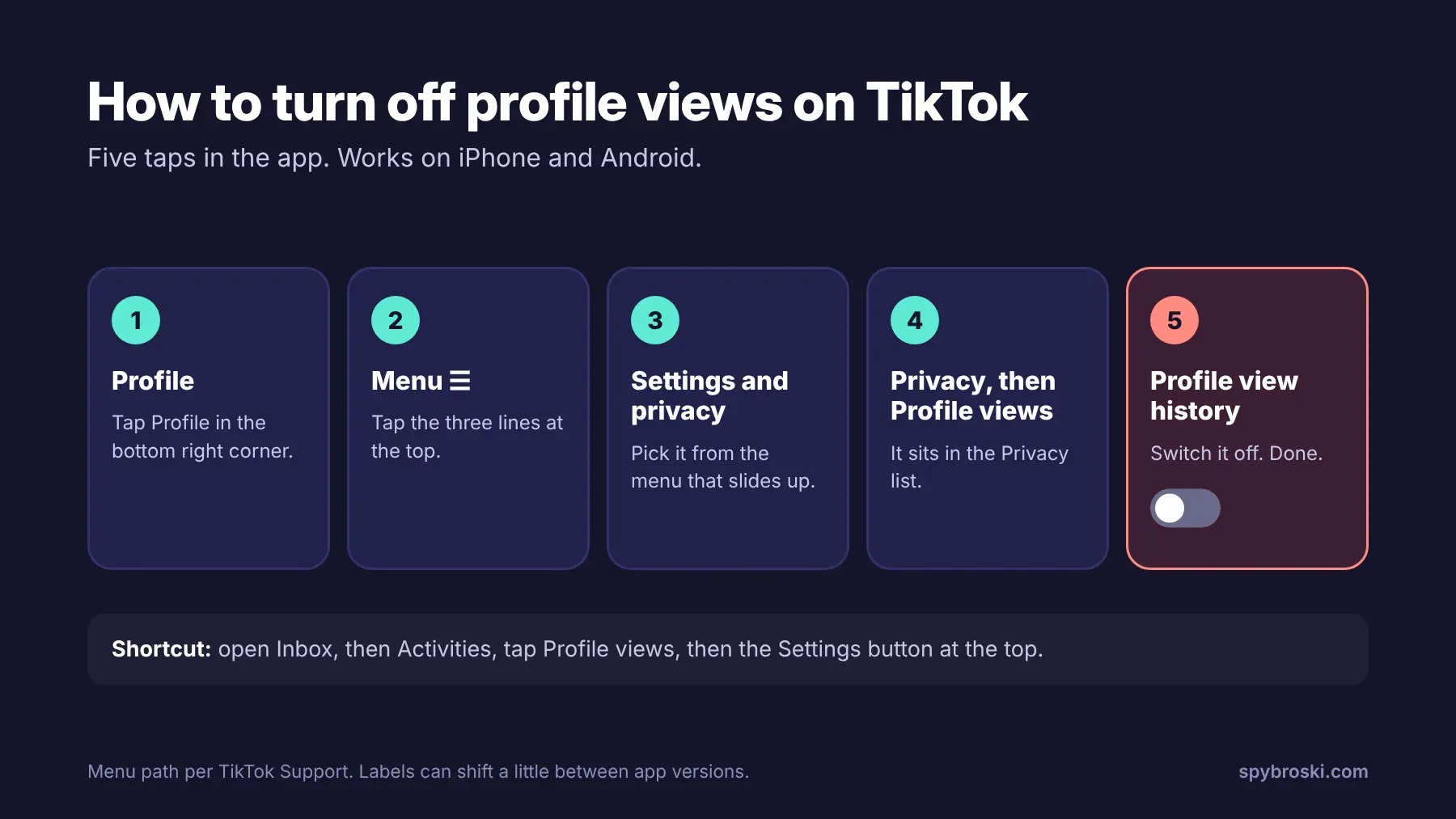
There are two shortcuts too. You can open Inbox, tap Activities, tap Profile views, then hit the Settings button at the top. Or go to your profile, tap the Profile views button, and tap Settings from there. All three roads end at the same switch.
One small heads up. TikTok shuffles its menus now and then, so a label might look a little different on your version of the app. If you can't find it, update the app first. That fixes it more often than you'd think.
What happens when you turn profile views off?
TikTok's help page spells it out. Once Profile view history is off:
- You won't see who viewed your profile.
- Other people won't see that you viewed their profiles.
That's the trade again, just running the other direction. You give up your own viewer list, and in return your browsing goes quiet.
How to turn profile views back on
Changed your mind? Follow the same steps and flip the switch back on. Your viewer list will start filling in again from the people who also have the feature on. Just remember that the moment it's on, your visits show up for them too. So maybe don't switch it on right before you go look at your ex's new partner's profile. Just saying.
Can you see who viewed your TikTok without turning it on?
No. And this is where a lot of people get burned.
TikTok only shows the viewer list inside its own app, and only under the rules above. No outside app or website can pull that data for you. So any app that promises to reveal your "secret profile viewers" is guessing at best. At worst, it wants your TikTok login, and that's how accounts get stolen. If something asks for your password in exchange for a viewer list, close it and move on.
Does TikTok show who viewed your videos?
Sort of, and it's a separate setting. TikTok calls it Post view history, and it sits right next to profile views under Settings and privacy, then Privacy, then Post views.
It follows similar rules. You need to be 16 or older with fewer than 5,000 followers. When it's on, TikTok shows:
- Followers who also have post view history on and watched your posts.
- People who liked or commented on your posts, even if they don't follow you and don't have the setting on.
That second point matters. Turning post view history off hides your quiet views, but it doesn't hide your likes or comments. If you like a video, the creator can see it, no matter what your settings say. TikTok also notes that Story views are handled separately from this setting.
How to look around TikTok without leaving a trail
Let's say you want to check out a creator, a brand, or a new account before you follow. That's normal. Here are your options, from simplest to most private.
Turn off Profile view history. This is the easy fix for most people. Your visits stop showing, and you keep using the app like normal.
Don't like, comment, or repost. Likes and comments show up no matter what your view settings are, and reposts get pushed to other people's feeds. A single accidental double tap at 2 am has ended many a quiet browse.
Browse public profiles while logged out. TikTok's website lets you open public profiles without an account, although it will push you to log in pretty often. With no account attached, there's no name to add to anyone's list.
Use a viewer tool. If you'd rather skip the login nagging, our free TikTok profile viewer lets you look at public profiles without logging in to TikTok at all. And for Stories, there's our TikTok story viewer. Both only work with public accounts. Private accounts stay private, and that's how it should be.
A quick gut check while we're here. Browsing quietly is fine for scouting creators, doing competitor research, or just being nosy about a viral video. It's not fine for keeping tabs on someone who doesn't want you around. If you're blocked, that's an answer, not a puzzle to solve.
Should you keep TikTok profile views on or off?
There's no wrong answer here, but each choice fits a different kind of user.
Keep it on if you're a small creator under 5,000 followers. Seeing who checks your profile after a video takes off tells you who's interested. It's also a nice nudge to follow back or reach out for a collab. A small business can use it the same way, to spot people who looked but didn't follow.
Turn it off if you mostly watch rather than post, or if you like to research accounts before you engage. Same if you just don't want the "they saw me look" anxiety. That feeling is real, and a ten second settings change makes it go away.
Curious how separate accounts still get linked behind the scenes? Our post on why privacy settings aren't a privacy strategy is worth a read.
The short version
If you skipped straight down here, here's what you need to know:
- TikTok profile views show who visited your profile in the past 30 days.
- You only see a visit, and only get seen, when both people have Profile view history on.
- The feature only works for accounts 16 or older with fewer than 5,000 followers.
- To turn it off, go to Profile, Menu, Settings and privacy, Privacy, Profile views, then switch off Profile view history.
- Likes, comments, and reposts are always visible, so a quiet browse means no double taps.
- No outside app can show you your viewers. Skip any that ask for your login.
TikTok profile views FAQ
Does TikTok show who viewed your profile?
Only if you both have Profile view history turned on. If either person has it off, the visit doesn't show.
If I turn off profile views on TikTok, can people still see that I viewed their profile?
No. TikTok says that once the setting is off, other people won't see that you viewed their profiles. You also lose your own viewer list.
How far back does TikTok profile view history go?
30 days. Older visits drop off the list.
Why can't I see profile views on TikTok?
The usual reasons are that you're under 16, you have 5,000 or more followers, the setting is off, or your app needs an update.
Can I see who viewed my TikTok if I have more than 5,000 followers?
No. The feature isn't available for accounts with 5,000 or more followers. Your TikTok analytics still count your profile views, they just don't show names.
Does TikTok show who viewed my videos?
Partly. With Post view history on, you can see followers who also have it on, plus anyone who liked or commented. It's a separate switch from profile views.
Can someone see if I view their TikTok without an account?
No. Profile view history only lists TikTok accounts that have the setting on. A logged out visit has no account attached, so there's nothing to show.