Proxies for TikTok: How to Manage Multiple Accounts Without Getting Flagged
Spybroski Team
If you run one TikTok account from your own phone, you don't need a proxy. The trouble starts when a social media manager logs into five client accounts from one laptop, or when an agency checks what a campaign looks like in Germany from an office in Texas. To TikTok, that can look like one person juggling a cluster of linked profiles, and linked profiles get reviewed together.
A proxy gives each account its own believable connection. Picking the wrong kind, or setting it up carelessly, can cause the very flags you were trying to avoid. This guide covers how proxies for TikTok actually work, which type fits which job, how to set them up one account at a time, and the mistakes that get accounts restricted.
Why TikTok Accounts Need Proxies in the First Place
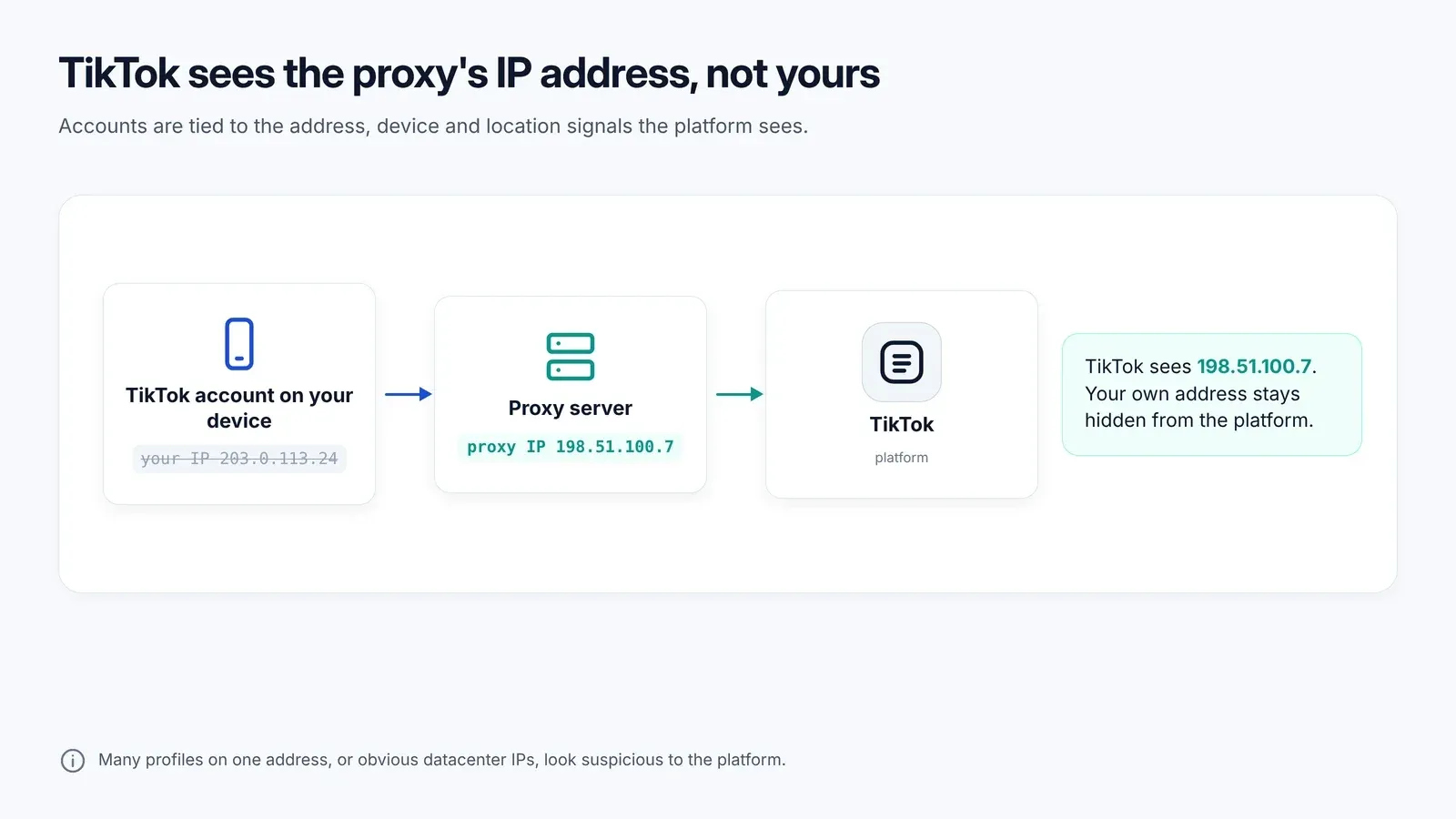
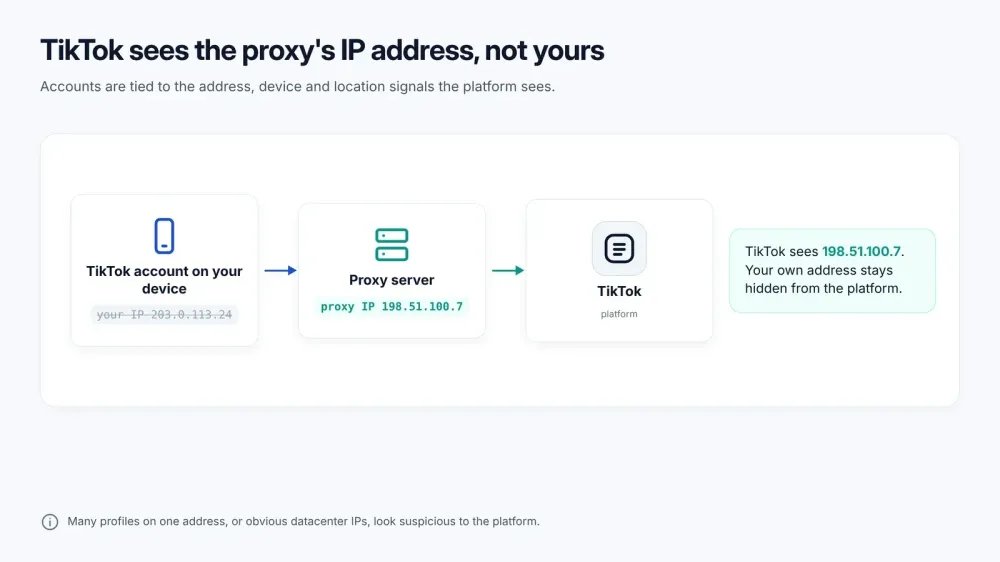
A proxy server sits between your device and TikTok. Your app or browser sends its traffic to the proxy, the proxy forwards it, and TikTok sees the proxy's IP address instead of yours.
That matters because TikTok doesn't judge an account by its password alone. Each login comes with signals: the IP address, the device, the browser, the time zone, the language, and the location those imply. When several accounts keep showing up with the same signals, the platform can treat them as connected. If one of them gets flagged, the others can come under review too.
TikTok's own rules spell out where the line is. Its Integrity and Authenticity guidelines allow multiple accounts, but not for deception: no bulk-registered accounts, no platform manipulation, and no new accounts made to get around a ban. A proxy doesn't change those rules. It only helps legitimate setups look like what they are, which is separate accounts run for separate reasons.
Who actually uses proxies for TikTok?
- Social media managers and agencies running client profiles from one office or one machine.
- Brands with regional accounts that need each one to show up from its home market.
- Marketers and researchers checking how content, ads or search results appear in other countries.
- Teams testing creative across markets before a launch.
If none of these describes you, the app's built-in account switcher is enough. For everyone else, the type of proxy you pick matters more than any other choice.
Residential vs Mobile vs Datacenter Proxies for TikTok
There are three main proxy types, and they differ in where their IP addresses come from. That origin is what TikTok reacts to.
Datacenter proxies
Datacenter IPs come from server ranges owned by hosting companies. They are fast and cheap, but no real phone or home router ever uses them. Platforms can spot server ranges easily, so a TikTok login from a datacenter IP starts out looking unusual. Datacenter proxies are fine for jobs that don't involve logging in. For active accounts, they are usually the weakest choice.
Residential proxies
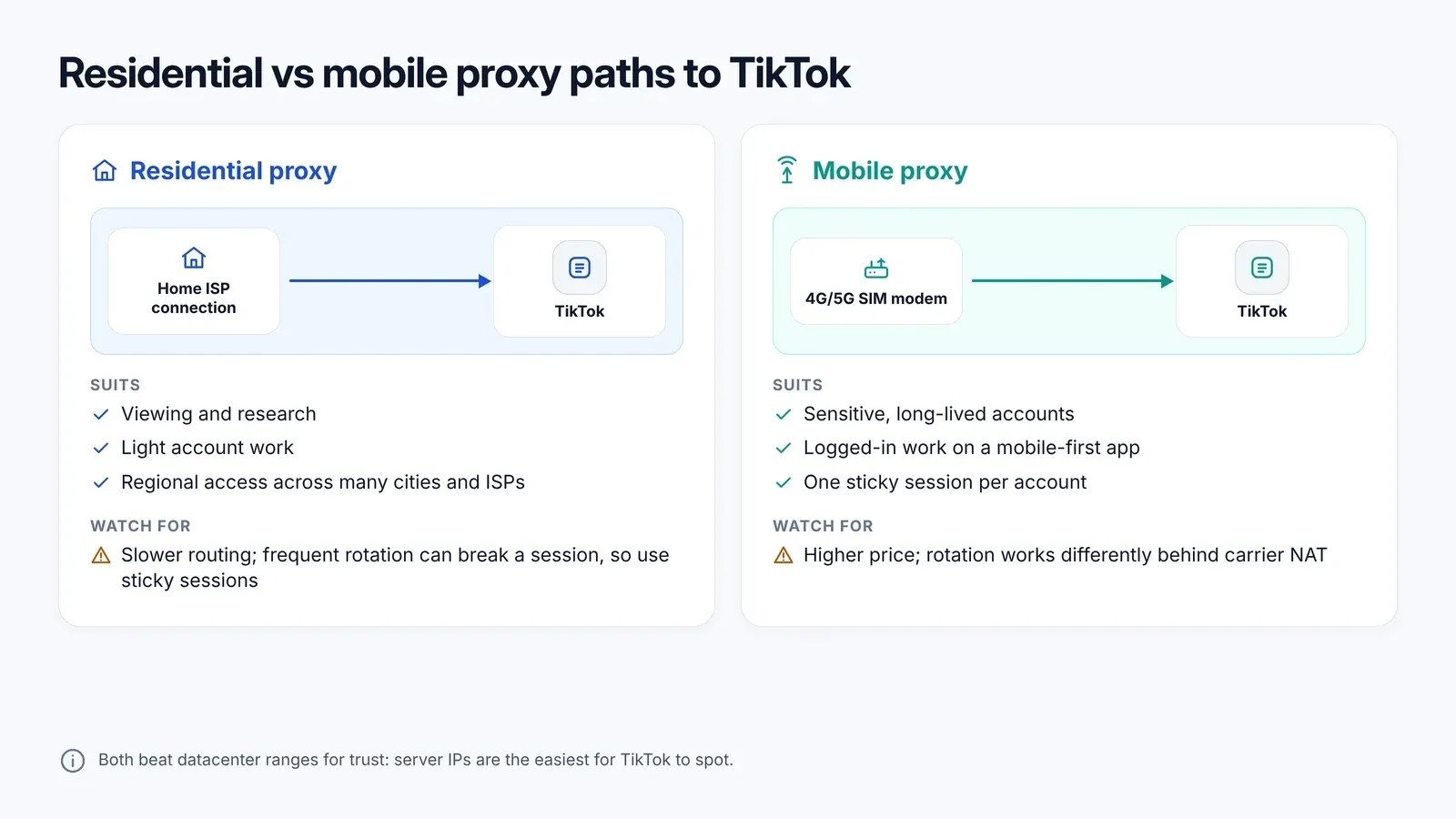
Residential proxies route traffic through ordinary home connections from consumer internet providers, so to TikTok they look like regular viewers at home. Many of these networks are built from people's own devices through bandwidth-sharing apps. A 2024 study of residential proxy traffic by researchers from the University of Science and Technology of China and Indiana University ran nodes on services such as PacketStream, IPRoyal and Honeygain to see what flows through them. That is also why sourcing and consent matter when you pick a provider.
Residential pools are broad, which makes them good for regional checks across many cities. The trade-off is speed and stability. Traffic goes through someone's home connection, so routing is slower. Many residential plans also rotate the IP, which can break a logged-in session if the address changes mid-use. Sticky sessions, which hold one address for a set time, fix most of that.
Mobile proxies
Mobile proxies use 4G or 5G addresses from mobile carriers. Carriers put many subscribers behind a small number of public IPs using carrier-grade NAT, so hundreds of real phone users can share one address at the same moment. Platforms know this and are cautious about blocking carrier IPs outright, because that would hit many real users at once. For a mobile-first app like TikTok, a carrier IP is also the most natural place for traffic to come from.
The cost is price, plus a different way of rotating. A mobile IP usually changes when the modem reconnects to the network, not on a timer inside a pool. For logged-in account work that is often what you want: the address stays put until you decide to change it.
The most stable mobile setups give you a whole modem rather than a slice of a shared pool. OnlineProxy, for example, is a mobile proxy service built on modems with real SIM cards from mobile carriers. A dedicated device is assigned to you for the rental period. You can change the IP by link or on a timer, or reboot the device. It supports HTTP and SOCKS5 and authenticates with a login and password.
Which type fits which job
| Task | Datacenter | Residential | Mobile |
|---|---|---|---|
| Checking regional content without logging in | Works, but often blocked | Good fit | Works, but costs more |
| Light account work (a few posts a week) | Risky | Good fit with sticky sessions | Good fit |
| Long-lived brand or client accounts | Not recommended | Workable with long sticky sessions | Strongest fit |
| Many accounts in many countries | Not recommended | Good fit for breadth | Good fit, at a higher cost |
| Cost per account | Lowest | Medium | Highest |
In short, residential suits viewing, research and lighter account work across many locations. Mobile is the safer pick for accounts you can't afford to lose. Datacenter belongs outside logged-in TikTok work.
What to Look for in a TikTok Proxy Provider
A huge IP pool looks impressive on a pricing page. For account management it matters far less than how the provider handles sessions. These are the points worth comparing:
- Source type. Residential or mobile, not datacenter, for anything logged in.
- Session control. For logged-in work you want sticky sessions, or a dedicated IP that stays the same until you change it. Session length varies a lot. Some providers cap sticky sessions at 10 to 30 minutes, others hold an address for hours or for the whole rental period. Check the documentation, not just the marketing page.
- Targeting. Each account's IP should match its audience. Country-level targeting is enough for most brands. City or carrier targeting matters if you run local accounts.
- How the IPs are sourced. Reputable residential providers explain how the devices in their pool consent to sharing bandwidth. If a provider can't answer that, look elsewhere.
- Billing model. TikTok is video, and video eats data. Per-GB plans can get expensive quickly for active accounts. Per-port or per-period plans (daily, weekly, monthly) are often more predictable when you manage several profiles.
- Protocols and authentication. You want HTTP(S), plus SOCKS5 if your tools need it. Also check whether access works by login and password, by IP whitelist, or both, because that decides which tools you can use.
- Trials and replacement terms. Read the refund and replacement terms on the provider's own site before you pay for more than a day or a week.
Proxy or VPN for TikTok: Which One Fits
People often treat proxies and VPNs as the same thing, but they do different jobs.
A VPN encrypts all traffic from your device and sends it through the VPN's servers. It is built for one person's privacy, and it is good at that. For account management it has two weaknesses. First, popular VPN exit servers are shared by thousands of users and widely recognized, so TikTok may limit them or ask for extra verification. Second, a VPN covers the whole device, so every account on that device ends up behind the same exit address.
A proxy routes only the app or browser profile you point at it. That is exactly what account separation needs. Account A goes through proxy A, account B goes through proxy B, and their sessions never cross.
So for privacy on your own phone, a VPN is fine. For running several TikTok accounts from one computer, proxies are the more practical tool.
How to Set Up Proxies for Managing Multiple TikTok Accounts
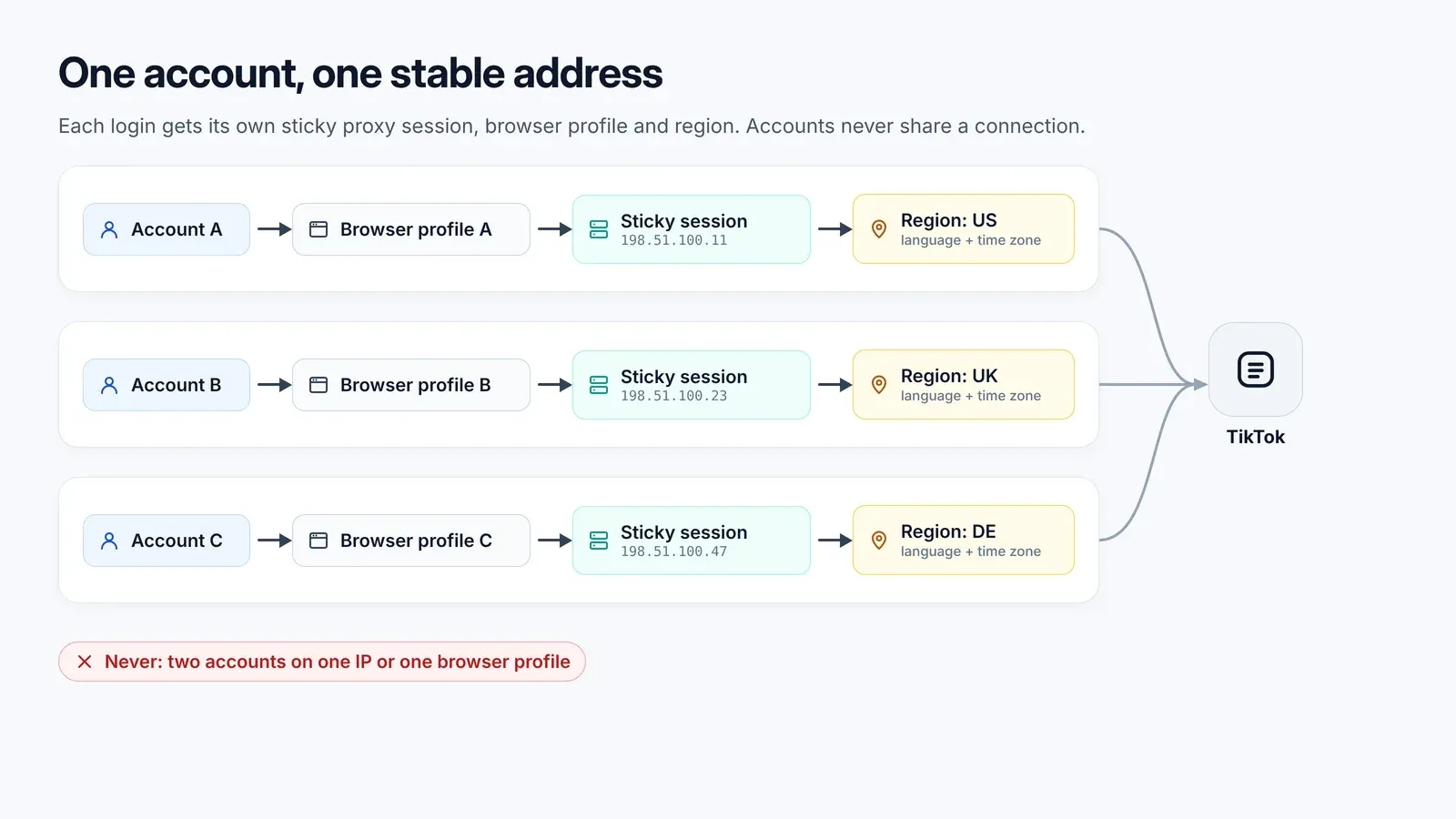
The safest setup follows one rule: one account, one stable address, one browser profile, one region. In practice that means the following steps.
- Give every account its own IP or sticky session. Write down which proxy belongs to which account, and keep it that way. Don't move an account to a new address unless the old one stops working.
- Use sticky sessions, not fast rotation, while logged in. An IP that changes every few minutes in the middle of a session looks like someone jumping between cities.
- Match the proxy's location to the account. A UK brand account should connect from a UK IP, with British English and a UK time zone in its browser profile. A mismatch between IP country, language and time zone is one of the easiest signals to catch.
- Use a separate browser profile for each account. Cookies, local storage and browser fingerprints link accounts as surely as a shared IP does. A separate Chrome profile is the minimum. For larger operations, an anti-detect browser keeps each profile's fingerprint consistent and separate. Store credentials in a password manager, not a shared spreadsheet.
- Configure the protocol your browser can actually use. Chrome can't send a username and password to a SOCKS5 proxy. Its proxy documentation states that no SOCKSv5 authentication methods are supported. If your provider uses login and password authentication, set it up as an HTTP(S) proxy in Chrome. For authenticated SOCKS5, use a tool or anti-detect browser that supports it.
- Warm new accounts up gradually. A brand-new account that posts ten videos and follows two hundred profiles on day one looks automated, whatever IP it uses. Start with normal browsing, a few likes and comments, then build up to a regular posting schedule over a week or two.
- Keep behavior human. Post at times that make sense for the account's region. Vary your actions. Never run the same burst of follows or likes across several accounts at once.
If you manage only a few long-lived accounts, a dedicated mobile IP per account is the simplest way to follow these rules, because the address never moves unless you move it. For broader regional checks where you don't log in, a residential pool with country targeting is usually cheaper and does the job.
A quick pre-launch checklist
Before you log an account into a new proxy, check these points:
- The IP's country matches the account's audience.
- The browser profile's language and time zone match that country.
- No other account has used this IP or browser profile.
- The session is sticky, or the IP is dedicated.
- You've tested the connection with an IP-lookup site in that same profile.
Mistakes That Get TikTok Accounts Flagged (and Whether Proxies Cause Bans)
A proxy doesn't cause a TikTok ban by itself. Behavior does, and so do setups that make separate accounts look connected or automated. The most common mistakes are these:
- Cheap shared datacenter IPs for logged-in accounts. They are easy to identify and often already have a poor reputation.
- Fast rotation while logged in. The account appears to hop between locations within minutes.
- One IP for many profiles. It defeats the purpose of using a proxy and links the accounts together.
- Location mismatch. A US IP with a Russian-language browser and a Singapore time zone tells a confusing story.
- Shared browser profiles. Cookies and fingerprints connect accounts even when their IPs differ.
- Bulk actions. Mass follows, likes or comments, especially in the same pattern across accounts, look like automation.
- Using proxies to get around enforcement. Creating new accounts to escape a ban breaks TikTok's guidelines. Under its Integrity and Authenticity rules, TikTok may ban the alternative accounts as well.
The results range from reduced reach and forced verification to losing the account, and sometimes the accounts linked to it. Also remember what a proxy can't hide. It changes your IP address, not your device ID or browser fingerprint. Scraping TikTok data through proxies is a different activity with its own legal and platform rules, and it is not something this guide covers.
FAQ: TikTok and Proxies
Why is my VPN not working on TikTok?
Popular VPN exit addresses are shared by many users and are widely recognized, so TikTok may limit or challenge them. TikTok also looks at other signals, including your SIM card's country, device settings and region, so a VPN alone may not change where TikTok thinks you are. For a specific account, a residential or mobile proxy with a matching browser profile is usually more reliable.
What is a proxy on TikTok?
A proxy is a server between your device and TikTok. It replaces your public IP address with its own, so TikTok sees the proxy's address. People use proxies for TikTok to keep several accounts on separate connections, or to see how content looks in another country.
Can I use one proxy for several TikTok accounts?
You can, but you shouldn't. Several accounts on one address are exactly what proxies are meant to avoid. Give each account its own IP or sticky session, and its own browser profile.
Are residential proxies or mobile proxies better for TikTok?
Mobile proxies are generally the safer choice for important, long-lived accounts, because carrier IPs are shared by many real phone users and fit how TikTok is normally used. Residential proxies are usually cheaper and offer more locations, so they suit viewing, research and lighter account work.
Are proxy servers legal?
Proxy servers are legal in most countries. What matters is how you use them. Using proxies to break TikTok's terms, for example by evading a ban, can get accounts removed, and local laws vary. Check both TikTok's terms and the rules where you live. This isn't legal advice.
Choosing the Right TikTok Proxy Setup
For sensitive TikTok accounts that need to last, mobile proxies with a stable, dedicated address are usually the safer choice. Teams that need many locations for research or light account work often get more value from a broad residential network with sticky sessions. Datacenter IPs belong outside logged-in TikTok work.
Whichever type you choose, the setup matters more than the brand: one stable IP and one clean browser profile per account, matched to the account's region, and behavior that looks like a real person. Get that right and a proxy simply lets each account look like what it is: a separate account, run on purpose.
If you want to go deeper on how separate profiles end up linked, read our guide on how separate social accounts become connected. For the wider privacy picture, see proxy servers as part of your anti-tracking toolkit.