How to Repurpose Long Videos for TikTok: A Step by Step Guide (2026)
Spybroski Team
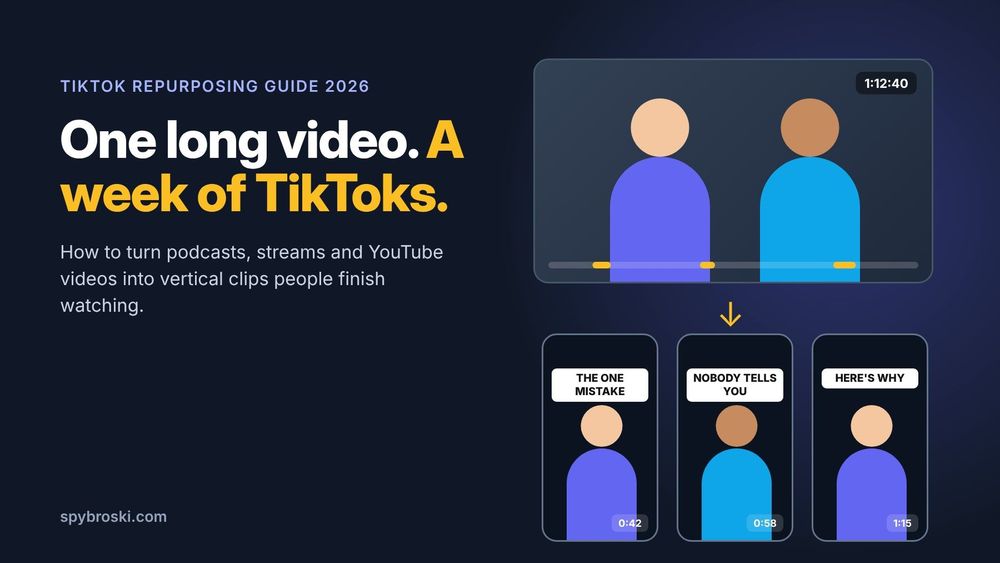
You recorded a 70 minute podcast. Or a webinar, or a two hour stream. It took a whole afternoon, it went up on YouTube, and it got 212 views. Meanwhile somewhere inside that video there's a 45 second moment that could pull thousands of views on TikTok. Learning how to repurpose long videos for TikTok is how you find that moment and give it a second life.
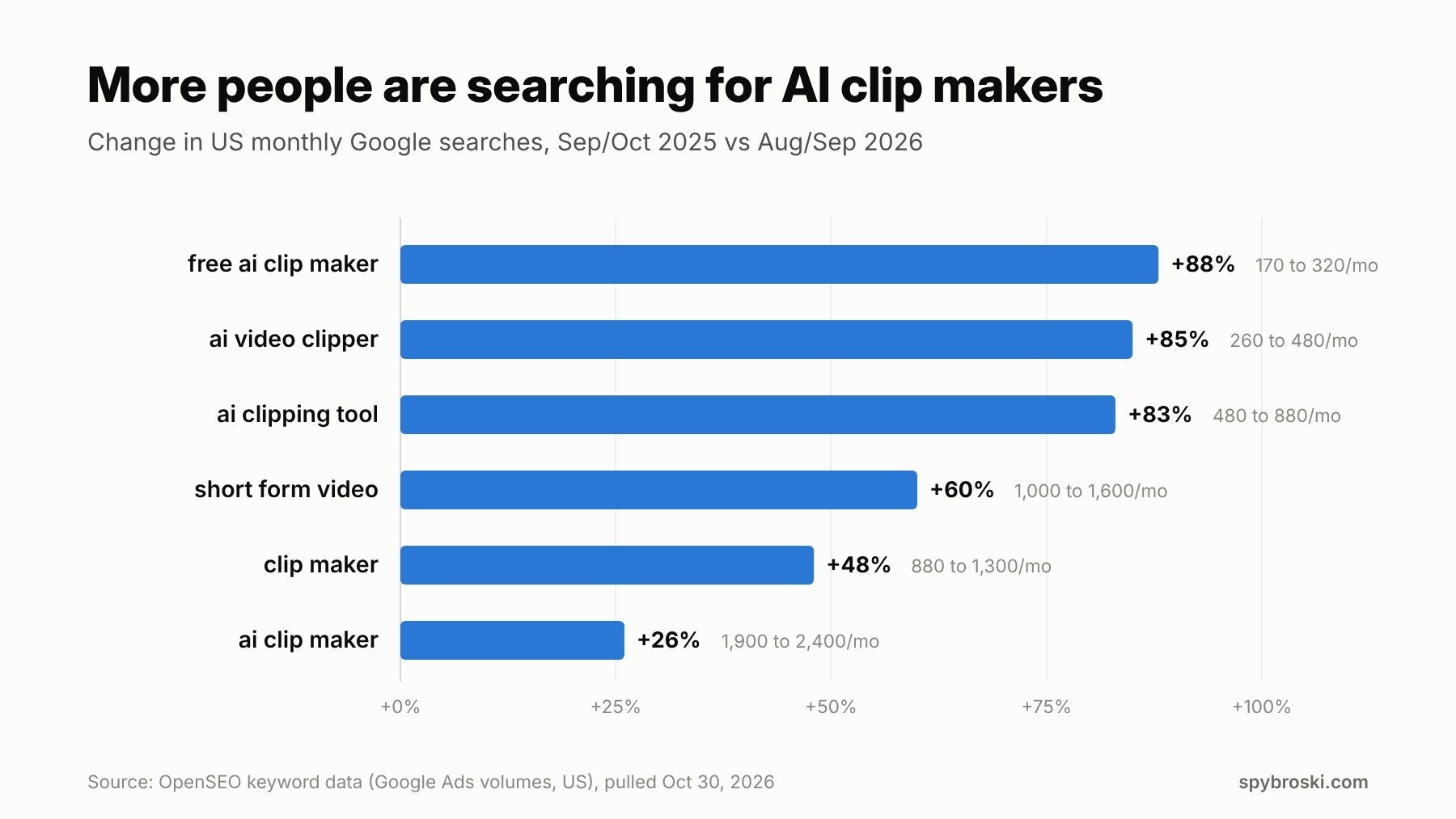
And people are catching on. US searches for "ai clipping tool" grew 83% in a year, and "free ai clip maker" grew 88%, according to keyword data we pulled from OpenSEO. More creators want to turn one long video into a stack of short ones, and they want it to take less than a weekend.
This guide walks through the whole process. Which videos are worth cutting, the TikTok specs to get right, a step by step workflow, how AI clip makers fit in, and the mistakes that kill reach. Let's get into it.
Why repurposing long videos for TikTok works
Here's the simple version. You already did the hard part. You planned the topic, sat down, talked for an hour, and probably said at least five things worth hearing. Repurposing just pulls those five things out and puts each one where short form viewers hang out.
It also fixes the hardest part of TikTok, which is posting often. One long video can feed your account for a week or more. Each clip works like a trailer too. Somebody who loves a 50 second clip about your guest's worst business mistake might go find the full episode.
Now a small contradiction. TikTok is built for short videos, but it pays for longer ones. TikTok's Creator Rewards Program only counts videos that run longer than one minute, according to Social Media Today's coverage of the program launch. So the "right" clip length depends on your goal. Short and punchy helps reach. Just over a minute helps if you're in the rewards program. We'll come back to this.
Which long videos are worth repurposing?
Not every long video cuts well. The best sources have people talking, because speech gives you clear starts, clear endings, and quotable lines. These usually work great:
- Podcasts and interviews, video or audio.
- Tutorials and how to videos.
- Product reviews and reactions.
- Webinars, talks, and panel discussions.
- Livestreams with a lot of commentary.
What doesn't cut as well? Long scenic B roll, music sets, slow vlogs where the story only makes sense from the beginning. You can still clip them, but you'll work harder for less.
One rule matters more than the rest. Only repurpose videos you own or have clear permission to use. TikTok's For You feed rules say that "reproduced or unoriginal content that is imported or uploaded without any new or creative edits" isn't eligible for the For You feed. Same goes for content with someone else's visible watermark. Cutting your own podcast into clips, adding captions, and reframing it counts as new edits. Reuploading somebody else's stream does not.
How to turn a podcast into TikTok clips
Podcasts are one of the best sources of TikTok clips out there. Every episode has a dozen little moments: a story, a hot take, a funny exchange. If you record video, frame the clips around whoever is speaking, or use a split screen when two people go back and forth. Is your podcast audio only? Pair the clip with a still image or a simple waveform. Then lean hard on big captions, since the words carry the whole thing.
TikTok specs for repurposed clips
Before you cut anything, set up your export settings once so every clip comes out right.
TikTok aspect ratio and video size
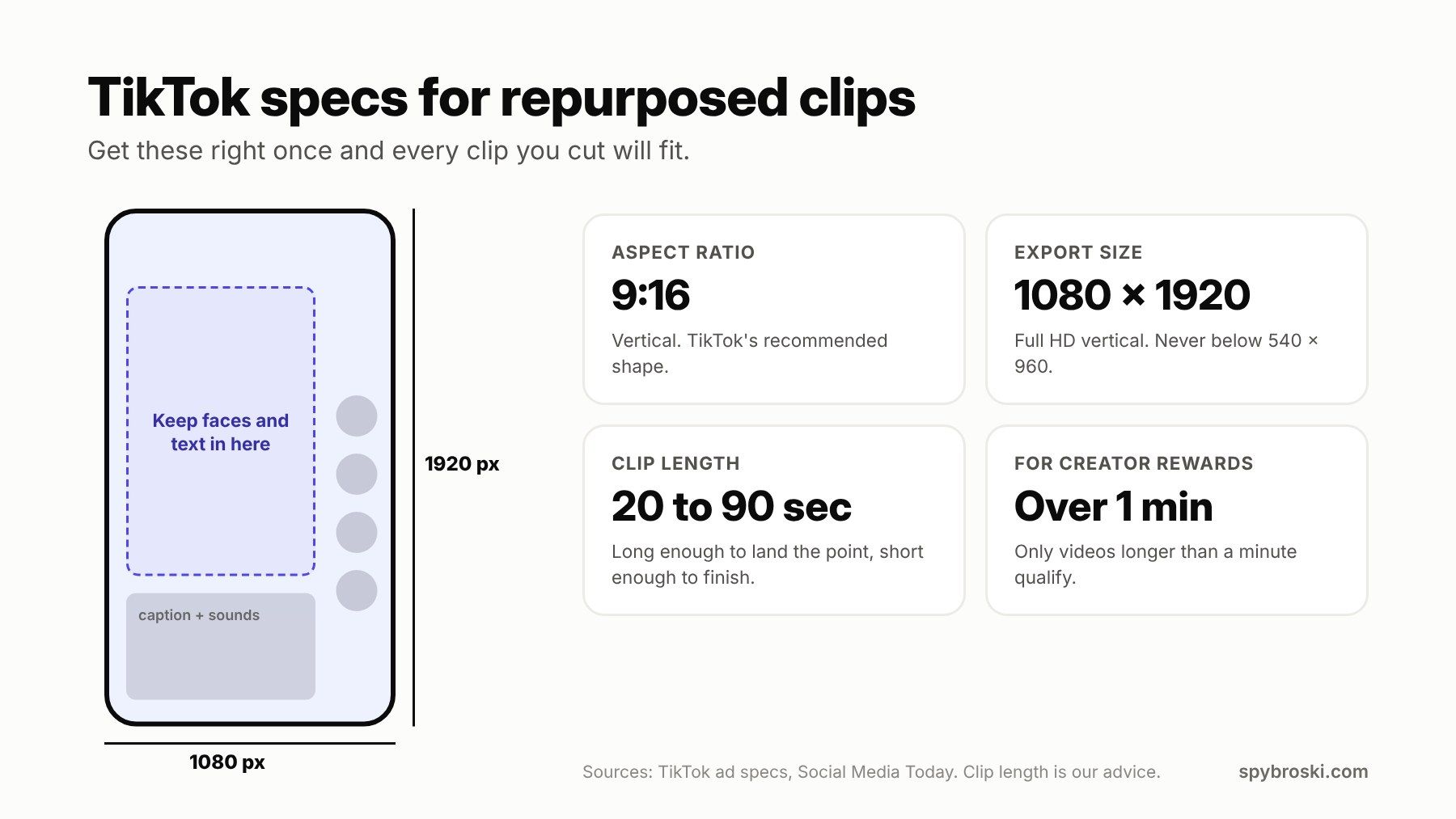
The TikTok aspect ratio you want is 9:16, which means vertical. TikTok's ad specs list 9:16 as the recommended shape, with a minimum of 540 x 960 pixels. In practice, export at 1080 x 1920 pixels (the standard TikTok dimensions for full HD vertical video) and you're covered.
Your long video is almost always 16:9, which is horizontal. So every clip needs reframing, not just shrinking. If you drop a horizontal video into a vertical frame, you get thick black bars above and below and a tiny picture in the middle. People scroll right past that.
Also watch the edges. TikTok puts its buttons down the right side and your caption and sound info along the bottom. Keep faces and on screen text in the middle area so nothing important hides behind them.
How long can TikTok videos be?
Longer than most people think. TikTok launched with a 15 second limit and has stretched it many times since. In 2024 it started testing uploads up to 60 minutes, as TechCrunch reported. The exact cap you see depends on your account and app version.
But "can" and "should" are different questions. For repurposed clips, somewhere between 20 and 90 seconds works for most topics. That's long enough to land one idea and short enough that people finish it. If you're in Creator Rewards, aim for clips just over the one minute mark.
How to repurpose a long video for TikTok, step by step
This is the core workflow. It works the same whether you do it by hand in an editor or with an AI clip maker doing the heavy lifting.
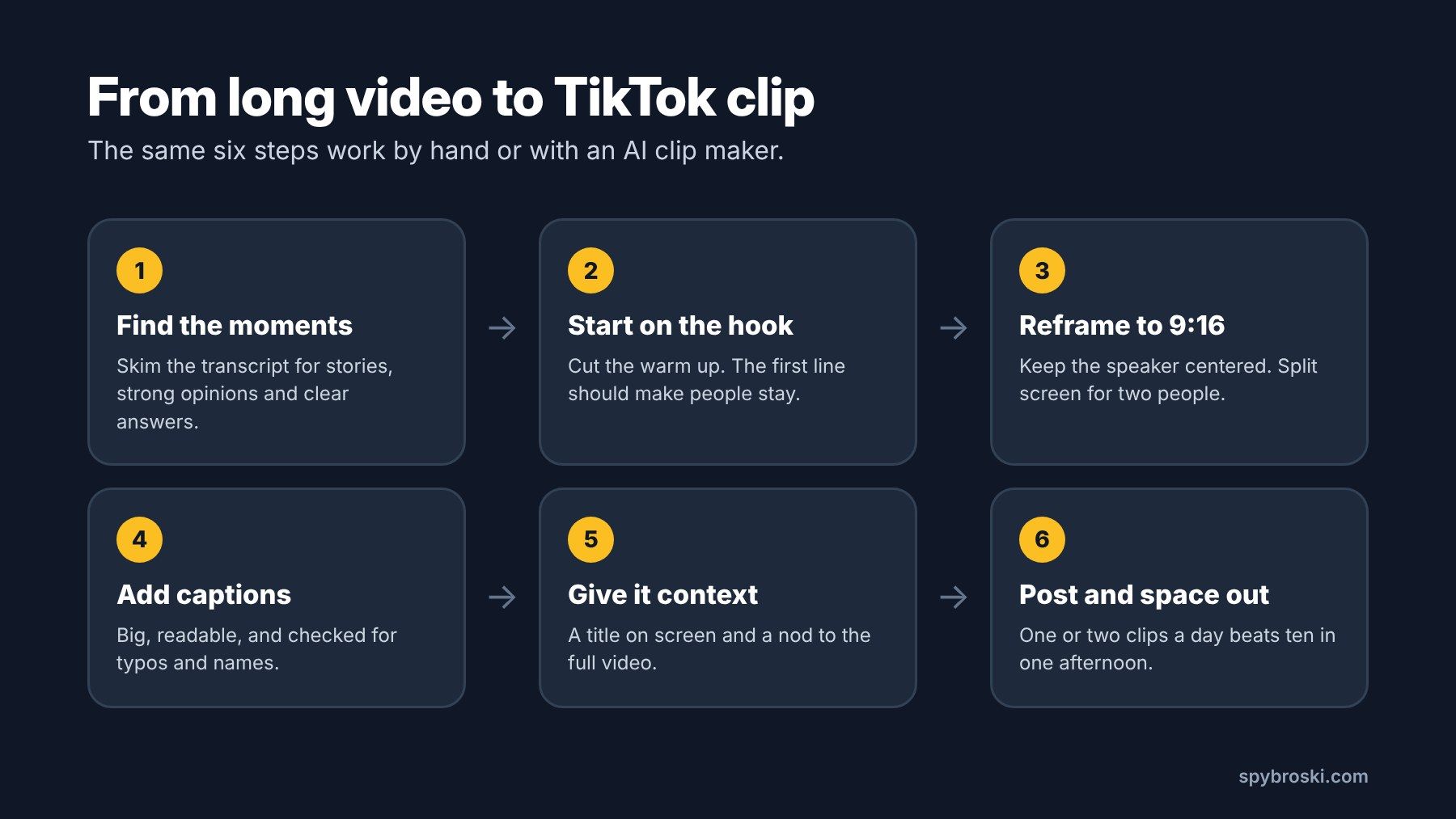
- Find the moments. Skim the transcript instead of rewatching the whole thing. Look for stories, strong opinions, surprising numbers, and clear answers to questions your audience asks. Mark the timestamps.
- Start on the hook. Cut straight into the most interesting line. Lose the "so yeah, um, anyway" warm up. If the first two seconds don't give people a reason to stay, they won't.
- Reframe to 9:16. Keep the speaker centered in the vertical frame. For two people, a split screen with one person on top and one on the bottom works well. For screen recordings, zoom in on the part that matters.
- Add captions. Make them big and easy to read, and check them. Auto captions love to mangle names, brands, and slang.
- Give it context. Add a short title on screen so a cold viewer knows what they're watching. If the clip comes from a longer episode, say so in the caption.
- Post and space them out. One or two clips a day beats dumping ten clips in one afternoon. It also gives you time to see which topics land before you cut more like them.
How to add captions on TikTok
If your editor didn't add captions, TikTok can. According to Riverside's guide (updated February 2026), the in app flow looks like this:
- Tap the plus button, then upload your clip and tap Next.
- In the toolbar on the right, tap Captions. If you don't see it, tap the small arrow to expand the toolbar.
- TikTok transcribes the audio and adds timed captions.
- Tap any line to fix the text, then use Style and Format to change how the captions look.
Two quirks to know. You can't change the timing on auto captions, only the words. And you can only edit captions on a posted video for 7 days after it goes up.
Doing it by hand vs using an AI clip maker
You've got two ways to do all of this.
By hand means opening an editor like CapCut, Premiere Pro, or DaVinci Resolve, scrubbing through the video, and building each clip yourself. You get full control over every cut. You also lose a lot of time. Clipping a one hour podcast into eight good TikToks can eat a whole afternoon.
An AI clip maker does the first draft for you. You upload a video or paste a link, the tool transcribes it, picks out moments it thinks will work, reframes them to vertical, and adds captions. Then you review, fix, and post. It's faster, but it isn't magic. AI picks moments based on patterns, and it doesn't know which story your audience already heard last week.
The sweet spot for most creators sits in the middle. Let a tool find and rough cut the clips, then spend your time picking the best ones and polishing them.
AI clip makers worth trying
There are a lot of these now, and most follow the same upload, pick, reframe, caption routine. A few you'll run into:
Klap is a tool built for this exact job. You paste a YouTube link or upload a file, and it picks out topics from what's being said, cuts them into vertical clips, and adds captions. Its reframing can switch layouts for split screen conversations, screen recordings, and gaming footage. It also handles transcription in 52 languages, which helps if you post in more than one. Klap says its algorithm leans on speech detection, so it does best with podcasts, interviews, tutorials, and reviews, and less well with music or mostly visual footage. Each clip also gets a virality score. Treat that as a hint about which clips to review first, not a promise. You can post or schedule clips to TikTok from inside the app, and you can try it on one video for free, but downloading and posting the clips needs a paid plan.
Opus Clip is the best known name in this space. It gets roughly 90,000 US searches a month, so it's likely the first one you'll hear about. It follows a similar flow of finding highlights, reframing, and captioning.
CapCut comes from ByteDance, the company behind TikTok, and it's the go to for hands on editing on a phone or computer. It has auto captions built in, which makes it a solid choice for polishing clips after an AI tool does the rough cut.
Adobe Express has a free clip maker too. It asks for a video at least one minute long and returns short highlight clips, which is handy if you only need a few clips now and then.
How to pick the right one
Skip the feature lists and test with a real video. Upload the same 20 minute episode to two or three tools and compare. Look at:
- Did it pick the moments you would have picked?
- Do the cuts start and end on full sentences?
- How good are the captions with names and jargon?
- Does it handle your layout, like two speakers or a screen share?
- Can you post or schedule straight to TikTok, or do you download and upload by hand?
- What does the free version include, and is there a watermark?
The tool that gets you closest to "post ready" with your own content is the right one, whatever the comparison sites say.
Mistakes that sink repurposed TikToks
A lot of repurposed clips flop for the same handful of reasons. Here's what to watch for.
Black bars. A horizontal video squeezed into a vertical frame looks lazy, and viewers notice in half a second. Always reframe.
Other apps' watermarks. If you download your own clip from another platform and it carries that platform's logo, TikTok's For You feed rules can keep it from being recommended. Export clean files from your editor or clip tool instead.
Slow starts. The clip opens with "great question, so, I think, um." Cut it.
Missing context. A clip that only makes sense if you watched minute 34 of the full episode leaves new viewers confused. Every clip should stand on its own.
Trusting the AI blindly. Tools cut mid sentence, misspell guest names, and sometimes pick a moment that sounds great out of context but means something else in context. Watch every clip before it goes out. Every single one.
Posting everything at once. Ten clips in one hour compete with each other. Spread them out over days.
The short version
If you skimmed down here, this is what matters:
- Pick long videos with lots of talking, like podcasts, interviews, tutorials, and webinars.
- Only repurpose content you own, and always add your own edits.
- Export in 9:16 at 1080 x 1920 and keep faces and text away from the edges.
- Start each clip on the hook, add checked captions, and give every clip enough context to stand alone.
- Use an AI clip maker for the rough cut if it saves you time, then review every clip yourself.
- Post one or two clips a day and double down on the topics that work.
Want to keep going? Our guide on how to batch create Reels and Shorts fast pairs well with this workflow. Our post on TikTok posting times helps you pick when each clip goes out. And if you want to study how other creators clip their long videos, you can browse public accounts with our TikTok profile viewer without logging in.
FAQ about repurposing long videos for TikTok
What is the best aspect ratio for TikTok?
9:16, which is vertical. Export at 1080 x 1920 pixels for full HD.
How do I turn a YouTube video into a TikTok?
Pick a strong moment, cut it so it starts on the hook, reframe it to 9:16, add captions, and upload the clean file to TikTok. Only do this with videos you own or have permission to use.
Can I repost my own YouTube videos on TikTok?
Yes, as long as they're yours. Edit them for TikTok first, though. Reframe to vertical, add captions, and remove any watermark from another platform, since TikTok's For You feed rules exclude content with someone else's watermark.
How long should a repurposed TikTok clip be?
Most clips work best between 20 and 90 seconds. If you're in TikTok's Creator Rewards Program, make them longer than one minute so they count.
Is there a free AI clip maker?
Several tools let you try them for free. Adobe Express has a free clip maker, and Klap lets you test one video for free before you pay to download clips. Free versions usually come with limits, so check what's included before you commit.
Do repurposed videos get less reach on TikTok?
Not if you edit them properly. TikTok holds back content that's imported without new edits or carries another platform's watermark. Clips you've reframed, captioned, and trimmed for TikTok are fair game.