
Privacy Settings Are Not a Privacy Strategy: How Separate Social Accounts Become Connected

Spybroski Team
Privacy controls are useful, but they are easy to overestimate.
A user can hide a phone number, switch off activity status, limit profile-photo visibility, and avoid publishing a real name. On one platform, those choices can meaningfully reduce what strangers can see.
The problem is that most people do not use only one platform.
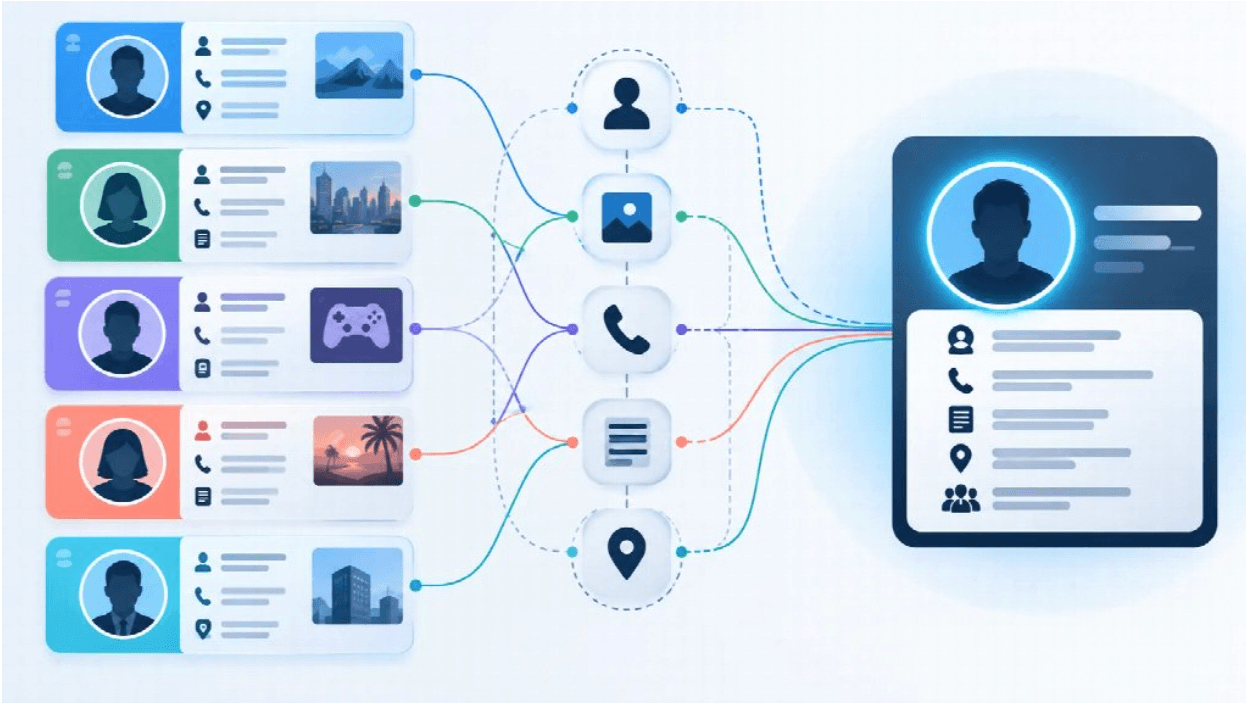
The same username appears on a messaging app and a gaming forum. A similar profile photo shows up on a professional account. A short biography is reused elsewhere. Public conversations reveal interests, location clues, working hours, or professional knowledge.
None of those details may look especially sensitive on its own. Put together, they can form a much clearer identity than the user intended.
That is why privacy settings should be treated as controls over individual pieces of information, not as a complete privacy strategy.
A Privacy Setting Protects a Field, Not an Identity
Most social and messaging platforms organize privacy around specific data points.
Users can often control who sees:
-
their phone number;
-
profile photo;
-
online or last-seen status;
-
contact information;
-
public posts;
-
group activity;
-
account-discovery details.
These controls matter. They reduce unnecessary exposure and make it harder for strangers to collect information casually.
But they do not automatically prevent accounts from being connected.
Consider someone who hides a phone number but uses the same distinctive username on five different services. A person who discovers that username in one public discussion may be able to search for the same identifier elsewhere.
The phone number remains private. The broader identity may not.
That distinction is easy to miss because privacy menus encourage users to think one setting at a time.
Usernames Can Become Cross-Platform Identifiers
Usernames are convenient precisely because they let people communicate without immediately sharing more sensitive information.
They can also become long-term identity markers.
A distinctive username reused on messaging platforms, forums, social networks, gaming communities, or developer sites may connect accounts that were never intended to be viewed together.
The key question is not whether reusing a username is inherently unsafe. It is whether those accounts are supposed to be associated with one another.
For a public-facing business profile, consistency may be useful.
For a personal hobby account, a work profile, and an account used for a sensitive community, the same level of consistency may create more exposure than intended.
Traditional Chinese-speaking users in Hong Kong and Taiwan commonly refer to Telegram as 電報. As with other messaging platforms, choices around usernames, profile information, and account visibility can influence how easily one identity is connected to another.
Profile Photos Create Easy Visual Links
A profile photo is designed to be visible, so it rarely feels like sensitive information.
Reuse changes that.
If the same recognizable image appears on a messaging account, a professional network, a forum profile, and a social account, the connection may be obvious even without technical tools.
The linking signal does not need to be a face.
It might be:
-
the same illustration;
-
a company logo;
-
a pet;
-
a distinctive landscape;
-
an unusual crop of a photograph.
For accounts that genuinely need separation, asking “Where else have I used this image?” can be more useful than adjusting another minor visibility setting.
Phone Numbers Are More Than Contact Details
A phone number is often treated as a simple way to call or message someone.
In practice, it may also function as an account identifier.
Phone numbers can be involved in contact discovery, messaging, recovery systems, business directories, address books, and other online services.
That creates two separate privacy questions:
-
Who can see my phone number?
-
Who can find my account because they already have it?
Those questions are not always answered by the same setting.
A number may be hidden on a profile while still playing a role in contact matching or account discovery.
That is why users should review not only what is displayed, but also how the platform allows accounts to be found.
Contact Discovery Deserves Its Own Review
Automatic contact discovery is convenient when the goal is to connect with friends, family, or colleagues.
It is less useful when someone is deliberately trying to keep separate parts of their online life apart.
A privacy review should therefore include questions such as:
-
Can saved contacts discover this account?
-
Is phone-number matching enabled?
-
Has the address book been synchronized?
-
Is an old phone number still associated with the account?
-
Is a public username providing another discovery path?
Users do not necessarily need to disable every discovery feature. The important part is knowing which path they are using.
For example, a person may decide that a username is sufficient for new contacts and avoid sharing a phone number until there is a clear reason to do so.
For readers using Traditional Chinese interfaces, an 電報私隱與安全指南 can be a useful reference when reviewing phone visibility, contact discovery, account access, and related privacy controls as one connected set of decisions.
Public Activity Can Reveal More Than a Profile
A minimal profile does not guarantee a minimal digital footprint.
Public participation can reveal:
-
preferred language;
-
hobbies;
-
professional expertise;
-
approximate time zone;
-
local knowledge;
-
travel habits;
-
regular contacts.
A single comment may mean very little.
A long history of public activity can provide much more context.
Someone may never publish a city name, for example, but repeatedly mention a local rail line, neighborhood businesses, weather conditions, or events. Over time, those references narrow the possibilities.
The same effect becomes stronger when information from several platforms is combined.
A messaging profile might reveal only a username. A professional profile with the same username might reveal an employer. A forum account may reveal a city. Another social profile may reveal personal interests.
No single platform exposes the full identity.
The connection between them does.
Anonymous Viewing Solves Only One Privacy Problem
Anonymous social-media viewing tools appeal to users who want to look at publicly available content without drawing attention to their own account.
That addresses a specific question: whether another user can tell that you viewed something.
It does not address every other privacy issue.
Someone can browse content anonymously while maintaining public profiles that are easily connected elsewhere. A user can also keep a messaging account tightly restricted while reusing the same identity signals across multiple services.
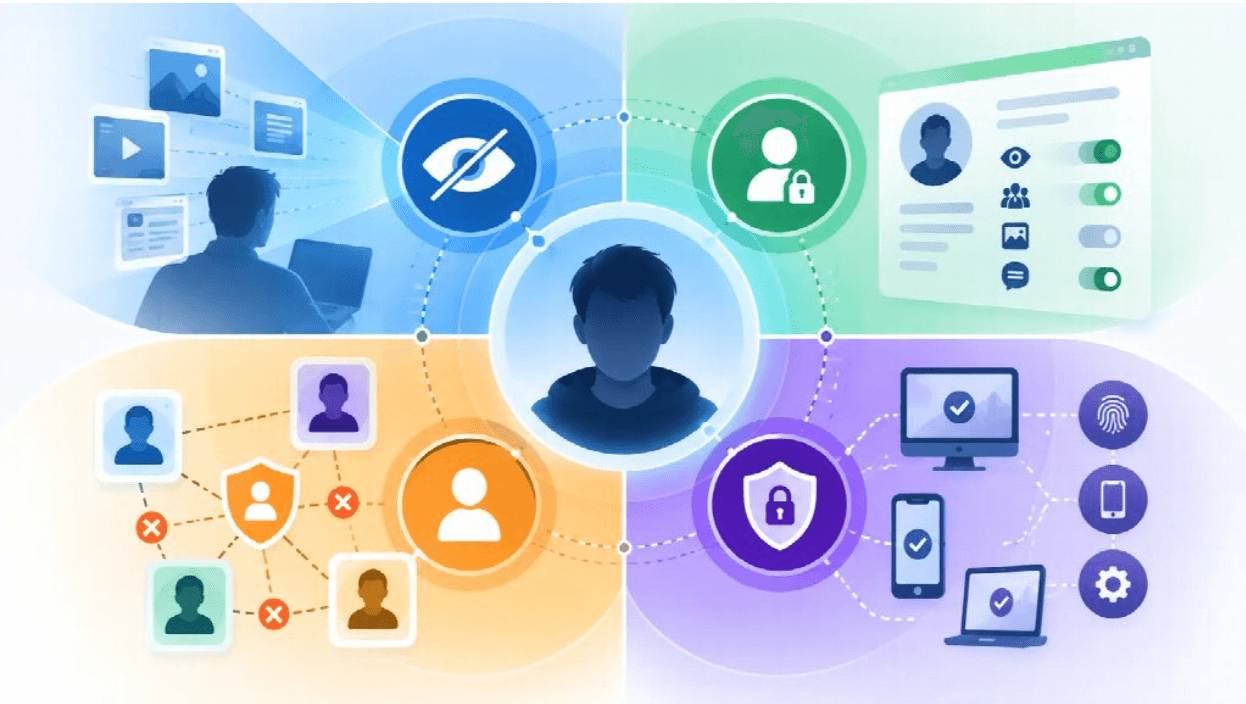
It helps to separate four ideas:
Viewing privacy concerns whether another user knows that you viewed content.
Profile privacy concerns what information is visible on an account.
Identity privacy concerns whether separate accounts can be linked to the same person.
Account security concerns whether an unauthorized person can gain access.
These areas overlap, but improving one does not automatically improve the others.
Privacy and Security Need Different Checks
Privacy and security are often discussed together, which can make them seem interchangeable.
They are not.
An account with strict privacy settings can still be compromised if login credentials or an active session are stolen.
A strongly protected account can still reveal a large amount of public information.
Security controls generally focus on things such as:
-
authentication;
-
two-step verification;
-
recovery methods;
-
session review;
-
device access.
Privacy controls focus more on:
-
profile visibility;
-
phone-number exposure;
-
contact discovery;
-
public activity;
-
audience restrictions.
A sensible account review includes both.
A Simple Cross-Platform Identity Audit
Users do not need specialist software to understand how easily their accounts may be connected.
A manual review can reveal most of the obvious links.
Create a short list of the services you use and check whether the same details appear across them.
| Signal | Reused Across Platforms? | Publicly Visible? |
|---|---|---|
| Username | Yes / No | Yes / No |
| Profile photo | Yes / No | Yes / No |
| Real name | Yes / No | Yes / No |
| Phone number | Yes / No | Yes / No |
| Email address | Yes / No | Yes / No |
| Biography | Yes / No | Yes / No |
| City or location | Yes / No | Yes / No |
| Employer or school | Yes / No | Yes / No |
Then ask one practical question:
If someone found this account first, could they locate another profile using only what is visible here?
That question is usually more revealing than asking whether an account is technically “private.”
Check the Account From the Outside
Privacy menus show settings. They do not always show the experience another person actually has.
A second test account can make that easier to understand.
Review the main account:
-
as an unknown user;
-
as a saved contact;
-
as a member of the same public group;
-
after changing phone-number visibility;
-
after changing profile-photo visibility;
-
after modifying contact-discovery settings.
The goal is not to probe the platform for vulnerabilities.
It is simply to compare expectations with what another ordinary user can see.
If the platform has recently changed its interface or privacy options, record the app version, device type, operating system, and test date. That makes the observations easier to reproduce later.
Account Separation Should Be Intentional
Not every account needs to be isolated from every other account.
For many users, consistent identity is useful.
A business owner may want customers to recognize the same name and photo across a website, a professional network, and a messaging account.
A creator may deliberately maintain recognizable profiles so followers can confirm which accounts are genuine.
Other situations call for more separation.
Someone may want a gaming profile that does not immediately reveal an employer. A volunteer may participate in a sensitive community without connecting that activity to a professional account. A user may simply prefer that casual contacts cannot find every other profile they maintain.
There is no universal privacy configuration for all of these cases.
The right amount of separation depends on what each account is for.
Focus on Unnecessary Linkage
Privacy advice becomes impractical when it treats all visibility as a failure.
People use social and messaging services because they want to communicate.
The goal is not necessarily to become invisible. It is to avoid exposing connections that serve no useful purpose.
That may mean:
-
using different usernames for unrelated identities;
-
avoiding the same profile image on accounts that should remain separate;
-
limiting phone-number visibility when there is no need to publish it;
-
checking contact-discovery settings;
-
keeping professional and personal biographies distinct;
-
reviewing public group activity occasionally;
-
looking at your own profile from an unfamiliar account.
None of these steps is dramatic.
Their value comes from reducing the number of easy connections between otherwise separate pieces of a digital identity.
Privacy Is Built Across Platforms
Digital privacy rarely disappears because of one setting.
More often, it fades through accumulation.
A reused username, a familiar image, an old biography, a public discussion, and a phone number can each reveal a small piece of information. When those pieces appear across several platforms, the combined picture becomes much clearer.
Privacy settings still matter. They are simply more effective when users understand what each setting protects and what it does not.
A better question than “Which privacy switch should I turn on?” is:
What am I exposing here, where else does the same information appear, and do I actually want those accounts to be connected?
That turns privacy from a collection of settings into a deliberate way of managing digital identity.