Build vs Buy Software in 2026: How AI Changed the Math
Spybroski Team


For about fifteen years, buying software was the safe call. Building took longer, cost more, and needed a team you probably didn't have. So nobody spent much time on the build vs buy software question. You picked a SaaS tool, paid per seat, and moved on.
That habit is getting a second look in 2026. AI coding agents made building cheaper. SaaS bills kept growing anyway. And AI agents started doing work across several tools at once, which changes what you need a tool for in the first place. US searches for "build vs buy" went from 590 a month in September 2025 to 880 in September 2026, according to keyword data we pulled from OpenSEO. Searches for "ai agents for business" jumped from 320 a month to 18,100 between August 2025 and August 2026. A lot of leaders are rerunning the math.
This guide walks through what changed, when buying still wins, when building makes more sense, and the hybrid path most companies end up on. You'll also get a simple way to run the numbers and a checklist to use before you sign anything.
Why the build vs buy question is back
Three things moved at the same time.
Building got cheaper and faster
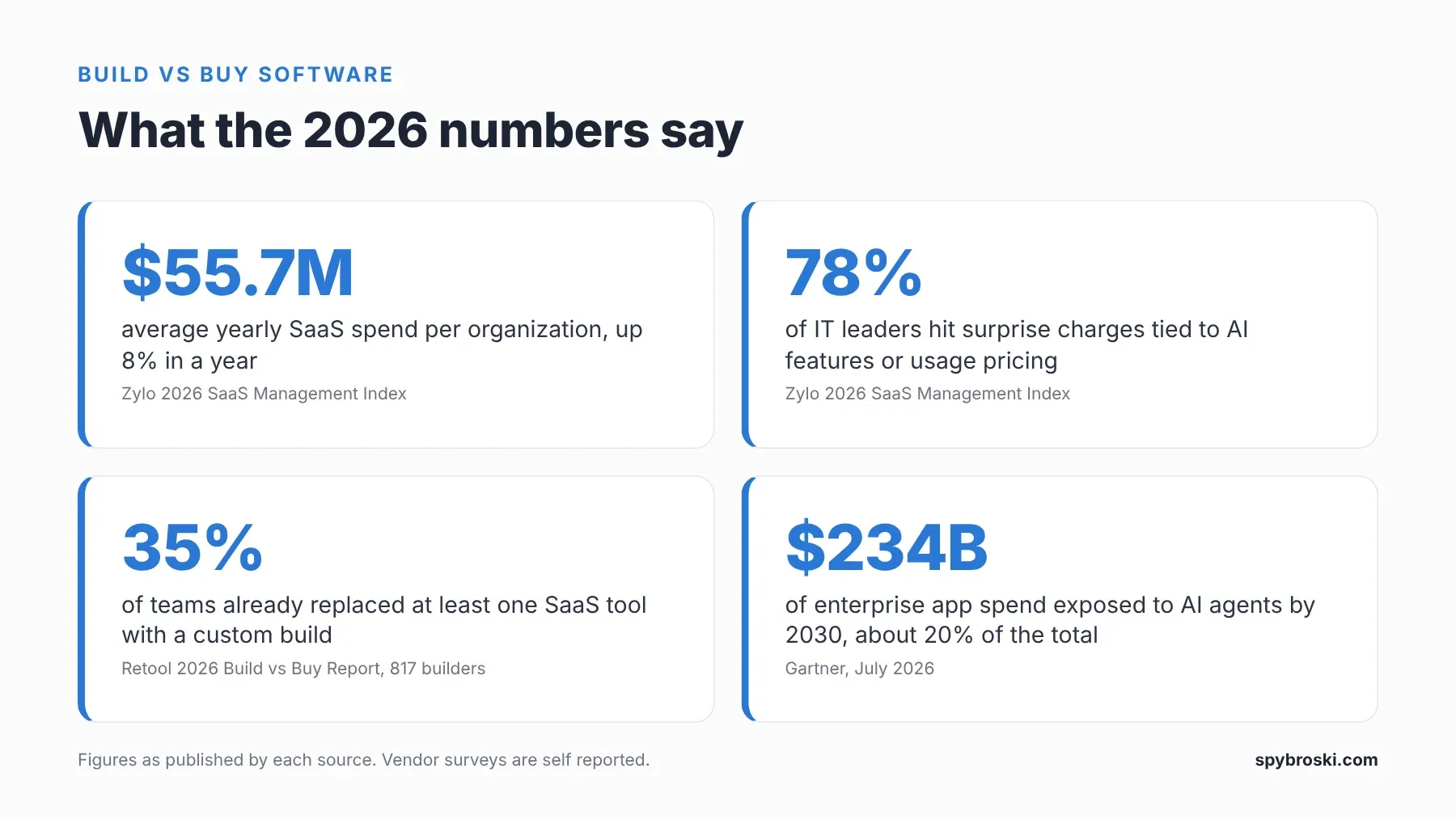
AI coding agents now write, test, and review a large share of new code. Engineers spend more time deciding what to build and less time typing it. That shows up in the data. Retool surveyed 817 builders for its 2026 Build vs Buy report and found that 35% of teams have already replaced at least one SaaS tool with a custom build. And 78% expect to build more custom internal tools this year. Workflow automations and internal admin tools top the list of what gets replaced, followed by BI tools and CRMs.
Retool sells a platform for building internal tools, so take the framing with a pinch of salt. But the direction matches what most engineering leads will tell you over coffee.
Here's the catch, though. Cheaper to build is not the same as cheaper to own. The same survey found that 60% of respondents built software outside IT oversight in the past year. That's a lot of tools with no owner, no audit trail, and no plan for who fixes them when they break.
AI doesn't make every team faster by default, either. A 2025 METR study found that experienced open source developers took 19% longer on tasks when they used early 2025 AI tools, even though they believed the tools made them 20% faster. The tools have improved a lot since then. The lesson still holds. AI speeds up the typing. It doesn't do the thinking or the review for you, so the process around the AI matters as much as the AI.
The SaaS bill kept growing
Meanwhile, the subscription bill didn't wait. Zylo's 2026 SaaS Management Index puts average SaaS spend at $55.7 million per organization per year, up 8% in a year. The median is $20.6 million, and the average portfolio holds 305 apps.
Two more numbers from the same report stand out. 78% of IT leaders saw unexpected charges tied to AI features or consumption pricing. And 61% cut projects because of unplanned SaaS cost increases. In its build vs buy guide, Zylo adds that organizations use just 54.4% of the licenses they pay for. That means close to half the seats sit idle.
Zylo sells SaaS management software, so it has a reason to go looking for waste. Still, anyone who has gone through a company card statement knows the feeling. There's always a tool nobody remembers buying. In our experience it's usually a survey app.
AI agents started working across tools
The third shift is the big one. AI agents can now finish a task that used to mean clicking through four apps. Gartner calls this "agentic arbitrage." In a July 2026 forecast, it estimated that $234 billion of enterprise application software spend is exposed to it through 2030. That's roughly 20% of enterprise application SaaS spend.
Markets noticed before the analysts did. In early February 2026, software stocks dropped hard in a selloff traders nicknamed the SaaSpocalypse. US searches for "saas is dead" climbed from about 110 a month in late 2025 to 2,900 in May 2026.
So is SaaS dead? No. Gartner's George Brocklehurst put it well: "This is less an apocalypse and more of a metamorphosis." Seat based tools with heavy dashboards are under pressure. Systems that hold your data and run your core processes are not going anywhere. What changes is how much you need to pay for the screens on top.
Custom software vs off the shelf: the honest comparison
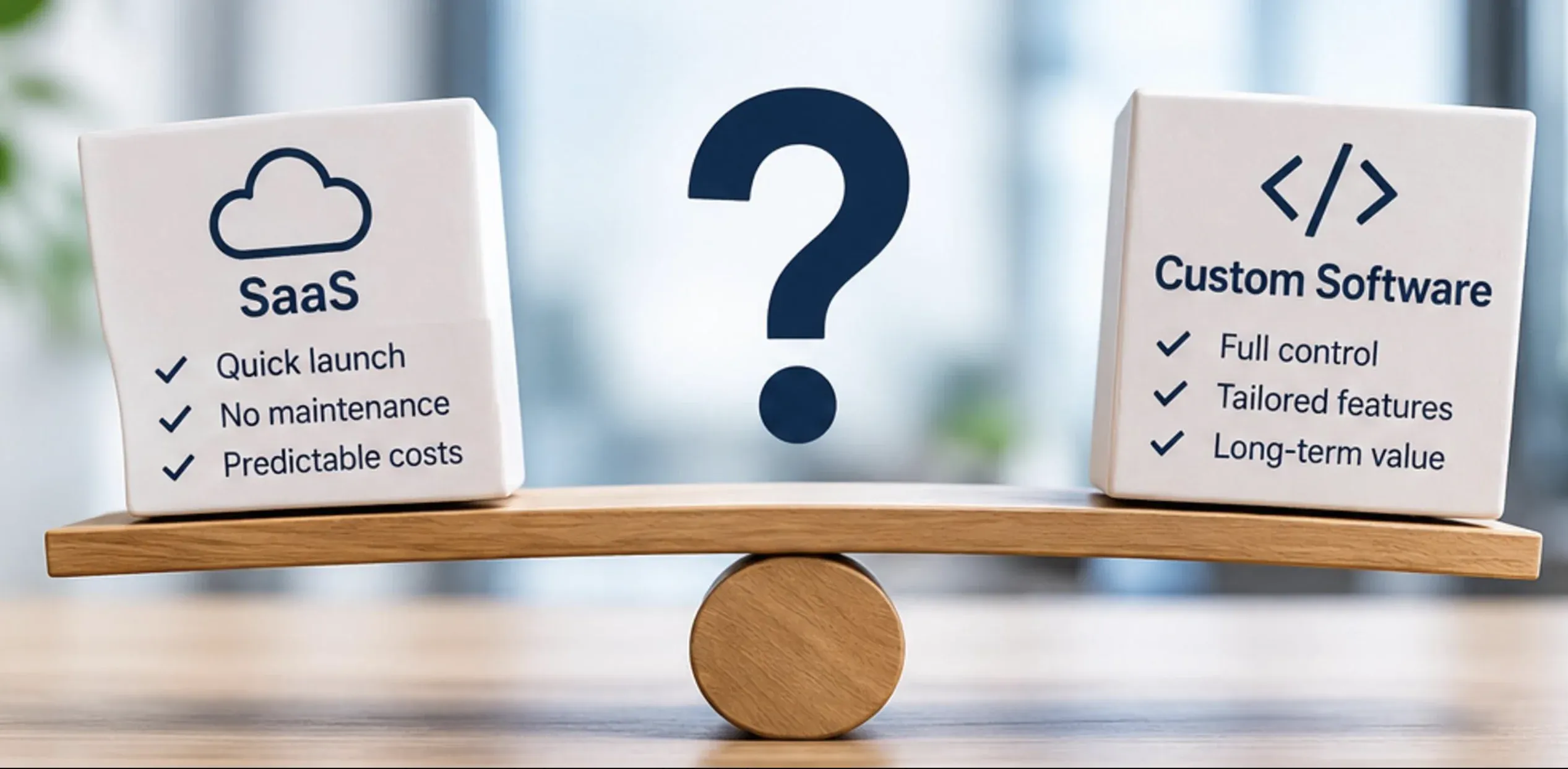
Every checkmark on that seesaw is true. Each one also comes with fine print.
SaaS gives you a quick launch, no maintenance, and predictable costs. But "no maintenance" also means the vendor's roadmap decides what you get and when. And "predictable costs" holds until the renewal adds an AI tier you didn't ask for.
Custom software gives you full control, features built for your process, and value that lasts. But full control is also full responsibility. Someone has to host it, patch it, and keep it working after the person who built it leaves. Big builds also have a rough track record. In a study with the University of Oxford covering more than 5,400 IT projects, McKinsey found that large IT projects ran 45% over budget on average and delivered 56% less value than predicted.
Here's how the three paths compare side by side.
| Factor | Off the shelf SaaS | Custom software | Hybrid: SaaS plus a custom AI layer |
|---|---|---|---|
| Upfront cost | Low | High | Medium |
| Cost over three years | Grows with seats, add ons, and AI credits | Mostly hosting, support, and changes | Licenses you keep plus a focused build |
| Time to launch | Days to weeks | Months | Weeks |
| Fit to your workflow | You adapt to the tool | The tool adapts to you | The core stays standard, the layer fits you |
| Data control | On the vendor's terms | You own it | You control the AI layer and where data flows |
| Integrations | Limited to the vendor's APIs | Built around your stack | Custom connectors across tools you already use |
| Who maintains it | The vendor | You or your partner | The vendor for the core, you for the layer |
| Biggest risk | Lock in and price hikes | Overruns and no clear owner | Scope creep in the layer |
When buying off the shelf software is the right call
Building isn't the answer to everything. Buying still wins when:
- The process works the same way across your industry. Payroll, accounting, email, HR, and basic CRM rarely set a company apart. A mature product already does them well, and rebuilding them adds cost without return.
- You need the tool running next week. No custom build beats a working login today.
- Compliance is the hard part. A vendor that already holds the certifications your industry asks for can save you a full audit cycle.
- Nobody will own it after launch. If you can't name the person who will maintain a custom system, buy.
There's one more point that surprises people, especially with AI. MIT's NANDA initiative published The GenAI Divide in 2025, based on 150 leader interviews, a survey of 350 employees, and 300 public AI deployments. It found that AI tools bought from specialized vendors and built through partnerships succeeded about 67% of the time. Internal builds succeeded about a third as often.
Read that twice, because it doesn't say "never build." It says going it alone is where projects die. Working with a partner who has shipped the same kind of system before changes the odds. That's a different question from build vs buy, and it might be the one that matters most.
When building custom software makes more sense
The workflow is how you win
If the way you price, underwrite, quote, or serve customers sets you apart, a generic tool sands that edge down over time. Competitors who buy the same product end up running the same playbook. Our post on custom software for companies with non standard business processes goes deeper on this.
Integrations cost more than the licenses
The license fee is often the smallest line in the real cost. Connectors, middleware, manual workarounds, and someone reconciling numbers between two systems every Friday all add up. When five tools need a dedicated person just to stay in sync, one purpose built system can cost less over three years.
You need AI that works on your own data
AI pays off when it works with your contracts, tickets, transactions, and history. Most SaaS vendors ship generic AI features tuned for the average customer. Custom AI solutions are built around your data, with control over where it lives, which model sees it, and who can access the results.
Before you switch on any vendor's AI add on, read what the contract says about how your data gets used. If the security side worries you, our cloud storage security checklist is a good place to start.
You're paying for seats nobody uses
If close to half your licenses sit idle and the tool only covers one narrow job, you may be renting a whole product to use one feature. That one feature is often a good candidate for a small custom build.
The hybrid path: a custom AI layer on top of the tools you keep
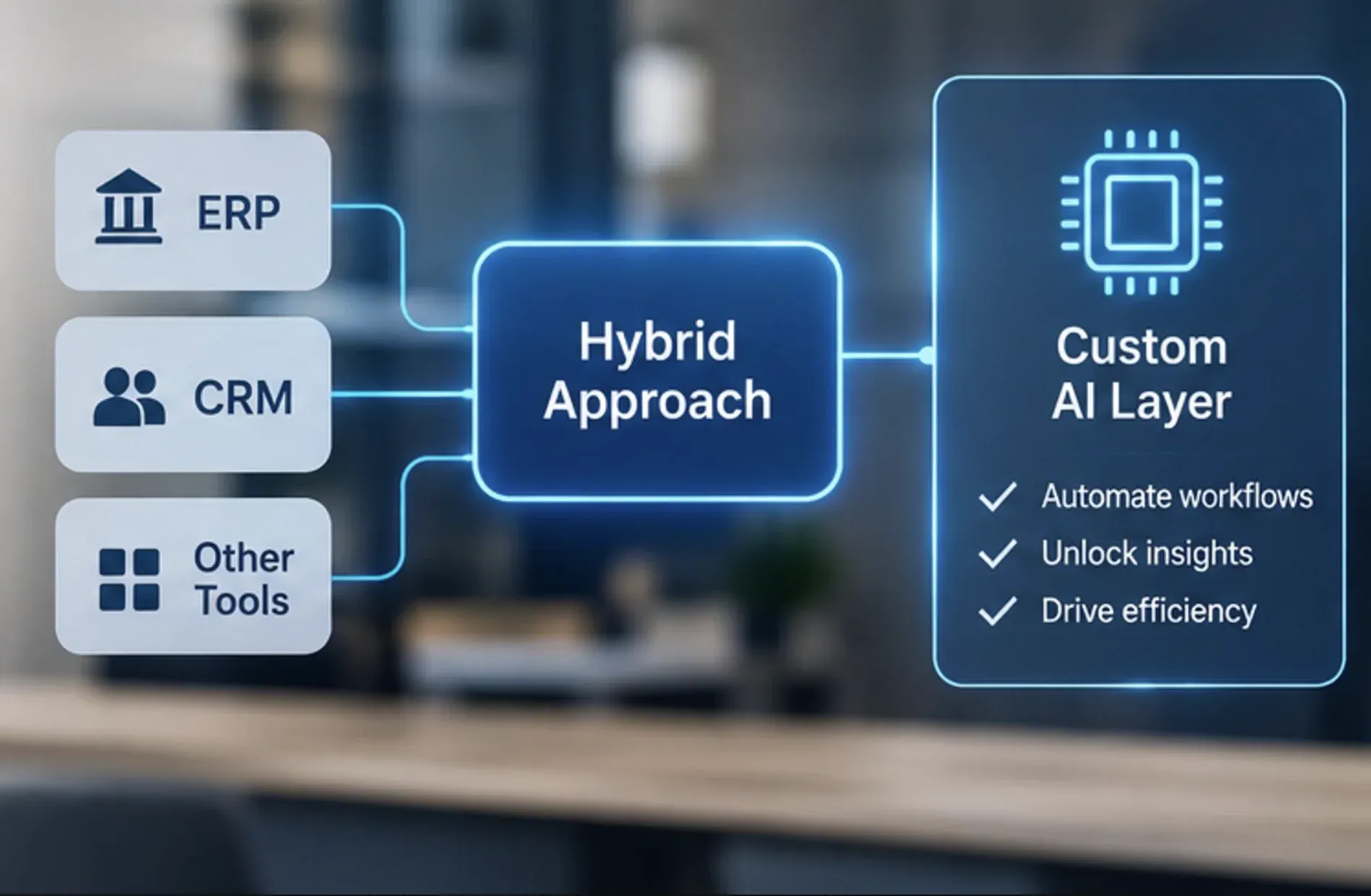
For most companies, the answer sits in the middle. You keep the systems that work, such as your ERP (enterprise resource planning) and CRM (customer relationship management) tools. Then you add a custom AI layer on top.
That layer is where AI agents for business earn their keep. It can read data across tools, draft documents, route requests, and score decisions. A few examples:
- An agent reads incoming invoices, matches them to purchase orders in the ERP, and flags the mismatches for a person.
- An agent pulls a customer's history from the CRM and the support desk, then drafts a renewal proposal for the account manager to edit.
- A scoring model ranks insurance claims or loan applications so reviewers start with the riskiest ones.
The vendor handles the commodity work. You own the part that makes you different. This is the same shift Gartner describes, where the value moves from the screens to the outcome.
Keep a human in the loop
Enterprise AI agents can do real damage when nobody checks their work. Gartner predicted in June 2025 that over 40% of agentic AI projects will be canceled by the end of 2027. It pointed to rising costs, unclear business value, and inadequate risk controls. It also warned about "agent washing," estimating that only about 130 of the thousands of vendors selling agentic AI are the real thing.
The answer isn't to avoid agents. It's to start narrow and keep a human in the loop. Pick one workflow, give the agent a clear job, and have a named person approve anything that touches money, customers, or compliance. Expand once you can measure the result. (And if your team is nervous about what agents mean for their jobs, our breakdown of whether jobs are at risk because of AI is a calmer read than most headlines.)
How to run the build vs buy math
You don't need a 40 tab spreadsheet. You need honest numbers for one workflow.
- Pick the workflow that costs you the most time and money. Not a whole department. One process, like onboarding a client or closing the month.
- Price both paths over three years. For SaaS, count seats, expected seat growth, add ons, AI credits, implementation, and integration work. For a build, count discovery, the build itself, hosting, model and API usage, support, and changes.
- Add the hidden work. How many hours a week do people spend copying data between tools or fixing sync errors? Multiply that by their hourly cost. This is usually the number that surprises people.
- Budget for maintenance from day one. Zylo's guide, citing IEEE research, notes that maintenance eats more than half of a system's lifecycle cost.
- Check whether your data is ready. AI on messy data just gives you messy answers faster. An AI readiness assessment shows what's usable, what needs cleaning, and what's missing.
- Test before you commit. A small working prototype on real data tells you more than any slide deck.
If the three year numbers come out close, buy. You'll get speed and less risk. If building wins by a wide margin, or the workflow is your edge, build. Or build the layer and keep the core.
What to ask a custom software development company before you sign
If you decide to build, the partner matters more than the tech stack. These questions separate teams that ship from teams that demo:
- Who writes the code, and who reviews it? If AI agents write code, ask how their work gets checked and by whom.
- Who signs off before anything goes live? You want a named person, not "the team."
- Who owns the code and the data when the project ends?
- Can you see a working prototype in days, instead of a slide deck in weeks?
- What happens after launch? Ask about support, documentation, and handover.
- Which business number will this move, and how will you measure it?
Those first two questions are coming up a lot more often. US searches for "ai sdlc" went from 210 a month in September 2025 to 2,400 in September 2026, per OpenSEO. An AI SDLC (software development life cycle) puts AI agents inside a delivery process with human checkpoints, so speed doesn't come at the cost of quality. Ask any AI software development company you talk to to walk you through theirs.
How Altamira Software approaches build vs buy
At altamira software, the conversation starts with the workflow that costs you the most time and money. The build or buy answer follows from there. If your systems are ready, the team adapts a proven engine, such as Document Intelligence or Scoring and Decision, to your process. If they are not, the work starts with a readiness assessment or a prototype built in a day or two.
Every project runs on Altamira's AI SDLC (software development life cycle). People define the requirements and approve the architecture. Agents write and test the code, and a different agent reviews each piece. A named person signs off before anything ships.
Checklist before you decide
- Does this process set your business apart, or is it standard for your industry?
- What will the full stack cost over three years, including integrations, AI add ons, and workarounds?
- Who owns the data, and can AI work with it safely?
- How many tools does the workflow touch today?
- Could a custom AI layer on your existing tools solve the problem faster than a full build?
- Is your data clean enough for AI to use?
- Who will own and maintain a custom system after launch?
- Which single number should move, and by how much, for this to count as a win?
The short version
If you skimmed straight down here, this is what matters:
- SaaS is still the right choice for commodity work like payroll, accounting, and email.
- AI lowered the cost of building, but not the cost of owning. Plan for maintenance and a named owner.
- SaaS bills keep rising, and 78% of IT leaders hit surprise AI charges, per Zylo.
- AI agents are moving value from software screens to outcomes. That's why Gartner sees $234 billion of app spend exposed by 2030.
- Most companies land on a hybrid. They keep the core tools and add a custom AI layer for the work that sets them apart.
- Start with one costly workflow, keep a human in the loop, and test a prototype before you commit.
Build vs buy software FAQ
What does build vs buy mean?
It's the choice between developing software yourself or with a partner (build) and licensing an existing product (buy). Today there's a third path: buy the core tools and build a custom layer on top.
Is custom software cheaper than SaaS?
Not upfront. Over three years it can be, especially when you pay for lots of idle seats, heavy integrations, or AI add ons. Run the numbers for one workflow before you decide.
Is SaaS dead?
No. Gartner expects SaaS to change form rather than disappear. Seat based tools with heavy dashboards face the most pressure as AI agents take over tasks across apps.
What is a custom AI layer?
It's software that sits on top of your existing systems, like your ERP and CRM, and uses AI to read data across them, draft documents, route requests, or score decisions.
How long does it take to build custom software?
It depends on scope. A focused prototype can take days. A custom layer on existing tools usually takes weeks, and a full system can take months.
What is an AI SDLC?
It's a software development life cycle where AI agents handle parts of the build, like writing and testing code. People still define the requirements, approve the architecture, and sign off on releases.
Why do so many AI projects fail?
MIT's 2025 GenAI Divide report found that most enterprise AI pilots stall with little or no measurable impact on profit. The authors point to a learning gap, where generic tools don't adapt to how a company really works. Projects run with specialized partners succeeded far more often than internal builds.