Cloud Storage Security Checklist: What You Should Do Today

Spybroski Team
Cloud Storage Security Checklist: What You Should Do Today
storage useful, but it also makes it a target. The real question is not “Should I secure my cloud storage?” It’s “What should I do right now?”
Start with actions you can do immediately: turn on multi-factor authentication, check your security settings closely, and learn how the shared responsibility model works. Skipping these basics can lead to serious problems, like data leaks, major costs, and lasting damage to trust.
This article is a clear checklist you can use to strengthen your cloud storage security step by step. It's worth knowing that some providers build several of these protections in by default — encryption-first free cloud storage services, for example, encrypt files on your device before they're uploaded, which means the provider itself cannot read your data even in the event of a server-side breach. That kind of architecture isn't a substitute for the checklist below, but it does change which items carry the most weight for you.
Cloud Storage Security: Why It Matters Right Now
Many companies now depend on cloud services for day-to-day work because they can scale easily and often cost less than running everything in-house. Individuals also use cloud storage for photos, school files, taxes, and other important documents. But wider use also brings more risk.
As of May 2026, cloud security is more urgent than ever because attacks keep increasing and more sensitive data is stored outside local systems.
What is Cloud Storage Security?
Cloud storage security means the set of steps and tools used to protect data stored online from unwanted access, leaks, and loss. It is not one product and it is not something you set up once and forget. It usually includes encryption (turning data into a coded form that needs the right key to read), access controls (so only approved people and systems can use the data), and meeting legal and industry rules (so sensitive data is handled the right way). The idea is simple: protect your data no matter where it is stored.
Cloud security also includes ongoing monitoring, early threat detection, and fast response when something goes wrong. Cloud setups can include virtual machines, containers, serverless functions, and managed services. Each one can bring different risks, especially when workloads change often. The goal is to keep your data correct (integrity), private (confidentiality), and available when needed (availability).
What Are the Risks of Insecure Cloud Storage?
Weak cloud storage security can cause major harm to businesses and individuals. A recent MIT report updated in July 2024 showed that data breaches rose by 20% in the first nine months of 2023 compared to all of 2022.
Ransomware attacks jumped by almost 70% in the same time. In 2023, the average cost of a data breach reached about $4.45 million, which was a 15% rise over three years. These numbers translate into real losses: money, time, business downtime, and damaged reputations.
Many incidents come from a few common problems. Weak passwords and missing multi-factor authentication (MFA) make it easy for attackers to break in. Cloud misconfigurations-often caused by mistakes or lack of training-can accidentally expose data to the public internet, like open AWS S3 buckets or overly open network rules.
Before assuming your accounts are still secure, it is worth checking have I been hacked to find out if your credentials have already been exposed through a known breach.
Insider threats also matter: employees or contractors may leak data on purpose or by accident. Another risk is “Shadow IT,” where staff use unapproved file sharing or cloud tools outside the company’s protected setup. If you want to avoid breaches, compliance trouble, and reputation damage, you have to address these risks directly.
Why Do Businesses and Individuals Need a Checklist?
Cloud systems can change quickly, and that makes security harder to manage without a plan. A cloud security checklist is a practical way to stay consistent. For businesses, it helps apply the same security rules across hybrid cloud setups, meet regulations (like GDPR, HIPAA, and SOC 2), and keep clear visibility into what is happening. Without a checklist, teams can get buried in alerts, miss key risks, and react too late.
For individuals, the same idea applies on a smaller scale. A checklist makes it easier to protect your files from common threats and breaks confusing security ideas into clear tasks. New users and experienced users both benefit from a set of controls that gives them a starting point. It also helps you focus on the highest-risk issues first and lowers the chance of an attack going unnoticed.
Key Threats and Current Challenges in Cloud Storage Security
Once you understand why cloud security matters, the next step is knowing what you are protecting against. Cloud security is not just the same as old-style IT security. Cloud systems work differently, so you need to think about risks in a different way.
5 Major Cloud Storage Security Risks
The cloud brings big benefits, but it also brings common security problems. Best-practice research, including Google Cloud’s 2025 Threat Horizons Report, shows that a few risks keep showing up again and again. Here are five major ones:
- Weak Credentials: About 47% of compromises start with weak credentials. This includes easy-to-guess passwords, default logins, and missing MFA-especially on admin accounts. Cloud speed can also lead to too many accounts, too many privileges, and stolen credentials that turn into full breaches.
- Misconfigurations: Misconfigurations cause about 29% of compromises. Public storage buckets, overly open network rules, and unpatched systems can expose data without anyone noticing. These issues can sit quietly for a long time and then cause a major incident, like the ESHYFT PII exposure caused by a misconfigured S3 bucket.
- Insider Threats: People with valid access can still create risk, either by mistake or on purpose. The risk grows when users have more access than they need, because a stolen account can do more damage.
- Supply Chain Attacks: Cloud systems depend on many services and vendors. Attacks like SolarWinds and problems like Log4j show why you must secure software dependencies and third-party tools. Risks include weak third-party settings and unsafe CI/CD pipelines.
- Advanced Persistent Threats (APTs) and Changing Malware: Attackers keep improving. AI is being used more in cloud operations, and it can also be used for more advanced attacks. Fixed, old-style defenses often fail against these threats, so you need ongoing detection and fast response.
Who Is Responsible for Securing Cloud Data?
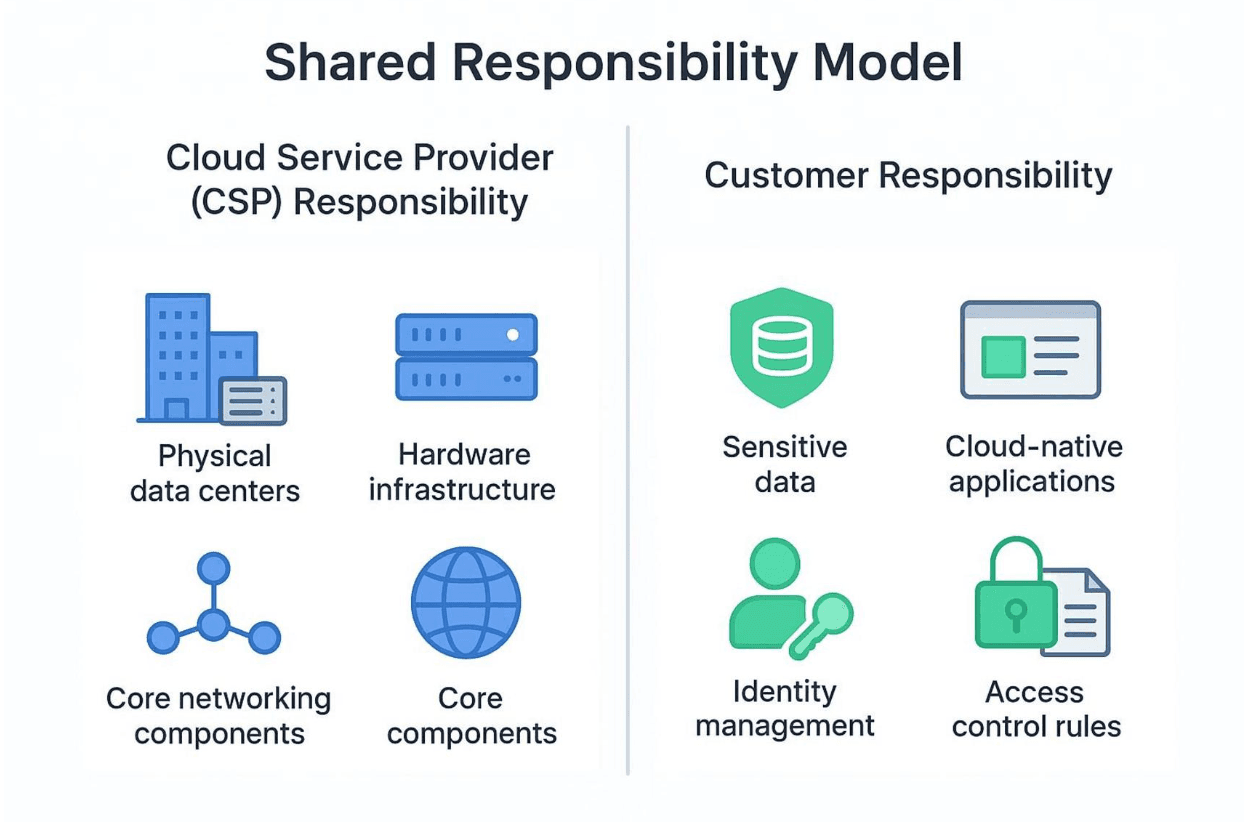
A common point of confusion is the shared responsibility model. It means the cloud provider and the customer both have security duties. The exact split depends on the service type (IaaS, PaaS, or SaaS).
- Cloud Service Provider (CSP) Responsibility: The provider usually handles “security of the cloud.” This covers physical buildings, hardware, core networking, virtualization, and base services. Companies like Google Cloud, AWS, and Azure spend heavily to protect this foundation.
- Customer Responsibility: The customer handles “security in the cloud.” That includes your data, your settings, your identities, and your access rules. With IaaS, you manage the most (OS, apps, network setup, data). With PaaS, the provider manages more of the platform. With SaaS, your main jobs are data, identity, and access settings inside the app.
The Center for Internet Security (CIS) shows clear examples of how this changes by service type. The main point: cloud security is shared across engineering, operations, and leadership. If nobody is clear on who owns which tasks, gaps will appear. Learn what your provider covers and define what your team must do.
Common Misconceptions about Cloud Provider Security
Even with the shared responsibility model, people still fall into the same traps. These misunderstandings often lead to poor security choices:
- "The cloud provider handles all security": Providers protect their infrastructure, but they do not automatically protect your data, permissions, or settings. You must set those up.
- "Cloud environments are inherently more secure than on-premises": Providers do have strong security teams, but cloud systems can also add new risks due to scale, fast changes, short-lived resources, and easy service creation. The attack surface can be larger.
- "Default settings are secure enough": Defaults are often chosen for ease of use, not maximum protection. Many use cases (especially regulated data) need stricter settings.
- "Security is a one-time setup": Cloud security requires ongoing work. Threats change, services add features, and settings drift over time.
These misconceptions are exactly why a clear checklist and ongoing habits matter. Assuming the provider or the defaults are “good enough” can lead straight to a breach.
Core Checklist for Securing Your Cloud Storage Today
Now we move into the steps you can apply. This checklist covers the main parts of a solid cloud storage security program and works for both beginners and experienced teams. If you apply these controls, you will reduce your exposure to the most common cloud threats.
1. Identity and Access Management (IAM)
In cloud systems, identity is the new boundary. If someone can log in, they often can do damage. That’s why permissions and access rules matter so much. Cloud speed can quickly create too many accounts and too many permissions, so strong IAM practices are required.
Enforce Multi-Factor Authentication
Multi-factor authentication (MFA) adds a second step beyond a password. Use it for every account, especially admin accounts and accounts with production access. Some MFA methods (like email-based MFA) can be tricked by advanced phishing. For stronger protection, use phishing-resistant options such as FIDO2 keys or YubiKeys.
These hardware keys make it much harder for an attacker to get in, even with a stolen password. Connect hardware MFA with your Single Sign-On (SSO) system (Okta, Azure AD, Google Workspace) and require re-checks before high-risk actions. Check MFA enrollment often so employees and contractors stay covered as roles change.
Apply Principle of Least Privilege
The Principle of Least Privilege (PoLP) means every user, app, or service should get only the access it needs-and nothing extra. Apply this to people and also to non-human identities like service accounts, APIs, containers, and serverless functions, which often get wide permissions for convenience. PoLP reduces how much damage a single stolen account can cause.
Start with “deny all,” then add only the needed actions. Replace broad wildcards (like s3:*) with specific actions (like s3:GetObject and s3:PutObject). Review permissions often and remove unused access from roles and service accounts. Tools like Wiz CIEM can help spot and fix excess permissions faster.
Rotate and Manage Credentials Regularly
Long-lived keys are risky. Keys should not be changed only after a breach; rotation is a normal prevention step. Rotate API keys and tokens often, using automation like HashiCorp Vault or AWS Secrets Manager. The CIS AWS Foundations Benchmark recommends rotating keys every 90 days or less. Rotating more often-especially for service accounts-reduces risk if a key leaks.
When possible, replace long-lived keys with short-lived credentials (AWS STS, GCP Workload Identity, Azure Managed Identities). Watch logs (CloudTrail, Audit Logs, Azure Monitor) for strange use after rotation, and revoke unused or exposed keys right away.
2. Data Protection and Encryption
Cloud security centers on protecting sensitive data. That means more than “turn on encryption.” You need to know where data is stored, who can reach it, how it may be exposed, and how it moves through your systems.
Encrypt Data at Rest and in Transit
Protect data while stored (at rest) and while moving (in transit). For data at rest, use strong encryption like AES-256 or Transparent Data Encryption (TDE) for databases. Confirm that storage volumes, databases, and object storage (AWS S3 SSE, Azure Storage Service Encryption, GCP CMEK) have encryption turned on. For data in transit, require TLS 1.2 or higher for all endpoints, API calls, and service-to-service traffic.
If you use a zero-trust approach, consider mutual TLS (mTLS) so both ends of a connection prove who they are. This helps stop impersonation and protects internal microservice calls.

Use Key Management Best Practices
Encryption depends on good key handling. Use a Key Management System (KMS) to create, store, manage, and rotate keys in one place. Use customer-managed keys with AWS KMS, Azure Key Vault, or GCP KMS for more control. Rotate keys regularly and audit usage to spot suspicious access.
Central key handling with a managed KMS supports consistent controls, automated key lifecycles, and audit logs for compliance. It also supports better separation, like using different keys per file to reduce risk.
Label and Classify Sensitive Data
You cannot protect data you cannot find. Classification and labels help you apply the right controls to the right data. Tag data by sensitivity (public, internal, confidential, restricted) to gain visibility and set rules that scale. Many cloud providers offer tools like AWS Macie, Azure Information Protection, or GCP DLP. Automate labeling at ingestion using tools like Lambda functions or Logic Apps.
After labeling, apply rules automatically-like requiring encryption, limiting access to “restricted” labels, and adding extra monitoring. Scan for PII, credentials, and financial data, then apply tags (like sensitivity=confidential) that trigger policies. For developer and analyst datasets, tokenization or anonymization can lower exposure while still allowing work to continue.
3. Configuration and Posture Management
Poor security settings are a leading cause of cloud incidents. They can lead to stolen access, data theft, downtime, and compliance fines. Configuration management needs to be a main focus.
Establish Secure Baseline Settings
Set secure minimum rules for each cloud resource from day one. Use Infrastructure-as-Code (IaC) modules (Terraform, ARM templates) that include approved machine images, required encryption, and strict network rules. This creates standard secure setups for new deployments.
Use CIS and NIST benchmarks as starting points. Services like AWS Config rules or Azure Policy can automatically flag drift, like unapproved images or public storage accounts, so your environment stays aligned with your baseline.
Automate Compliance and Misconfiguration Monitoring
Manual checks cannot keep up with cloud changes. Automate compliance and misconfiguration checks, and add policy checks inside CI/CD pipelines. Tools like Open Policy Agent (OPA) or Terraform Sentinel can block pull requests with unsafe settings before they reach production. Use Checkov or Prowler scans on each commit to catch issues early.
For ongoing coverage, log every configuration change. When drift is found, connect alerts to automation that fixes the issue quickly-for example, using AWS Systems Manager Automation to reset security groups or Azure Automation to reapply required tags and policies. This helps keep compliance on track and reduces the chance of fines.
4. Network Security Controls
Cloud network security needs more than old perimeter-based defenses. Cloud systems are distributed and change often, so you need fine-grained controls and approaches that do not depend on a single boundary.
Limit Public Exposure of Storage Resources
Limit public access to storage as much as possible. Sensitive apps and data should live in private subnets that the public internet cannot reach. Block public access to storage like S3 buckets and Azure Blob Storage unless it is truly required. Use private endpoints or VPC endpoints so services are reachable only from internal networks.
In GCP, Private Service Connect can keep traffic private. Review data flows often to confirm nothing is exposed by accident due to endpoint mistakes.
Implement Firewalls and Access Rules
Use cloud firewalls, security groups, and access lists to control traffic in and out. Allow only required traffic. Web Application Firewalls (WAFs) help protect against SQL injection, XSS, and other web threats. Use AWS WAF or Azure Front Door with rules that match your real traffic and risks.
Add DDoS protection with automatic mitigation to stay online during traffic floods. Review security groups and NACLs often to remove old rules and reduce drift.
5. Backup, Recovery, and Resilience
Even with strong protection, incidents still happen. Backups and recovery plans are your last safety net and support business continuity.
Schedule Automated Backups
Automate daily snapshots of key volumes, databases, and workloads (like EBS volumes or Azure managed disks). Keep backups based on your Recovery Point Objectives (RPOs), which define how much data loss is acceptable in time. Use the 3-2-1 rule: three copies of data, two storage types, one copy offsite.
For stronger ransomware protection, use the 3-2-1-1-0 rule: add one offline or immutable copy and aim for zero backup errors. Encrypt backups at rest and in transit.
Test Data Recovery Processes
Backups only help if they can be restored. Test backups by restoring into isolated environments and confirming they work. Run failover drills at least twice a year and measure results against Recovery Time Objectives (RTOs), which define acceptable downtime. Keep clear runbooks for different scenarios, including regional outages.
Run apps across multiple availability zones and use load balancers that can route around failures. Monitor zone health and confirm routing works during planned maintenance.
6. Monitoring, Logging, and Incident Response
Cloud environments change fast, and attacks can spread quickly. That’s why you need ongoing detection and quick response.
Enable Centralized Logging
Logs help you spot problems early-if you collect and review them in one place. Send logs from cloud services to a centralized SIEM like Splunk or Azure Sentinel. Include sources like AWS CloudTrail, CloudWatch, VPC Flow Logs, Azure Activity Logs, and GCP Cloud Audit Logs for full visibility.
Add support for app-specific logs so you can detect issues generic rules miss. Central logs help with audits, anomaly detection, and finding configuration gaps. Set retention rules that meet compliance and investigation needs.
Set Up Automated Alerting for Suspicious Activity
Create detection rules for common threats like privilege escalation, unusual API behavior, and unauthorized access attempts. Add real-time alerts for unusual logins, sudden traffic spikes, or changes to key IAM policies. Tools like Alert Logic or Elastic Security can send alerts through Slack or PagerDuty.
Use AI-based detection where it fits to spot early threat signals and suggest fast fixes. This can help teams keep pace as attacks become more automated and advanced.
Develop and Run Incident Response Playbooks
Security incidents will happen sooner or later, so plan for them. Connect each alert type to a triage playbook so responses are consistent. Define what counts as an incident (data breach, malware outage, etc.) and assign responsibilities across engineering, operations, communications, and legal teams, including backups for key roles.
Use a clear flow: detection → assessment → containment → eradication → recovery → lessons learned. Practice with tabletop drills at least once per year. Record all actions and keep logs immutable for investigations.
7. Compliance and Regulatory Requirements
Security and compliance are linked. Strong security supports compliance, and weak security makes compliance fail. With stronger requirements around data location and handling, you need a clear governance plan.
Map Security Controls to Industry Standards
Build your cloud controls around trusted frameworks and rules like NIST 800-53, ISO 27001, SOC 2, HIPAA, GDPR, and PCI DSS. These are practical guardrails for handling sensitive data safely. Tools like Vanta or Drata can help map monitoring data to control requirements and make audits easier. Compliance teams should review gaps regularly and drive fixes through clear reporting.
Maintain Audit Trails and Documentation
Audit logs help with investigations, compliance proof, and accountability. Log access attempts, configuration changes, security events, and policy violations, and store them safely. Add policy as code (PaC) so guardrails are enforced at scale from the start. CSPM tools can find violations, but policy-as-code helps stop them before deployment.
Keep a central list of approved exceptions and review it during incident response drills to confirm exceptions still make sense. Security assessments and penetration tests also create documents that help in audits and help teams track fixes.
8. Third-Party and API Security
Most cloud setups depend on third parties and APIs. Your security is only as strong as the weakest external link, so these risks need direct attention.
Assess Vendor and Integration Risks
Review the security of vendors and integrations. Use questionnaires, request penetration test results, and check certifications like SOC 2 or ISO 27001. When possible, favor providers built around transparency and end-to-end encryption, such as Proton, whose apps are open source and independently audited by security experts. Keep a vendor register with contract dates, renewal deadlines, and security contacts.
Review high-risk vendors at least quarterly. Also watch your software dependencies for vulnerable libraries using an agentless SBOM approach. Incidents like SolarWinds show why supply chain security must be a core part of cloud security, especially in large, distributed environments.
Secure API Endpoints and Tokens
APIs are a core part of cloud apps and are often attacked. Make sure every API uses strong authentication and authorization. Put external APIs behind an API gateway (Kong, Apigee, Amazon API Gateway) with per-route rules, rate limits, and IP allow lists. Require OAuth2 scopes and validate JWTs at the gateway. Keep tokens short-lived and avoid wide scopes. Use TLS 1.2+ everywhere and mTLS for internal service-to-service traffic.
Discover and tag APIs, then block or remove undocumented and old versions. Send API logs to your SIEM and alert on 401/403 spikes, unusual data pulls, or enumeration patterns. Test APIs regularly using fuzzing and contract testing tools, and add tools like Postman or Dredd into CI pipelines to confirm schemas and error handling. Security teams should review failures and update documentation.
Best Practices for Teams Using Cloud Storage
Tools matter, but people still play the biggest role in security. Mistakes or lack of awareness can weaken even strong systems. Building good habits and training teams is a key part of staying safe.
Build a Security-Aware Culture
Cloud security is not only for the security team. It involves engineering, operations, and leadership. To make shared responsibility work without turning into blame, teams need a culture where security is part of normal work. Treat security as a basic part of building reliable systems, not just a compliance checklist.
Make it normal to raise concerns early, add security checks to code reviews (hardcoded secrets, too-broad API calls, exposed endpoints), and follow a “never trust, always verify” mindset with zero-trust ideas. You can also make training more engaging by tracking and rewarding people who find issues or report problems.
Train Employees on Cloud Storage Risks
Training needs to be ongoing because attackers change tactics often. Employees should understand common cloud storage risks and what they can do to reduce them. Run regular sessions on phishing (including simulations), Shadow IT risks, strong password habits, and MFA use.
Make sure staff know rules for data handling, access requests, and incident reporting. Use blameless postmortems after incidents so people share mistakes instead of hiding them. Threat modeling sessions also help developers think like attackers during design, not only after release.
Limit Human Error with Automation
People will make mistakes, so use automation to reduce how often mistakes turn into incidents. Use policy-as-code tools like Open Policy Agent or Terraform Sentinel to block unsafe infrastructure changes.
Use SOAR tools to detect issues and run automated fixes for common problems. For example, scan container images for known vulnerabilities before deployment and block merges when high-severity issues appear.
This “shift left” approach places security inside development work so teams can move quickly without losing safety. Security champions inside platform teams can maintain these automated rules and keep them updated.
How to Continually Assess and Improve Cloud Storage Security
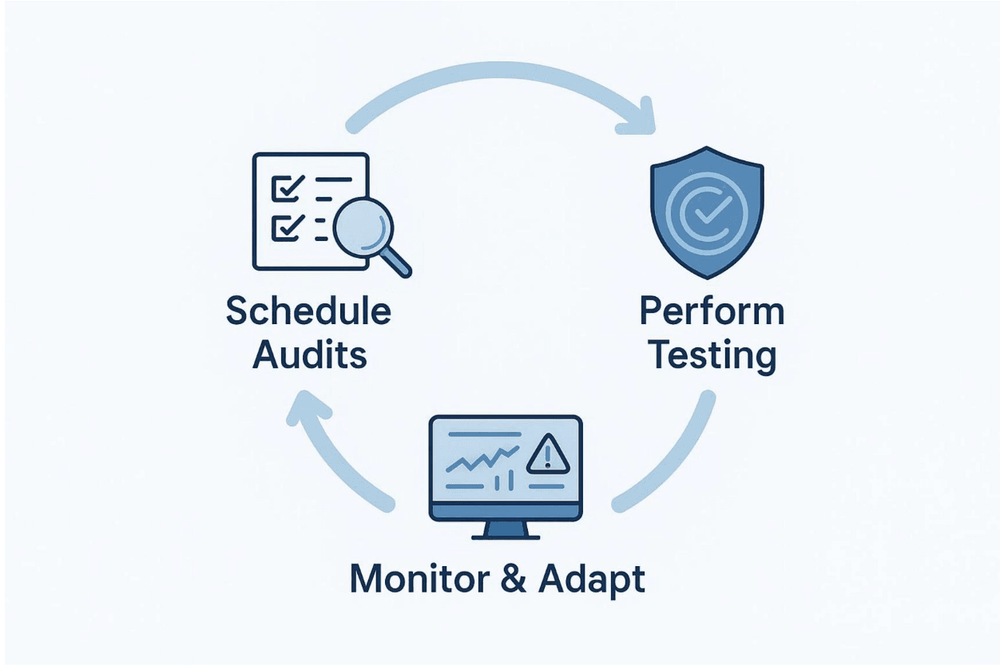
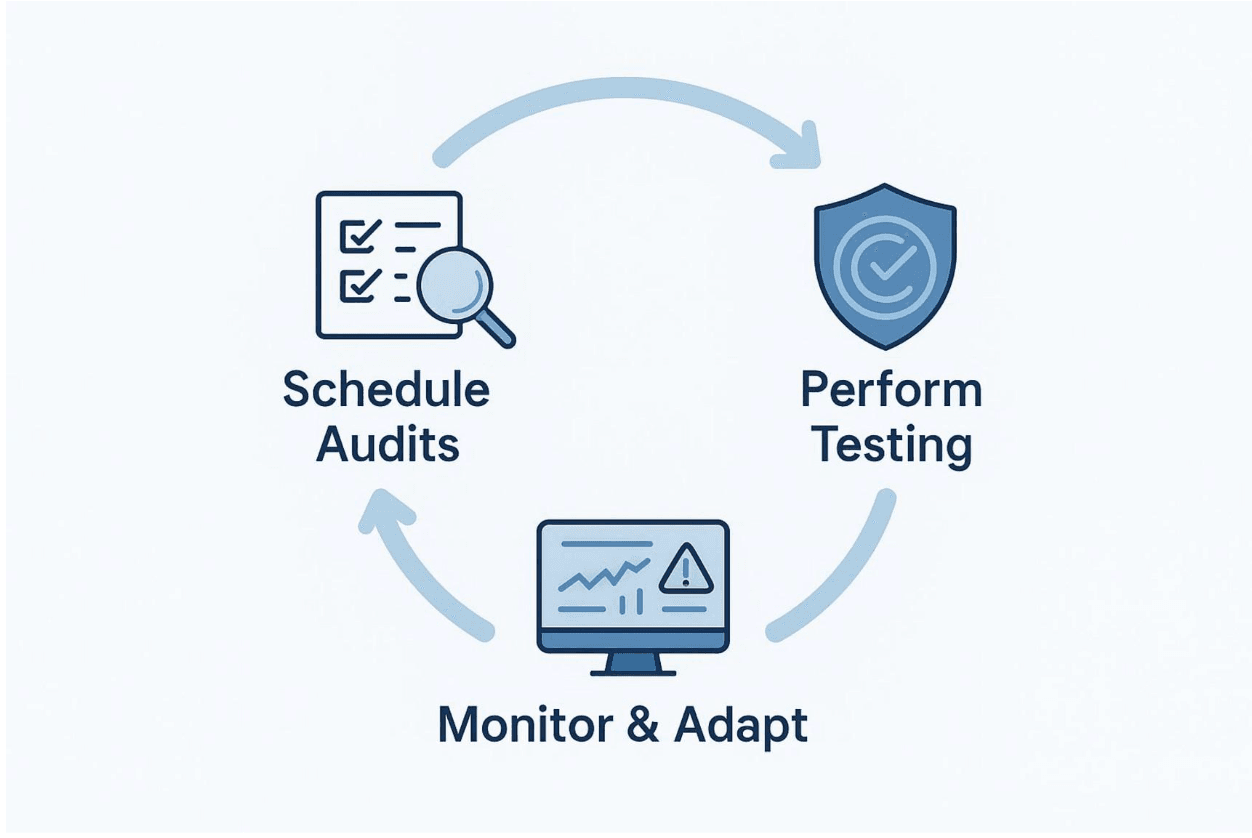
Cloud security changes as technology changes and attackers adjust. A fixed security setup becomes outdated fast. To stay protected, you need an ongoing loop of review, updates, and improvement.
Schedule Regular Security Audits
Security audits are a core part of a proactive plan. They give you a clear view of risk and help you plan long-term fixes. Many teams do a yearly baseline audit, but you may need more frequent reviews in some cases. After major infrastructure changes (like moving to a new service or adding a new vendor), run another review. High-risk systems and sensitive data also need more frequent checks.
An audit should define scope, list assets, set a baseline (for example, using the Cloud Controls Matrix), compare current controls to that baseline, and test where needed. The goal is to understand your setup, find gaps, and create a realistic plan to reduce risk over time.
Perform Vulnerability Scans and Penetration Testing
Audits are not enough by themselves. You also need active testing. Scan cloud workloads-VMs, containers, and serverless functions-for vulnerabilities and misconfigurations on an ongoing basis. Because there are so many possible issues, use risk-based priority: focus on weaknesses that attackers can actually reach and use in your environment.
Reachability analysis can help cut false alarms and highlight real threats. Add SAST and DAST tools into CI pipelines to catch issues early. Run penetration tests regularly to see how apps react to real attack methods. These tests can find problems that config scanners miss and can be mapped to standards like MITRE ATT&CK.
Keep Up with Evolving Threats and Cloud Provider Updates
Cloud providers release new features and updates often. Attackers also find new weaknesses and new ways to exploit them. Stay current by following CVE feeds checked by security researchers and tracking supply chain risks. Automate patching and connect it with DevSecOps workflows. Rebuild container images weekly using patched base images. Keep managed services on supported versions (databases, runtimes, gateways).
Also follow your provider’s security guidance, like the Google Cloud recommended security checklist published in March 2026, which lists controls that help build safer cloud setups. Replacing older security tools with cloud-native ones-such as a unified Cloud-Native Application Protection Platform (CNAPP)-is often the next step for a stronger program.
Action Steps: What You Should Do Today to Secure Cloud Storage
This can feel like a lot, but small steps add up. You do not need to fix everything at once. Below are fast actions you can take now, plus steps for building long-term security.
Quick Wins for Immediate Risk Reduction
These steps are fast to apply and close common gaps that attackers often use:
- Enable Multi-Factor Authentication (MFA) Everywhere: Require MFA for all users, especially admins. If possible, use phishing-resistant options like hardware tokens. This helps reduce credential-based attacks, which cause nearly half of compromises.
- Review and Restrict Public Access: Check storage buckets (AWS S3, Azure Blob Storage) and other resources for public access. Turn off public access unless it is truly needed.
- Implement Basic Backup Automation: Create automated daily backups for your most important data. Confirm backups are encrypted.
- Audit and Remove Unused Accounts/Resources: Disable inactive users, remove unused API keys, and delete old resources that are no longer used.
- Enforce Strong Password Policies: Use long passwords, block reuse, and apply rotation rules for service accounts along with MFA.
Next Steps for Long-Term Security Posture
After you handle the most urgent issues, work on long-term controls that keep security stable over time:
- Implement the Principle of Least Privilege (PoLP): Review and reduce permissions across all human and service identities. Start from “deny all” and add only needed actions.
- Centralize Logging and Monitoring: Collect logs into a SIEM or data lake and set up alerts for suspicious behavior so you can detect issues early.
- Establish Secure Configuration Baselines with IaC: Use IaC templates with secure defaults and add policy checks in CI/CD so unsafe settings do not reach production.
- Develop and Test an Incident Response Plan: Define roles, communication steps, and actions for different incident types, and practice with tabletop exercises.
- Classify and Encrypt All Sensitive Data: Label sensitive data and encrypt it at rest and in transit. Use a KMS to manage keys safely.
- Regularly Assess and Audit: Run audits, vulnerability scans, and penetration tests on a schedule, and fix issues based on risk.
If you take these actions now and keep building over time, you can greatly improve cloud storage security and protect your data against ongoing threats.
Frequently Asked Questions about Cloud Storage Security
As more people and companies rely on cloud storage, the same security questions come up often. Clear answers help make cloud security easier to understand and apply.
What Are the First Steps to Take After a Cloud Storage Breach?
A cloud storage breach needs fast, coordinated action. Start by activating your incident response plan so everyone follows the same roles and communication path. Then focus on containment to stop more damage and data theft. That may mean isolating systems, revoking suspicious credentials, or turning off public access to affected resources. Next, find the root cause.
A cloud security review can help identify whether it was a misconfiguration, weak login controls, or missing patches. Keep evidence like logs, audit trails, and system images for investigation. This is needed to understand what happened, meet legal or compliance duties, and prevent repeat incidents. A blameless postmortem helps teams learn and improve rather than hide mistakes.
Should Small Businesses Use the Same Security Checklist as Enterprises?
The main security ideas are the same for everyone, but small businesses should adjust the scope to match their size and budget. For example, Google Cloud’s recommended security checklist breaks guidance into Basic, Intermediate, and Advanced levels, which makes it easier to scale.
Small businesses should start with high-value basics like MFA, least privilege, encryption, and backups. Begin with a focused review of IAM and key risks, and expand controls as the business grows. The goal is steady improvement without getting overwhelmed by large-enterprise requirements.
How Often Should You Review Cloud Security Settings?
Cloud systems change often, and new threats appear regularly, so security settings need regular review. Many teams do a full cloud security review once a year, but you should review more often in these cases:
- After Major Changes: If you move to a new service, add a new vendor, deploy a new app, or change architecture, review security again.
- For Extra Risky Assets: High-impact systems and sensitive datasets (PII, financial data) should be reviewed more often-quarterly or even monthly based on risk.
- When the Threat Landscape Shifts: If a major exploit appears or your industry sees a spike in certain attacks, review and adjust your controls quickly.
- Continuous Monitoring: Between formal reviews, use automated monitoring to detect drift, odd activity, and policy violations.
Keeping a strong cloud security posture requires ongoing attention and updates over time, not a one-time setup.