Fake Brand Accounts on Instagram and TikTok: How to Find Them, Report Them and Warn Your Followers
Spybroski Team
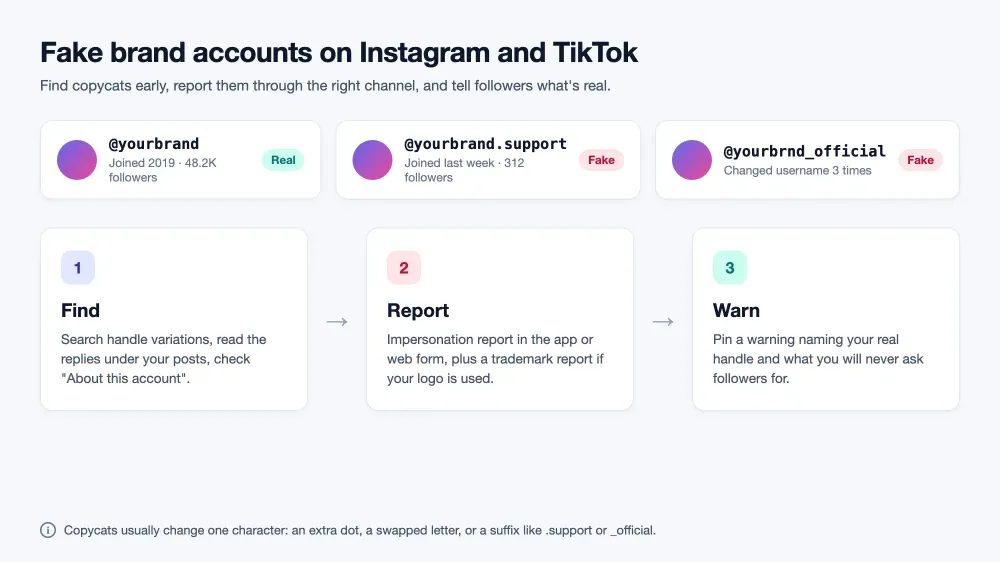
A fake brand account usually shows up the same way: a follower messages you asking why "your" account asked them to pay a shipping fee, or confirm their card details to claim a prize, or log in through a link to fix a "copyright problem." By then the copycat has your logo, your bio, a handful of your posts, and a username one character away from yours.
You can't stop people from creating fake accounts. You can find them faster, get them removed through the right channel, and make sure your followers know what the real account will and won't ask them to do. This guide covers all three for Instagram and TikTok, with the exact reporting routes for brands, creators and the people who manage their accounts.
Quick answer: To report a fake Instagram account, open the profile, tap the three dots, choose Report, then pick the option for an account pretending to be someone and select Me or A business or organization. If you don't have an Instagram account, or you represent the brand, use Instagram's impersonation report form. On TikTok, report the profile in the app and choose the impersonation reason, then follow up with TikTok's impersonation report page. If the fake uses your registered logo or brand name, file a trademark report as well.
What a Fake Brand Account Looks Like
Most impersonation accounts fall into four types. Knowing which one you're dealing with tells you where to look and how fast to act.
The clone. A copy of your main profile with a slightly changed handle: an extra underscore, a swapped letter (rn for m), or a suffix like .official, .support or _shop. It reposts your recent content so it looks active, then sends DMs to your followers.
The fake support account. It never posts much. It waits in the comments under your posts, especially complaints, and replies with "Sorry for the trouble, please DM us your order number." The goal is to move your customer into a private chat where it can ask for payment or login details.
The fake giveaway or collab account. It tells commenters they've "won" and need to pay a small fee or verify their account through a link. Aimed at creators, it pitches a brand deal that requires signing in to a fake "partner portal."
The fake shop. It uses your product photos to sell items that never arrive, or cheap copies. These often run paid ads, so they can reach people who have never seen your real profile.
Why These Scams Work So Well
They use trust you already built. A follower who knows your brand doesn't question a message that looks like it came from you, and a stressed customer who just posted a complaint is happy to hear back from "support" quickly.
The losses add up. According to the FTC's April 2026 Data Spotlight, people reported losing $2.1 billion in 2025 to scams that started on social media, and nearly 30% of people who lost money to any scam said it began on a social platform. Shopping scams were the most frequently reported type. Those figures come from voluntary reports, so the real totals are higher.
For your brand, the cost isn't only what followers lose. People who get scammed by "you" often blame you, leave angry comments, and stop buying.
How to Find Fake Accounts Impersonating Your Brand
Set aside 15 minutes a week for this. Impersonators come back, and a fake account found on day one has reached far fewer people than one found after a month.
Search for handle variations
Search Instagram and TikTok for your brand name plus the usual additions: official, support, help, team, shop, store, giveaway, and your name with dots, underscores or doubled letters. Also search your founder's or lead creator's name. Executives and faces of the brand get impersonated as often as the brand account.
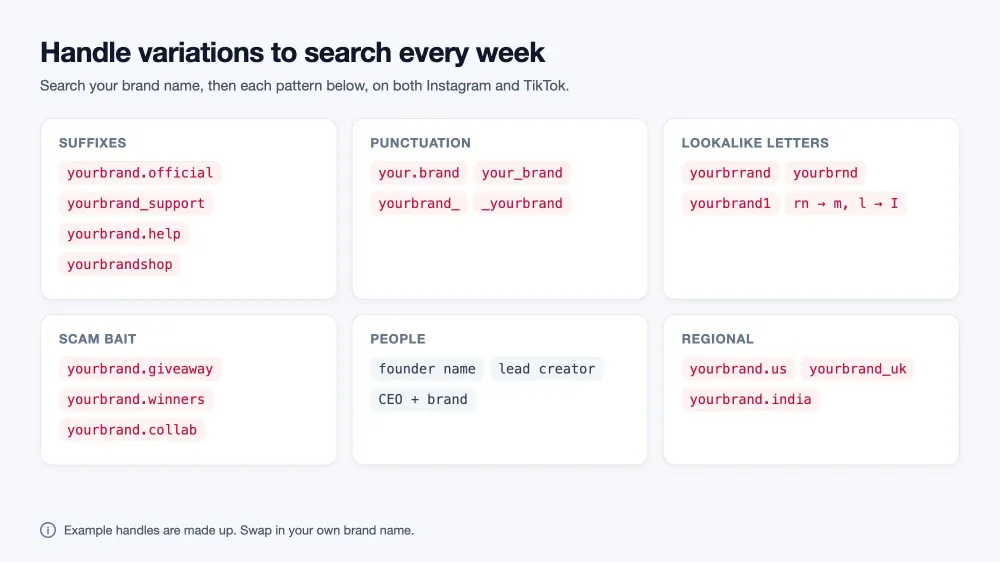
Check the comments under your own posts
Fake support and giveaway accounts work in your comment section, often in replies that are easy to miss. Read the replies under your most popular posts and under any complaint. If you manage a big account, a tool like Spybroski's Instagram comment viewer or TikTok comment viewer lets you scan a post's full comment list in one place and search it for words like "DM," "winner" or "support."
Look at a suspect profile without engaging
Don't follow, like or message a suspected fake. Interacting with it can make it look more legitimate to the people it targets, and it tells the operator you've noticed. To check a public profile's posts, bio and links without logging in, you can use an anonymous Instagram profile viewer or TikTok profile viewer, and take screenshots for your report.
On Instagram, open the profile's menu and tap About this account. It shows when the account joined, the country it's based in and how many times it has changed its username. A "brand" account that joined last week, is based in a country where you don't operate and has changed its name three times is not yours.
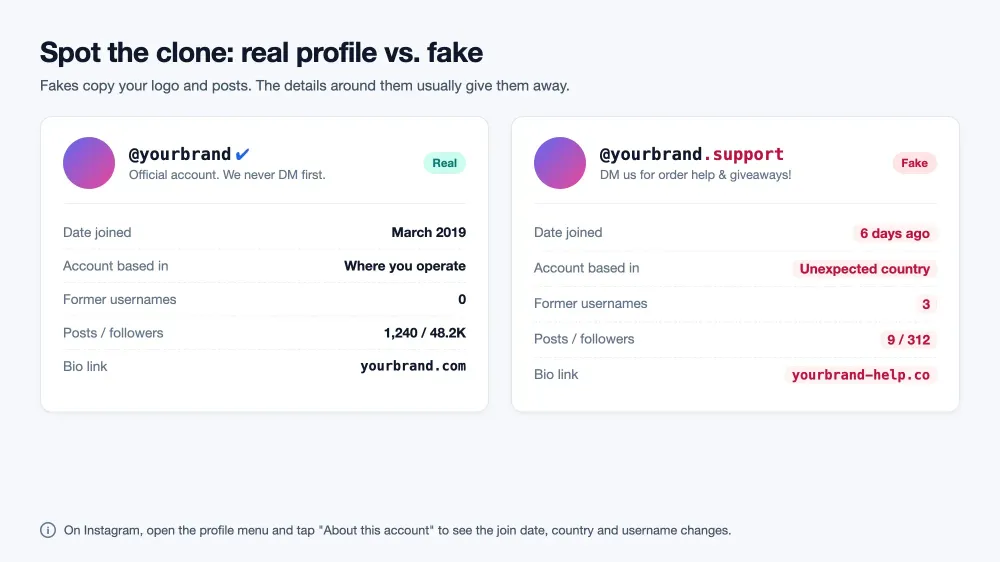
Ask your followers to tell you
Your audience sees DMs you never will. Add a line to your bio or a pinned post such as "We never DM first. Got a message from us? Report it and tell us." Every tip becomes a lead.
How to Report a Fake Instagram Account
Instagram has three routes. Use the one that matches who you are and what the fake is copying.
1. In-app report (fastest, needs an account). Open the fake profile, tap the three dots in the top corner, tap Report, then choose the option for an account pretending to be someone else. Instagram then asks who is being impersonated: you, someone you know, a celebrity or public figure, or a business or organization. The wording changes between app versions, but the impersonation option is always under the account report, not the post report. Report the account itself. Reporting single posts as spam rarely removes an impersonator.
2. The impersonation form (for brands, representatives and people without an account). Instagram's impersonation report form lets you report an account pretending to be you or someone you represent. Instagram may ask for ID to confirm who you are. If you represent a business, have your business documents ready and fill it in from a computer, where uploads are less likely to fail.
3. Trademark report (when your logo or brand name is used). An impersonation report asks whether the account is pretending to be you. A trademark report asks whether it's using your registered mark. If the fake uses your logo, product photos or brand name to sell something, file through Meta's trademark report form too. Registered trademark owners dealing with repeat impersonation can also apply for Meta's Brand Rights Protection tool, which lets you search for and report infringing accounts and ads in bulk.
A few habits make reports more successful:
- Report each fake account separately and include the exact username and profile link.
- Keep dated screenshots of the profile, the About this account screen and any scam messages followers sent you.
- Ask a few trusted followers who received scam DMs to report the account too.
- If an account comes back under a new handle after removal, report it again and mention the earlier removal.
How to Report a Fake TikTok Account
TikTok works in a similar way, with an in-app report, a web form and a separate route for trademarks.
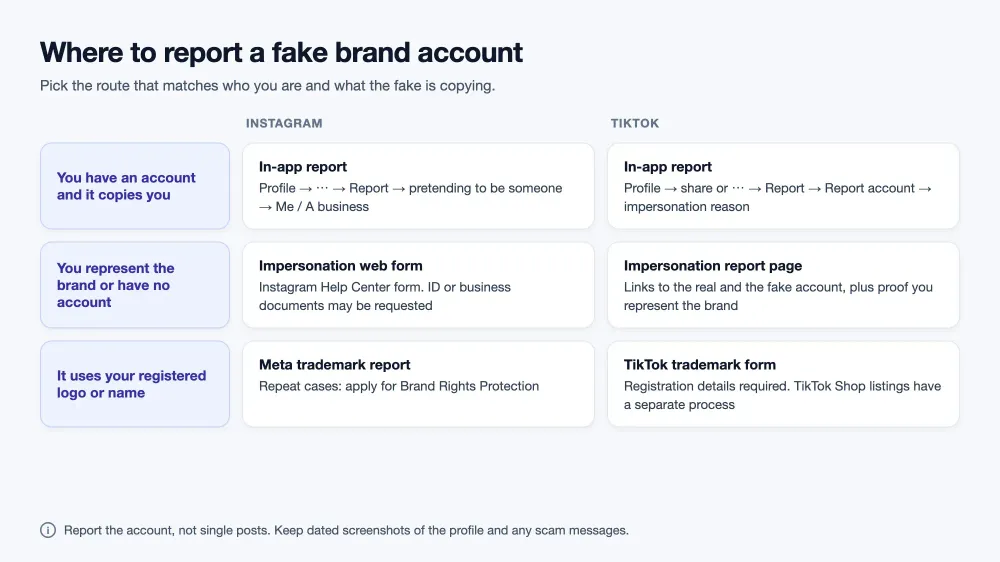
In-app report. Go to the fake profile, tap the share arrow or the three dots, tap Report, then choose to report the account and pick the reason about pretending to be someone. Say whether it's impersonating you or a business you represent.
Impersonation web report. For brands and representatives, TikTok's impersonation report page explains the current process. You'll need links to both your real account and the fake one, plus proof that you own or represent the brand. Third-party guides note that the US form can accept several profile links in one report, which helps when you're dealing with a batch of clones.
Trademark report. If the fake uses your registered brand name or logo, file through TikTok's trademark report form with your registration details. Counterfeit product listings in TikTok Shop have their own reporting process, so don't use the account form for those.
Catching Impersonation Early When You're Bigger
Manual searches work for a creator or a small shop. They stop working when you run several brands, operate in many countries or have executives with public profiles. Impersonators also rarely stay on one platform. The same group that sets up a fake Instagram support account usually registers a lookalike domain for the phishing page it links to, and may already be using leaked employee logins.
At that point, impersonation stops being only a social media task and becomes a security one. Exposure management services such as Check Point's threat intelligence watch for fake social profiles, lookalike domains and leaked credentials tied to your brand, and can request takedowns for you. The benefit for a social team is timing: you hear about a clone or a phishing page when it goes live, not when the first angry customer comments under your post.
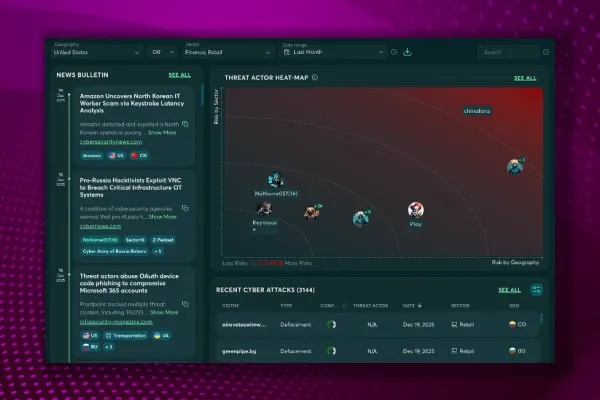 Check Point's threat intelligence view combines threat news, threat actor context and recent attacks. Image: Check Point.
Whatever you use, agree in advance on who owns the response. A sensible split:
- The social team watches comments, gathers follower reports and posts warnings.
- Security or IT handles phishing domains, leaked logins and takedowns beyond the platforms.
- Legal owns trademark reports and repeat offenders.
For a wider look at listening tools that can also flag brand mentions from unknown accounts, see our guide to the best social media monitoring tools.
How to Warn Your Followers Without Promoting the Fake
Warning your audience is the step most brands skip, and it's what protects the people who already got a DM. The goal is to tell them what's real without sending traffic to the fake.
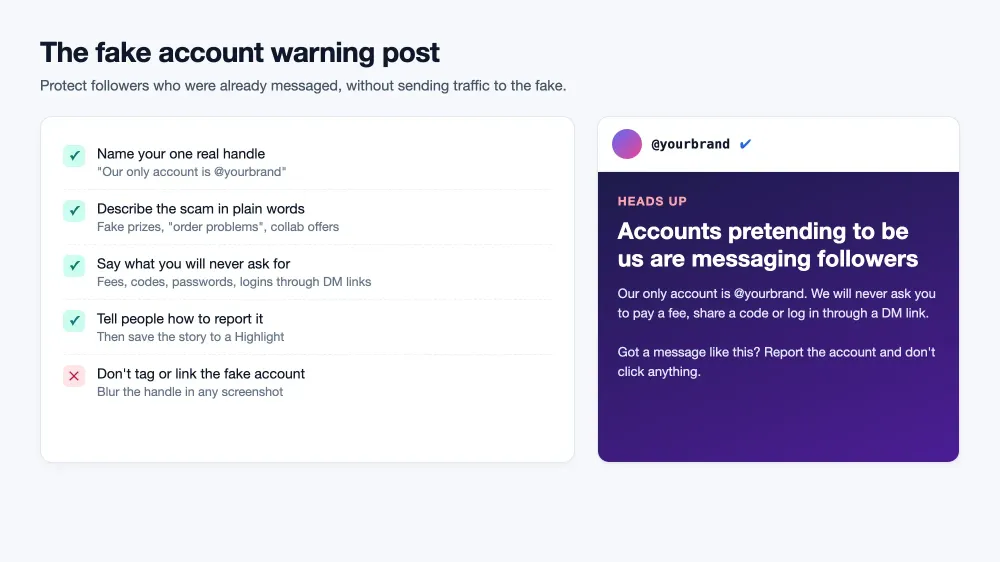
Post a story and a pinned post. Keep it short and specific. For example:
Heads up: accounts pretending to be us are messaging followers about "prizes" and "order problems." Our only account is @yourbrand. We will never ask you to pay a fee, share a code or log in through a DM link. If you get a message like this, please report the account and don't click anything.
Don't tag or link the fake account. Tagging it sends people to it and can boost it in search. Describe the scam instead, and if you must show it, use a cropped screenshot with the handle blurred.
Save the warning to a Highlight. New followers will see it on your profile long after the story expires.
Reply to people who were targeted. If someone comments that they got a scam DM, reply publicly to confirm it wasn't you and that you've reported the account. Other followers read those replies.
Repeat the warning when it happens again. Fake accounts come back in waves, often after a giveaway, a product launch or a viral post. Repost the warning each time.
Make Your Real Account Harder to Copy
You can't make impersonation impossible, but you can make the real account easy to recognise and the fake one easy to spot.
- Get verified where you can. A verified badge doesn't stop copies, but it gives followers a quick check. Meta Verified for businesses also includes impersonation protection.
- Use the same handle everywhere. If you're
@yourbrandon Instagram, be@yourbrandon TikTok, Threads and YouTube. Claim your handle on platforms you don't use yet, so nobody else can. - Put your rules in your bio. "Official account. We never DM first." is enough.
- Link only to your own domain. Followers learn that the real you only sends them to one site.
- Secure the accounts you have. Turn on two-factor authentication with an authenticator app, limit who has login access, and remove ex-employees and old agencies. An impersonator is a nuisance. A hacked real account is a much bigger problem.
- Remember how platforms contact you. Instagram doesn't ask for your password in a DM. You can check whether an email really came from Instagram in the Emails from Instagram section of your settings.
If Followers Already Lost Money
Tell them to report the account in the app and contact their bank or card issuer straight away. In the US, they can also report the scam to the FTC at ReportFraud.ftc.gov. Keep a short internal log of each case: date, fake username, what was asked for and how much was lost. If the same operation keeps targeting your customers, that log is what your legal team, your security provider or the platform will want to see.
Frequently Asked Questions
How long does Instagram take to remove a fake account?
There's no fixed time. Clear impersonation cases with good evidence are often handled within a few days, but some take longer or need a second report. Using the official impersonation form with proof that you own or represent the brand usually gets a more reliable result than many in-app spam reports.
Can I report a fake Instagram account without having an Instagram account?
Yes. Instagram's impersonation form is open to people without an account. You'll need to describe the account and may be asked for ID.
Is a fan account the same as a fake account?
No. Fan accounts that clearly say they're unofficial are usually allowed. An account becomes impersonation when it pretends to be you or your brand, for example by claiming to be the official account or messaging people as if it were you.
Should I message the fake account and ask them to stop?
No. It rarely works, it confirms you're watching, and it gives the operator a chance to change handles before the platform acts. Report it, collect evidence and warn your followers instead.