How to Reset Your Instagram Algorithm and Other Feeds (2026)
Spybroski Team
You watched three videos about sourdough in March. Now it's November and Instagram still thinks bread is your whole personality. About 8,100 people a month in the US search Google for "how to reset Instagram algorithm," according to keyword data we pulled from OpenSEO in November 2026. That makes Instagram the most-searched feed to reset by a wide margin.
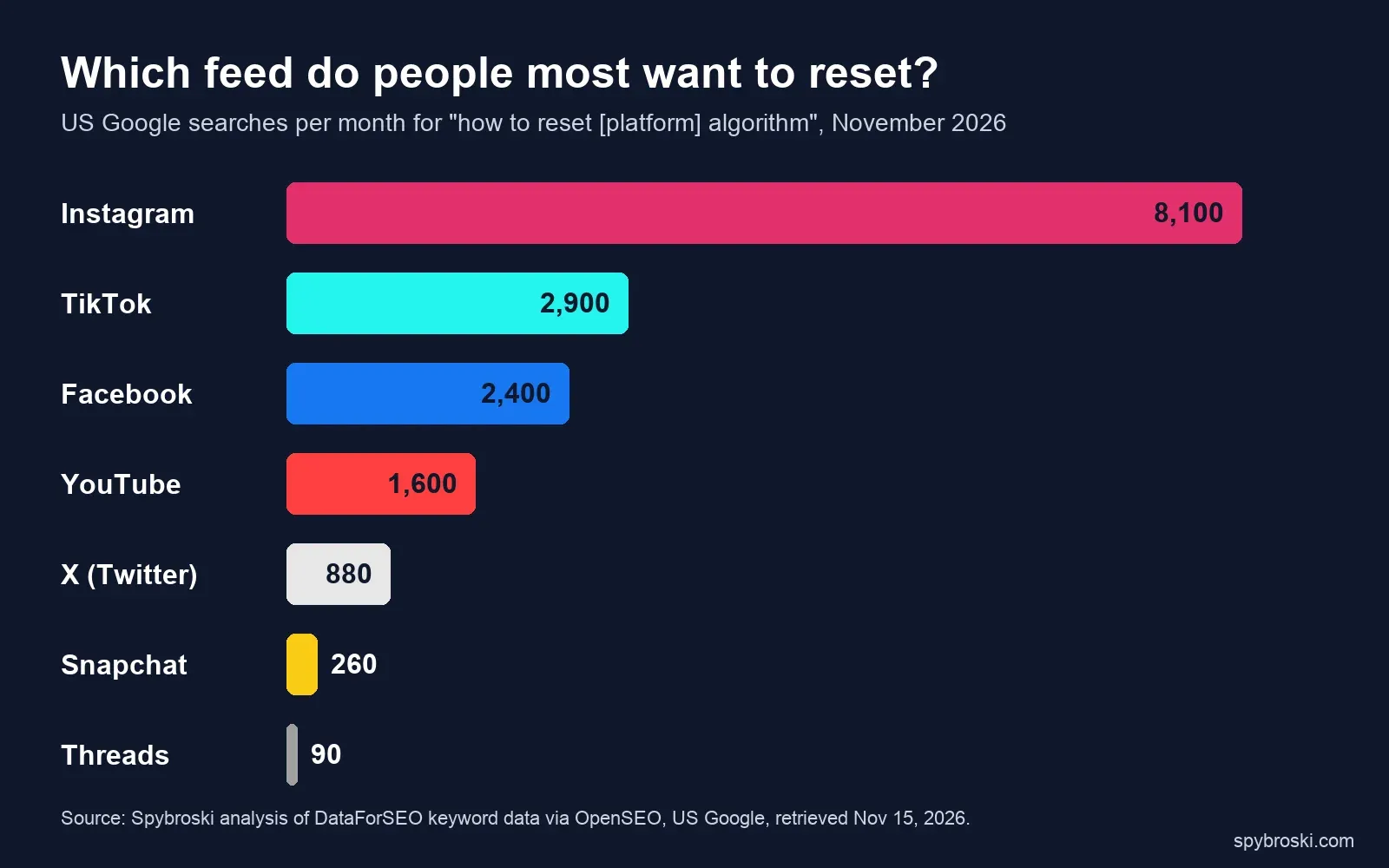 Source: OpenSEO (DataForSEO data), US monthly Google searches, November 2026.
You don't need a new account to fix it. Instagram now gives you two separate tools: a one-time wipe called Reset suggested content, and an ongoing control called Your Algorithm. This guide covers both, then walks through TikTok, YouTube, Facebook, Snapchat, Threads and X, with each menu path checked against the platform's own help pages and announcements in November 2026.
Key Takeaways
- On Instagram, go to Settings and activity, then Content preferences, then Reset suggested content. It clears recommendations in Explore, Reels and Feed, keeps your follows, and can't be undone.
- Your Algorithm is the newer Instagram tool. It shows the topics Instagram thinks you like and lets you turn them up or down. Since June 10, 2026 it covers Feed, Reels and Explore.
- TikTok and Snapchat have a real reset button. YouTube resets when you delete watch and search history. Facebook has no full reset, only topic controls.
- A reset only clears old signals. What you watch, save and skip right after it shapes the new feed. There's no official timeline, so we suggest a 7-day plan.
- Resetting your feed doesn't touch ads, your followers or how your own posts reach people.
How to reset your Instagram algorithm, step by step
Instagram's official reset clears the content it recommends to you across Explore, Reels and Feed, so suggestions start over based on what you do next. Meta launched it on November 19, 2024 and said it's open to "everyone on Instagram – including teens" (Meta Newsroom).
Here's how to reset your Instagram feed in the app:
- Open Instagram and tap your profile picture at the bottom right.
- Tap the three lines (menu) at the top right to open Settings and activity.
- Scroll to the "What you see" section and tap Content preferences.
- Tap Reset suggested content.
- Instagram shows you the accounts you follow. Unfollow any you've outgrown, or skip this step.
- Tap Reset to confirm.
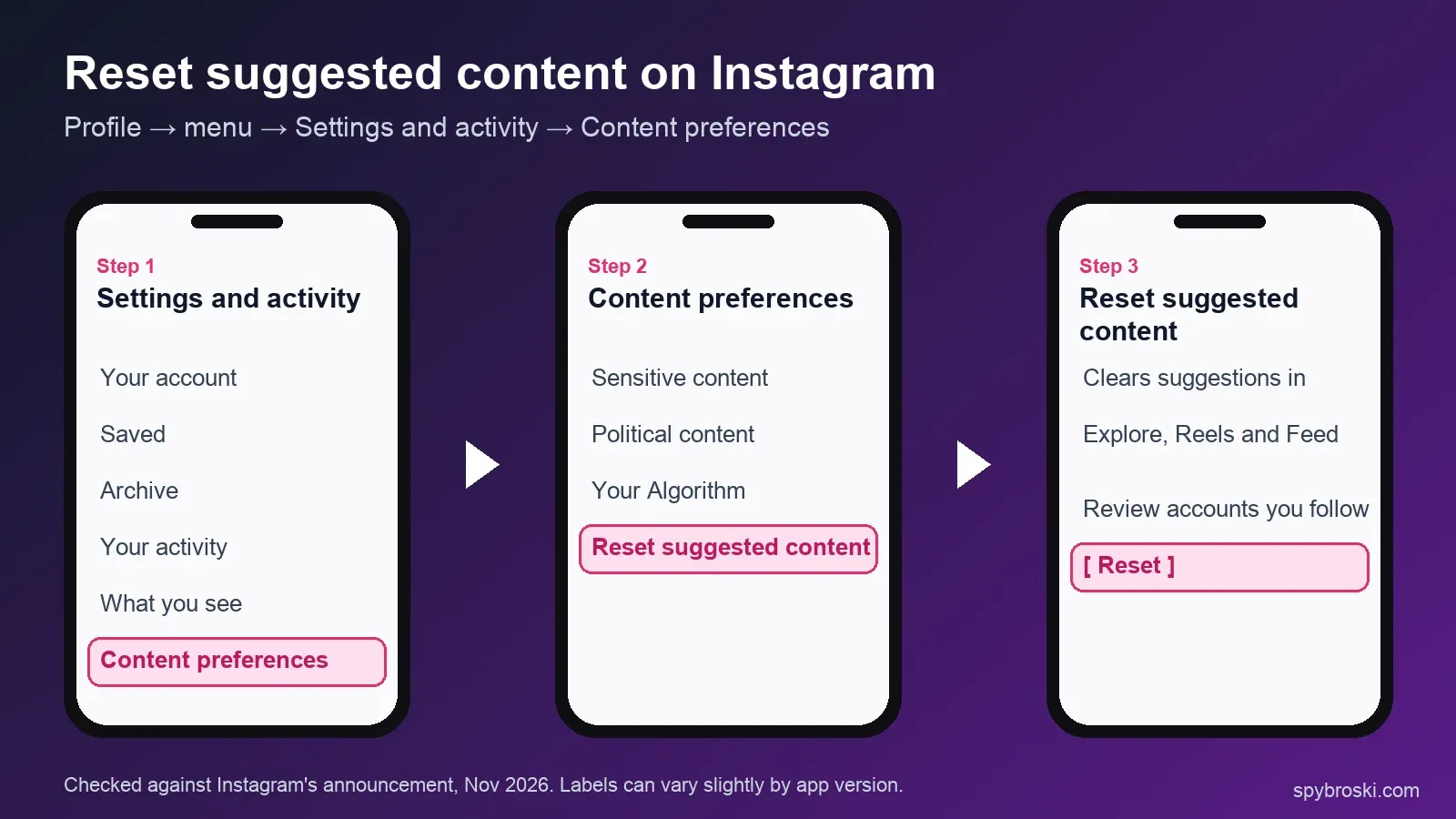
What changes: suggested posts and Reels from accounts you don't follow start fresh. Instagram's own announcement says the reset lets you "clear your recommended content across Explore, Reels and Feed" (Instagram).
What stays: your follows, saved posts, DMs, close friends and posts. You won't lose followers either. The reset is about what you see, not who sees you.
What to know before you tap it: the reset can't be undone, so check your settings in the mobile app first. Expect suggestions to feel generic for a few days while the app learns from you again.
Reset vs. Your Algorithm: the two Instagram tools people mix up
Reset suggested content is a clean slate. Your Algorithm is a steering wheel. You'll get the best result by using the reset once, then using Your Algorithm to keep the feed on track.
Your Algorithm launched in the US on the Reels tab on December 10, 2025 (TechCrunch). Instagram expanded it to Explore and made it available "globally in English" on April 15, 2026. On June 10, 2026 Instagram wrote that "Your Algorithm is now live across all of Instagram, including Feed, Reels, and Explore" (Instagram).
To open it, go to Reels or Explore and tap the small icon in the top right corner (two lines with hearts). You can also find it under Settings and activity, then Content preferences. Inside, you'll see:
- A short summary of what Instagram thinks you're into right now.
- A list of topics you can set to see more or less of.
- A box to type your own topic, like "trail running" or "UX design," and add it.
| Reset suggested content | Your Algorithm | |
|---|---|---|
| What it does | Wipes your recommendation history | Shows and edits your interest topics |
| Undo | Not possible | Change topics any time |
| Best for | A feed that's completely off | A feed that's mostly fine but drifting |
| Where | Settings and activity → Content preferences | Icon at top right of Reels or Explore |
If your feed is 80% fine and one topic has taken over, skip the reset. Turn that topic down in Your Algorithm and tap "Not interested" on a few posts instead. You'll keep everything Instagram already got right.
Other Instagram settings that shape your feed
These won't reset anything, but they keep a fresh feed clean:
- Not interested: tap the three dots on any suggested post or Reel. It tells Instagram to show fewer posts like that one.
- Sensitive content control: under Content preferences. Choose Less to see fewer borderline posts. Teens are set to Less by default and can't choose More.
- Hidden words: hides suggested posts that use words, phrases or emojis you pick.
- Following and Favorites feeds: tap the Instagram logo at the top of your home feed to switch to a feed of only accounts you follow, in time order.
How to reset your TikTok algorithm (For You feed)
TikTok has had a real reset since March 2023. It's called Refresh your For You feed, and afterwards your For You page shows content as if you'd just signed up.
- Go to your Profile and tap the menu (three lines) at the top right.
- Tap Settings and privacy, then Content preferences.
- Tap Refresh your For You feed and follow the prompts to confirm.
Only the For You feed changes. Your Following feed, profile, inbox and ads stay the same, and the refresh can't be undone (TikTok Support).
TikTok also has finer controls:
- Manage topics: in June 2025 TikTok added sliders for more than 10 popular topics. They change how often a topic shows up rather than removing it. TikTok also said it would double the keyword filter limit to 200 words (TikTok Newsroom).
- AI-generated content slider: since November 2025, Manage topics includes a slider for how much AI-made content you see. It turns AI videos down but can't remove them completely (TechCrunch).
A note for US users: the TikTok USDS Joint Venture was set up on January 22, 2026. It said it would "retrain, test, and update the content recommendation algorithm on U.S. user data," hosted in Oracle's US cloud (Silver Lake). If your For You page has felt different this year, that may be part of it, though TikTok hasn't said when the retraining is finished. The refresh button works the same either way.
If you just want to check one creator's videos without teaching your FYP anything, you can browse their public profile logged out. Our anonymous TikTok story viewer does that without touching your account.
How to reset your YouTube algorithm
YouTube has no single reset button. You reset it by deleting the history it learns from. YouTube's help center says you can "start fresh by deleting your watch and search history" (YouTube Help).
- Go to myactivity.google.com (or open You → Settings → Manage all history in the app).
- Delete your YouTube watch history and search history. Choose "All time" for a full reset.
- Then clear your old feedback: in My Activity, open Other Google activity, find YouTube "Not interested" feedback, and delete it. This step is separate from deleting history.
Careful with pausing history. If you turn watch history off, YouTube removes recommendations from your home page entirely (YouTube Help). Some people like that quiet home page. If you want good recommendations, delete history but leave it on.
New in 2026: Custom Feeds. YouTube announced custom home feeds at Made on YouTube on September 23, 2026 (YouTube Blog). You type what you want to see and YouTube builds a feed from that prompt. Right now it's US and English only, needs watch history on, and allows 3 feeds (8 with Premium). Prompts expire after 30 days of inactivity (YouTube Help).
How to reset your Facebook algorithm
Facebook doesn't have a full reset button, and we couldn't find any official one in November 2026. What it does have is a new topic tool, Your algorithm.
Your algorithm came to Facebook Feed and Reels on October 13, 2026. Meta calls it "a dedicated space to tell us exactly what you're into." You describe topics in your own words, and recommendations update in real time (Meta Newsroom). You open it from the three-dot menu on any post. Meta says it's rolling out, so you may not have it yet.
Until you do, use these:
- Show more / Show less on posts in your feed (three-dot menu). Meta added these in 2022 to raise or lower similar posts (Meta Newsroom).
- Hide post and Snooze for accounts or Pages you're tired of.
- Feeds tab, which shows posts from friends, groups and Pages in time order, with no suggested posts.
Snapchat, Threads and X: the quick versions
How to reset your Snapchat algorithm
Snapchat has a Reset Suggested Content option in Settings that refreshes the Discover and Spotlight feeds. Snapchat says most personalization signals reset, but not all. You may still see creators you follow and content picked for your age group (Snapchat Support). You can also turn off personalization. Spotlight then recommends using only basics like your language, age and country (Snapchat Support). Separately, since July 2026 Spotlight no longer recommends fully AI-generated videos (TechCrunch).
Threads: Dear Algo instead of a reset
Threads has no reset, but it has Dear Algo, launched February 11, 2026. Write a public post that starts with "Dear Algo" and say what you want more or less of. It adjusts your feed for three days, and you can repost someone else's Dear Algo post to copy their request. It's available in the US, UK, Australia and New Zealand (Meta Newsroom).
How to reset your X (Twitter) algorithm
X has no reset button either. Since late November 2025, Grok ranks the posts in your Following feed, though you can still switch to a chronological view (Social Media Today). In April 2026 X added Custom Timelines: you pin up to 10 topics or lists, picked from more than 75 topics, to your home tab. At launch it was for Premium subscribers on iOS only (TechCrunch). To steer X without a reset button, mark "Not interested in this post" often, mute words and unfollow accounts that drag your For You feed off course.
Every reset tool, side by side
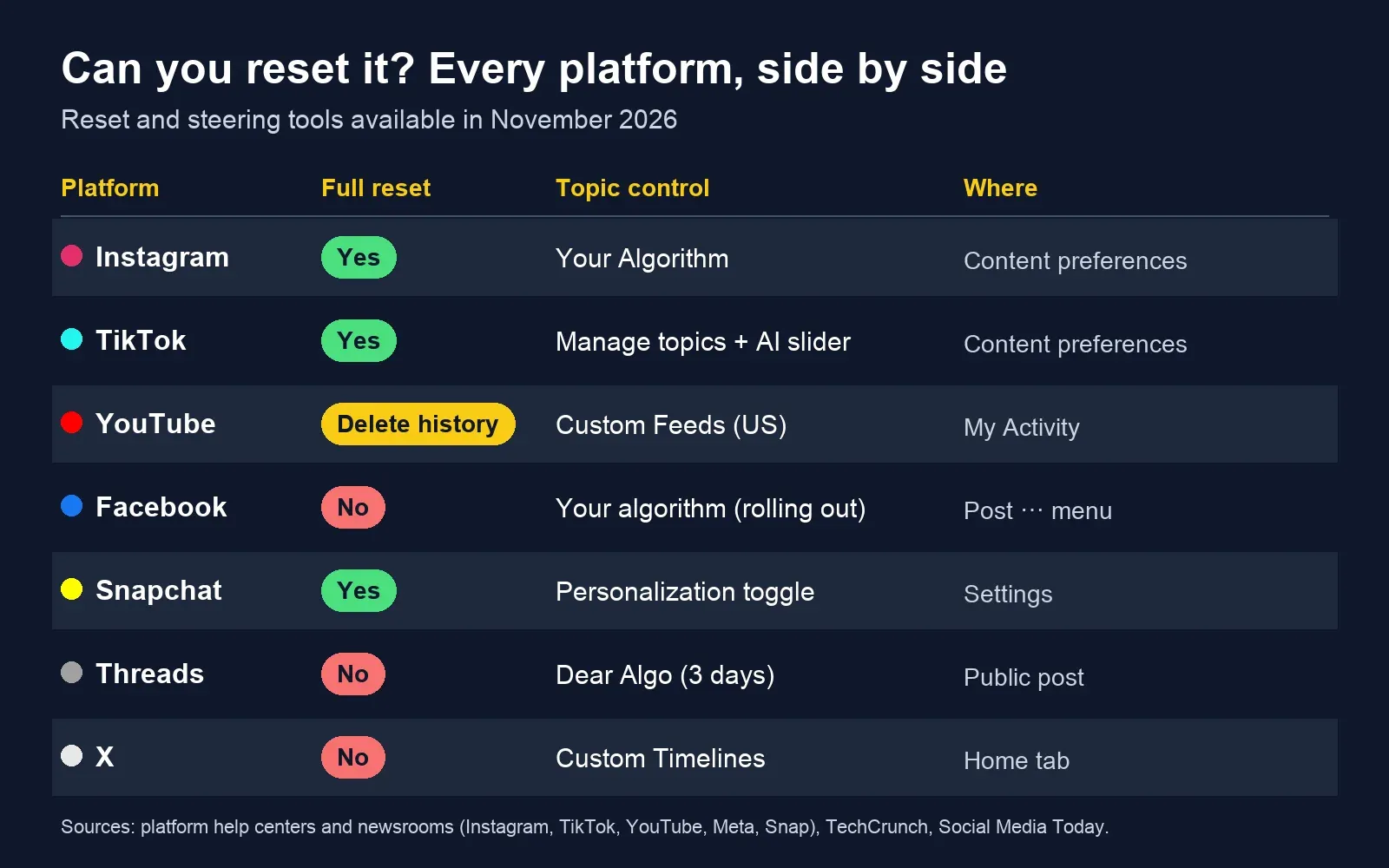
| Platform | Full reset? | Topic control | Where to find it |
|---|---|---|---|
| Yes: Reset suggested content | Your Algorithm (Feed, Reels, Explore) | Settings and activity → Content preferences | |
| TikTok | Yes: Refresh your For You feed | Manage topics, AI slider, keyword filters | Settings and privacy → Content preferences |
| YouTube | Delete watch and search history | Custom Feeds (US, English) | My Activity / You → Settings |
| No | Your algorithm (rolling out), Show more/less | Three-dot menu on a post | |
| Snapchat | Yes: Reset Suggested Content | Personalization on/off | Settings |
| Threads | No | Dear Algo (3 days) | Write a public "Dear Algo" post |
| X | No | Custom Timelines (Premium, iOS) | Home tab |
The 7-day plan to retrain any algorithm
A reset only clears old signals. The feed you get afterwards is built from what you do in the first week. Recommendation systems learn from what you watch to the end, save, share and skip, so give them clear signals early.
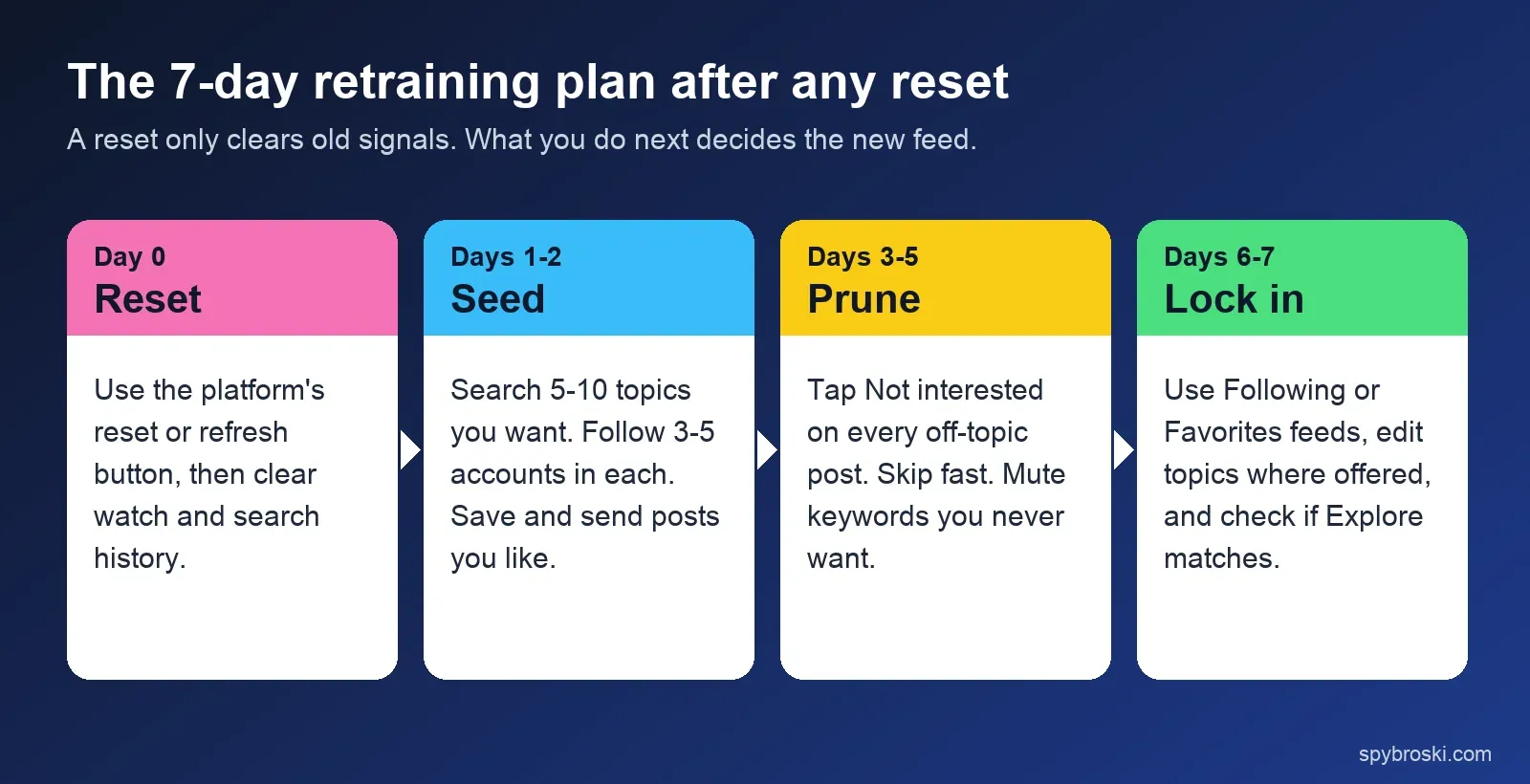
- Day 0, reset: use the platform's reset or refresh button, and clear watch and search history where the app keeps it.
- Days 1-2, seed: search 5-10 topics you actually want. Follow 3-5 good accounts in each. Save and send posts you like, because shares and saves are strong signals.
- Days 3-5, prune: tap "Not interested" on every off-topic post. Swipe past fast. Watching a bad video to the end adds watch time, one of the top signals Instagram has named, so swipe away instead.
- Days 6-7, lock in: set your topics in Your Algorithm or Manage topics, and use Following or Favorites feeds when you just want your people.
What a reset won't fix
A feed reset is narrower than most people expect. Three things stay the same:
- Ads. Ad targeting runs on separate settings. On Instagram and Facebook, manage it in Accounts Center under ad preferences.
- Who sees your posts. Resetting what you see doesn't change your reach, your followers or your profile.
- Snooping clicks after the reset. Every profile you open while logged in is a signal. If you need to check an account without feeding that visit back into your new feed, use a logged-out tool like our anonymous Instagram profile viewer or Instagram story viewer. And if you're curious how much "private" really protects on Instagram, we explain it in what private on Instagram actually means.
What feed resets mean for creators and marketers
Every reset button and topic control is a new way for people to filter brands out. Here's what changes on the business side.
The audience is choosing topics now, not just follows. Your Algorithm on Instagram and Facebook, Manage topics on TikTok and Custom Feeds on YouTube all sort content into topics. If your account posts about five unrelated things, it's harder to match to anyone's chosen topics. A clear niche is now a distribution advantage, not just a branding choice.
The signals that win are the ones Instagram has named. In January 2025, Instagram head Adam Mosseri said the three most important ranking signals are watch time, likes and sends. He told creators to track average watch time, likes per reach and sends per reach (Social Media Today). Because sends are one of the top signals, shareable posts are well placed to reach people who are rebuilding their feeds. For the creator side in more depth, see our breakdown of how the Instagram algorithm decides what gets seen.
The audience is still worth the effort. In the US, 84% of adults use YouTube, 71% Facebook, 50% Instagram and 37% TikTok (Pew Research Center, survey of 5,022 adults, Feb–Jun 2025), and 45% of shoppers in a 2025 Sprout Social survey said they look to social media for product ideas (Sprout Social).
Regulators are pushing feed control too. In the EU, the Digital Services Act requires the largest platforms to offer at least one recommendation option "not based on profiling" (Article 38, EUR-Lex). In New York, final rules for the SAFE for Kids Act bar algorithmic feeds for users under 18 without parental consent (New York Attorney General, July 2026). More users will see chronological or topic-picked feeds, which rewards accounts people choose to follow. If you're working on that side of things, our guide to how trends move from one network to another is a good next read.
Frequently Asked Questions
Does resetting the Instagram algorithm delete my followers or posts?
No. Reset suggested content only clears what Instagram recommends to you in Explore, Reels and Feed. Your followers, the accounts you follow, your posts, saved items and DMs all stay. Instagram does show you your following list during the reset so you can unfollow accounts if you want to.
Can I undo an Instagram or TikTok reset?
No. Both Instagram's Reset suggested content and TikTok's Refresh your For You feed are permanent. If you only want to change one topic, use Your Algorithm on Instagram or Manage topics on TikTok instead, since you can change those back any time.
How long does it take for a reset algorithm to learn my interests?
Most people see their feed take shape within a few days of normal use. There's no official timeline. The more clearly you signal in the first week (saving, sharing, skipping and tapping Not interested), the faster the new feed settles. Our 7-day plan above is built around that.
How do I reset my Instagram Explore page only?
There's no Explore-only reset. Reset suggested content clears Explore, Reels and Feed together. To change Explore alone, open Your Algorithm from the icon at the top right of Explore and turn topics up or down, or tap Not interested on posts you don't want.
Does looking at someone's profile change my algorithm?
It can, when you're logged in. Instagram ranks suggestions using your activity on the app, like what you watch, like, save and search. Browsing a public profile through a logged-out viewer, like the Spybroski profile viewer mentioned above, isn't tied to your account, so it doesn't add to that activity.
The bottom line
If your Instagram feed is completely off, use Reset suggested content once, then spend a week giving it clear signals. If it's only drifting, open Your Algorithm and adjust a few topics instead. On TikTok and Snapchat you have real reset buttons. On YouTube, delete your history and your old "Not interested" feedback. On Facebook, Threads and X, steer with the topic tools since there's nothing to wipe. Each reset takes a few taps. Retraining takes a week or so of normal use, which still beats starting a new account.