How to Use Proxy for Pinterest | Full Technical Guide

Spybroski Team
How to Use a Proxy for Pinterest
Pinterest serves over 500 million monthly active users and hosts more than five billion images indexed across its visual search engine. For data engineers, market analysts, and automation developers, that's an enormous pool of structured, publicly available information. The challenge is that Pinterest's infrastructure is tuned to detect and throttle non-human traffic patterns aggressively – more so than most comparable platforms.
If you're building a Pinterest scraper, running market research at scale, verifying ad placements, or monitoring keyword trends in visual search, sooner or later you will hit rate limits, connection resets, or session invalidation. This guide explains exactly why that happens and how to configure proxies that actually hold up under production workloads.
Why Pinterest's Infrastructure Is Harder to Work With Than It Looks
Most engineers assume Pinterest behaves like a standard REST API wrapped in a CDN. It doesn't. Pinterest uses a layered detection model that combines IP reputation scoring, request cadence analysis, TLS fingerprinting, and behavioral entropy checks. A single IP address exceeding a threshold of roughly 60–90 requests per minute on the same endpoint family will either receive throttled responses (429) or silently receive degraded data – partial JSON payloads that appear valid but are missing fields.
The platform also rotates its internal rate limit windows. Unlike Twitter/X's rigid 15-minute windows, Pinterest's limits are dynamic and depend on the API surface being hit. The pin feed, visual search, board metadata, and catalog endpoints all have independent throttle policies that aren't publicly documented.
This means the naive approach – one proxy, sequential requests, no session management – fails not because your proxy is banned, but because the traffic pattern itself is anomalous. A human user browsing Pinterest doesn't hit the same endpoint 90 times in a row. The proxy is only one layer of the solution; request spacing, session rotation, and header diversification are equally important.
Proxy Types and How They Perform on Pinterest
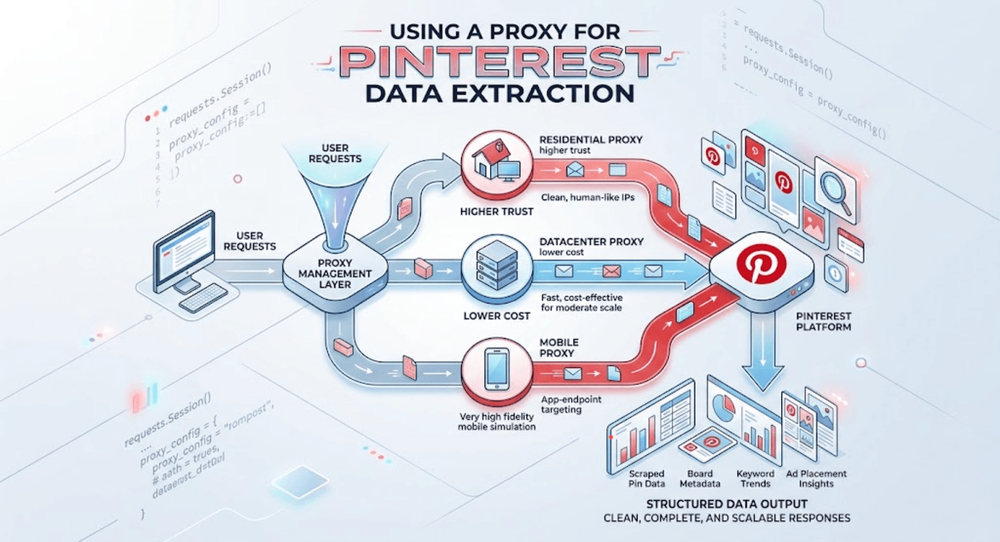
Not all proxy types deliver the same results on Pinterest. The platform's IP reputation layer is particularly sensitive to datacenter IP ranges, which are routinely pre-flagged based on ASN classification before a single request is made. This doesn't mean datacenter proxies are unusable – but it does mean the use case determines the right choice.
Residential proxies route traffic through IPs assigned to real consumer ISPs. Because these addresses appear in the same ASN ranges as ordinary Pinterest users, they carry substantially higher trust scores at the platform level. They're the right choice for scraping pin data, extracting board structures, or running competitive analysis where you need clean, complete responses at scale. The tradeoff is throughput: residential proxies are slower and more expensive per GB than datacenter alternatives.
Datacenter proxies – both dedicated and shared – are well-suited for tasks that don't require the highest trust tier. Ad verification requests, analytics endpoint polling at moderate cadence, and authenticated API calls using developer tokens are all workloads where a clean datacenter IP performs reliably. The cost-per-request advantage is significant, particularly for operations running tens of thousands of requests per session.
Mobile proxies, which route through 4G/5G carrier infrastructure, occupy the top tier for trust scoring but come at a premium. They're worth considering when you need to simulate mobile app behavior, specifically when targeting Pinterest's app-optimized endpoints that apply stricter behavioral filters than the desktop surface.
| Proxy Type | Trust Tier on Pinterest | Avg Latency | Best Use Case | Approx. Cost |
|---|---|---|---|---|
| Residential (static) | High | 180–400 ms | Pin scraping, board data, trend analysis | $3–8/IP/month |
| Residential (rotating) | High | 200–600 ms | Large-scale catalog crawling | $4–15/GB |
| Datacenter (dedicated) | Medium | 30–80 ms | Ad verification, authenticated API calls | $1.40–3.60/IP/month |
| Datacenter (shared) | Medium-Low | 40–120 ms | Low-volume testing, dev environments | $0.67–1.50/IP/month |
| Mobile (rotating) | Very High | 300–900 ms | App-endpoint targeting, high-fidelity simulation | $15–40/GB |
Proxys.io offers dedicated datacenter IPs starting at $1.40/month and residential options at the premium tier – useful for workloads where IP exclusivity matters.
Configuring Pinterest Proxies: What Actually Matters
The configuration layer is where most implementations break down. Engineers set a proxy, point their scraper at it, and assume the work is done. In practice, five configuration decisions determine whether your Pinterest operation runs reliably or degrades within an hour.
Authentication method. Pinterest's infrastructure observes TCP-level behavior, and proxies using IP whitelisting create a subtly different fingerprint than those using credential-based authentication (username:password). For most production deployments, credential auth offers better operational flexibility – you can rotate credentials without IP changes, which matters when you're managing multiple scraping workers.
Protocol selection. HTTPS proxies are mandatory for Pinterest. The platform doesn't serve HTTP content, and any proxy that downgrades your connection will cause TLS handshake failures before a request reaches the application layer. SOCKS5 proxies are also viable and offer the advantage of handling non-HTTP traffic cleanly, which matters if you're integrating Pinterest requests into a broader data pipeline that includes WebSocket or binary protocol components.
Session persistence vs. rotation. This is the most consequential decision. A rotating proxy that assigns a new IP on every request looks nothing like human behavior and will trigger Pinterest's entropy detection. For most scraping workflows, session-bound rotation – where the same IP is held for 15–45 minutes before rotating – produces significantly higher success rates. Proxys.io's dynamic proxy tier supports configurable rotation intervals, which makes this straightforward to implement.
Concurrent connection limits. Running 50 threads against a single proxy IP is a reliable way to generate a block. Pinterest's rate limit model accounts for connection concurrency, not just request volume. A reasonable ceiling is 8–12 concurrent connections per IP on residential addresses and 15–25 on dedicated datacenter IPs, depending on the endpoint family.
Header consistency. Proxy configuration alone doesn't handle this, but it interacts with it. A residential IP sending requests with a headless Chrome User-Agent but no Accept-Language, Sec-CH-UA, or viewport-related headers creates an inconsistency that fingerprinting systems catch. If you're not using a full browser automation stack, ensure your HTTP client sends a complete, internally consistent header set on every request.
Diagnosing Failures: Reading Pinterest's Response Signals
When a Pinterest proxy session degrades, the failure mode tells you what to fix. Most engineers default to "the proxy is bad" before examining the actual error. Here's what the signals mean:
A 429 status code with a Retry-After header is a soft throttle – your IP is fine, but your request cadence exceeded the window. Reduce concurrency or increase delay between requests on that session.
A 200 status code with a partial payload – for example, a JSON response missing the pin_data or rich_metadata fields – indicates the platform served a degraded response without declaring an error. This is Pinterest's way of handling suspected non-human traffic while not triggering bot detection alarms on your monitoring. Rotate the session immediately and treat that IP as degraded.
A 403 response typically means the IP is in a temporary block state, not a permanent ban. Datacenter IPs recover within 2–6 hours depending on the request history. Residential IPs are rarely placed in this state; when they are, the block window is usually under 30 minutes.
A connection timeout or SSL handshake failure points to a proxy infrastructure problem, not a Pinterest-level decision. Check whether the proxy node itself is healthy before blaming the platform.
Rotation Architecture for Sustained Pinterest Operations
At scale, the rotation architecture is more important than any single proxy configuration parameter. The goal is to make your traffic profile statistically indistinguishable from a diverse set of organic users.
A well-designed Pinterest proxy pool should follow a few structural principles. Maintain IP diversity at the subnet level – a pool of 50 IPs from the same /24 block behaves very differently from 50 IPs drawn from 10 different ASNs and geographic regions. Pinterest's infrastructure correlates requests at the subnet level, so subnet diversity is as important as IP count.
Implement health-checking outside the request path. A background process that tests each IP against a lightweight Pinterest endpoint – something like the public search API – every 5–10 minutes allows you to remove degraded IPs before they affect your scraping throughput. IPs that return partial responses or elevated latency should be pulled from the active pool and either rested or replaced.
For geographic targeting – particularly relevant when you're collecting data for regional market research or tracking location-specific trend data – ensure your proxy pool includes IPs from the target region. Pinterest personalizes content delivery at the country level, and requests from mismatched geographies will return different datasets than what your research target requires.
Choosing a Proxy Provider for Pinterest Workloads
The proxy market includes a range of providers, and the performance gap between them is wider than most buyers expect before running a production workload.
Bright Data and Oxylabs are the highest-profile residential proxy networks, with pools exceeding 70 million and 100 million IPs respectively. Their coverage is comprehensive, but pricing reflects the brand premium – residential bandwidth typically runs $10–15/GB, with enterprise contracts required for high-volume use. For teams with significant budgets and compliance requirements, they're defensible choices.
Smartproxy positions itself in the mid-market, offering a residential pool of approximately 55 million IPs at a lower price point, typically $7–9/GB for residential bandwidth. Their datacenter options are straightforward and well-suited for moderate-scale operations.
Proxys.io serves a different segment: operations where IP exclusivity and cost efficiency are the primary constraints. Dedicated datacenter IPs start at $1.40/month, premium residential proxies (including Polish and Russian residential) are available at $3.60/month per IP, and the service supports HTTP, HTTPS, and SOCKS5 across a broad location set. The dedicated IP model means you're not sharing your IP's reputation with other users – a meaningful operational advantage when running sustained Pinterest scraping campaigns where IP history affects trust scoring.
For teams running sustained Pinterest operations without the budget for enterprise-tier providers, a hybrid approach often delivers the best cost-performance ratio: dedicated residential IPs for high-trust endpoints and dedicated datacenter IPs for lower-sensitivity workloads like metadata polling or ad verification checks.
Practical Implementation: Getting a Pinterest Proxy Session Running
The following is a minimal but production-relevant Python configuration using requests with proxy authentication and session management:
import requests
import time
import random
proxy_config = {
"http": "http://username:[email protected]:port",
"https": "http://username:[email protected]:port"
}
headers = {
"User-Agent": "Mozilla/5.0 (Windows NT 10.0; Win64; x64) AppleWebKit/537.36",
"Accept-Language": "en-US,en;q=0.9",
"Accept": "application/json, text/plain, */*",
"Sec-Fetch-Site": "same-origin",
"Sec-Fetch-Mode": "cors"
}
session = requests.Session()
session.proxies.update(proxy_config)
session.headers.update(headers)
def fetch_pinterest_data(url, session, max_retries=3):
for attempt in range(max_retries):
try:
response = session.get(url, timeout=15)
if response.status_code == 200:
return response.json()
elif response.status_code == 429:
wait = int(response.headers.get("Retry-After", 30))
time.sleep(wait)
else:
time.sleep(random.uniform(2, 5))
except requests.exceptions.ProxyError:
# Rotate proxy on connection failure
break
return None
This handles the most common failure modes – rate limiting, connection instability, and retry logic – without introducing the kind of aggressive retry behavior that compounds a throttle situation. Session reuse across requests also ensures that Pinterest sees consistent session-level behavior rather than a new connection on every call.
Conclusion
Effective Pinterest proxy usage comes down to three factors operating in concert: proxy type matched to workload trust requirements, rotation architecture that reflects realistic traffic patterns, and diagnostic discipline that distinguishes platform-level signals from infrastructure failures.
The engineers who get the most out of Pinterest data collection treat their proxy layer as a dynamic system – one that needs active monitoring, IP health management, and periodic reassessment of rotation logic as platform detection evolves. Selecting a provider that offers IP exclusivity, multiple proxy types under a single account, and protocol flexibility gives you the configuration surface you need to adapt.
Start with a small, well-monitored pool before scaling. Measure your success rate per IP, track partial response rates as a leading indicator of degradation, and build rotation logic around session duration rather than fixed request counts. That operational discipline, combined with the right infrastructure, is what separates stable long-running scraping operations from ones that break every few days.