How Small Brands Can Turn a Product Page Into Short Video Ads
Spybroski Team
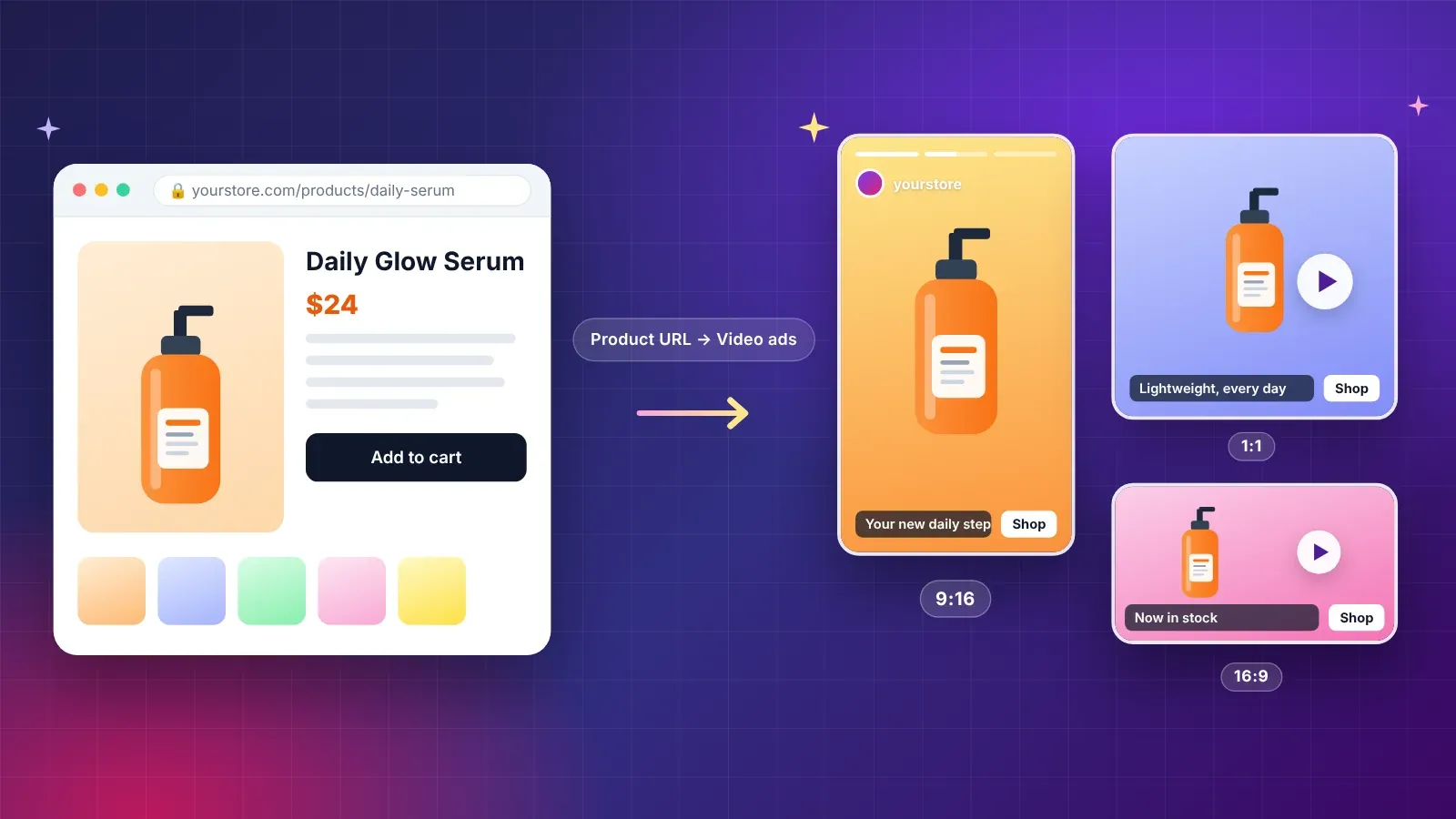
Most small brands already have what a video ad needs: a product, a few good photos and a page that explains why people buy it. What they lack is the time and budget to turn those pieces into short videos for social platforms.
That gap matters because short video is where much of the scrolling happens. A brand that cannot produce a steady supply of vertical clips is often invisible in the feed. An AI Ad Generator tries to close the gap by starting from the product page itself. Higgsfield AI is a native AI creative suite, which offers advanced AI image, video, and voice generation, editing, and upscaling tools. This guide looks at how small brands and solo operators can use it to make draft ads, what to check before spending money on them and where the tool stops being useful.
Why Is Video Production the Bottleneck for Small Brands?
An ad needs a script, footage, a presenter or voice, captions and a format for each platform. For a small team, each of those is a separate task, and every revision multiplies the work.
The result is predictable. Brands post when they can, run the same clip for too long and never test alternatives. Testing is how advertisers learn what works, so a team that can only afford one video learns very little.
Anything that lowers the cost of a first draft makes testing realistic. The goal is not a perfect ad on the first try. The goal is several decent drafts you can compare.
What Is Higgsfield's AI Ad Generator?
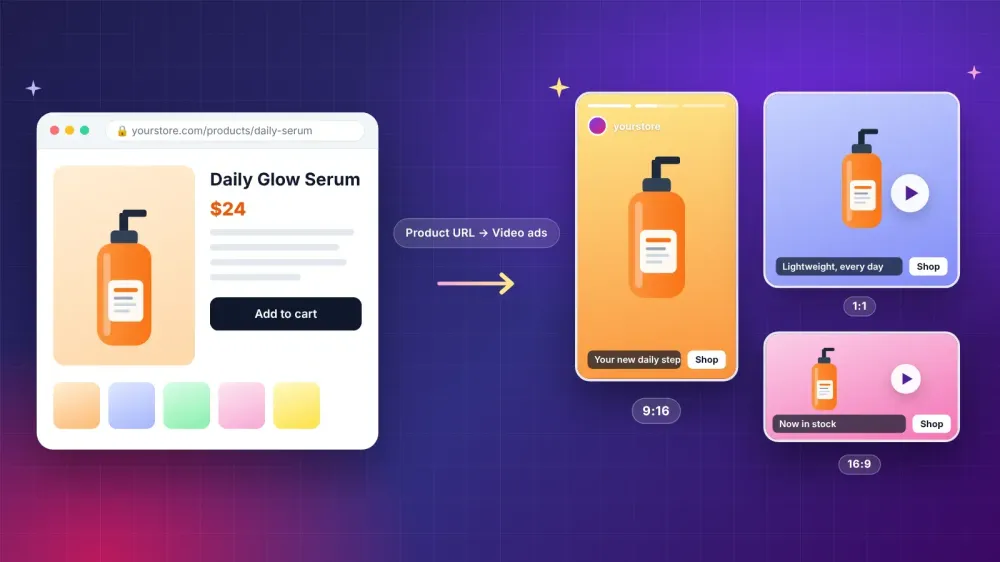
According to the live product page, the tool starts from a product URL and produces a finished video ad. The features that matter for a small brand include:
- Product URL to video ad. You paste a product link and the tool builds an ad from the page.
- Marketing Studio. A workspace for creating and managing ads.
- Up to 5 images. You can add your own product images.
- Nine video modes. These are TV Spot, UGC, Tutorial, Product Review, Unboxing, UGC Virtual Try On, Hyper Motion, Pro Virtual Try On and Wild Card.
- 40+ avatars. Digital presenters you can choose from.
- Models. The page names Seedance 2.0 and Nano Banana among the models behind the output.
- Formats. 9:16, 16:9 and 1:1 aspect ratios.
- Team features. Tools for working with colleagues.
The page does not state pricing, so confirm current plans with Higgsfield before you plan a budget.
How Does the Product URL Workflow Work?
The idea is simple. You give the tool a product page, and it uses the information and images on that page as raw material for an ad.
That makes the quality of your page matter. Clear photos, an accurate description and honest claims on the page become the base for the ad. If the page is vague, the draft will be vague.
Before you start, read your own page as a stranger would. Does it say what the product is, who it is for and why it is worth buying? Fix gaps there first, and the ad draft improves with it.
How Do You Prepare a Product Page for Ad Generation?
A little preparation goes a long way.
Use sharp, honest photos. Show the product as it really looks.
Write a clear first paragraph. Say what it is and who it helps in plain words.
List real features. Avoid vague promises.
Check prices and offers. Make sure they are current, since an ad that shows the wrong price causes complaints.
Add up to five images. Choose a mix of angles and a lifestyle shot.
Decide on one goal. Is the ad meant to get a click, a sale or an email signup?
Which Mode Fits Which Product?
Modes shape the style of the ad. A few matches to consider:
Product Review and Unboxing suit physical products where first impressions matter.
Tutorial suits products that need explanation, such as tools or software.
UGC gives a casual, creator style feel for everyday items.
TV Spot suits a more polished brand announcement.
Virtual Try On modes suit clothing and accessories.
Wild Card is for experiments when you want a surprising angle.
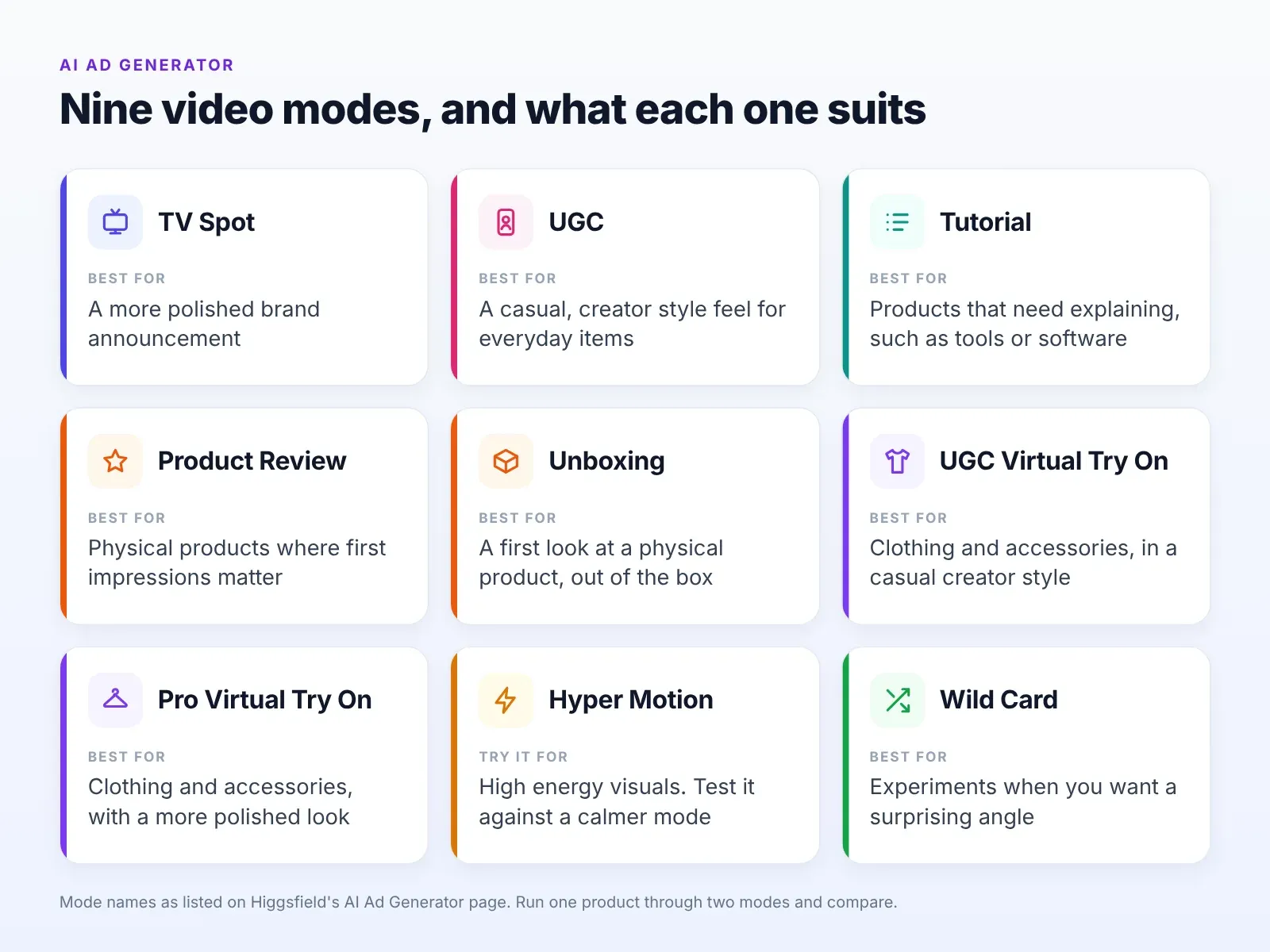
Run the same product through two modes and compare. The cheapest way to learn what your audience prefers is to show them both.
How Do You Build a Small Test Plan?
Testing does not need to be complicated.
- Pick one product and one goal.
- Generate three drafts in different modes in Higgsfield.
- Review each for accuracy. Fix any claim you cannot support.
- Create the right shapes. The page lists 9:16, 16:9 and 1:1.
- Add captions and a clear call to action.
- Run a small test. Use a modest budget and the same audience for each draft.
- Record results. Note views, completion and clicks.
- Keep what works. Retire the rest and make new variations.
Treat the first round as learning. The numbers will tell you more than any opinion.
What Does a First Week With Higgsfield Look Like?
Keep the first week modest. On day one, choose a single product and tidy its page. On day two, paste the link into Higgsfield, add up to five of your own images and generate a first draft. On day three, try a second mode and compare the two.
On day four, read both drafts the way a customer would. Mark every claim, price and line of text that needs fixing. On day five, make the changes, create the shapes you need and add captions. Over the weekend, schedule a small test.
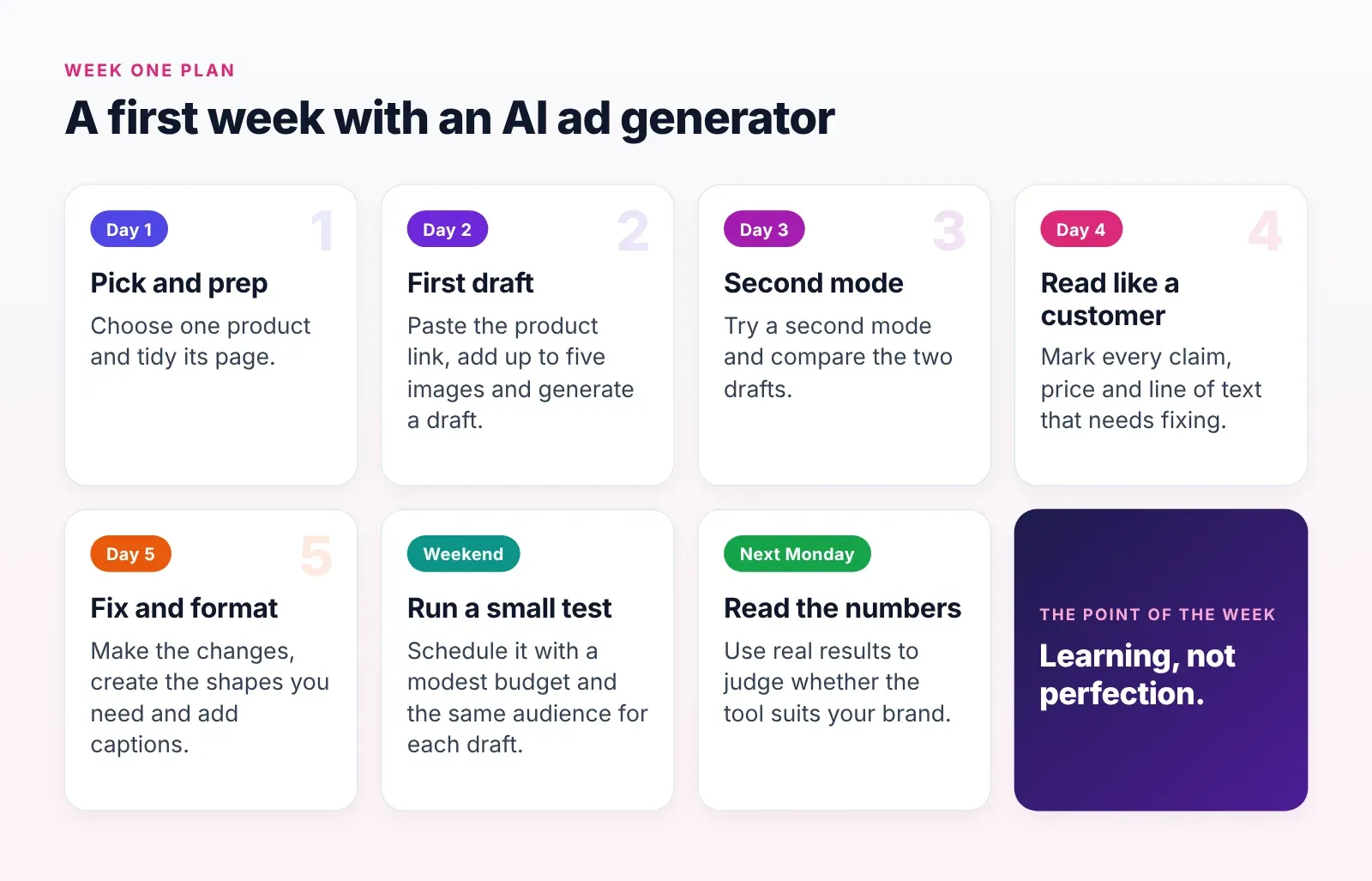
By the following Monday, you will have real numbers and a clearer sense of whether Higgsfield suits your brand. The point of the week is learning, not perfection.
How Do You Write Copy That Matches the Visuals?
An ad is a short conversation. The picture grabs attention, and the words carry the reason to act.
Lead with one benefit. Pick the single most useful thing the product does for the buyer.
Use plain words. Avoid slang that will date the ad quickly.
Be specific. A concrete detail is more believable than a general claim.
Keep captions short. People read them in a glance.
End with one action. Shop, learn more or sign up.
Read it aloud. If it sounds awkward, simplify it.
Match the tone to the product. A craft seller can be warm and personal. A tool seller can be direct and practical. Do not borrow a tone that does not fit your brand.
How Should You Read the Results of a Test?
Numbers are easy to misread. A few habits help.
Compare like with like. Use the same audience, budget and time for each draft.
Look at more than clicks. Watch completion, saves and the actions that follow the click.
Allow enough time. One day of data can mislead.
Change one thing at a time. If you alter the mode, the copy and the audience together, you will not know what worked.
Write down what you learned. Note the winner, the loser and your guess about why.
Test again. A good result can be a fluke.
Treat the Higgsfield drafts as a quick way to produce options, and let your audience decide which one deserves more budget. Over several rounds, you build a picture of what your customers respond to, which is worth more than any single ad.
How Do You Adapt One Ad for Different Placements?
A single idea often needs several shapes. The page lists 9:16, 16:9 and 1:1, which cover the common placements.
Vertical suits full screen feeds and stories. Keep key content away from the edges, where interface elements may cover it.
Square suits many feed placements. Centre the product.
Wide suits websites, email and channels that play on larger screens.
Check each version, because a crop can hide text or cut off the product. Fix problems before you publish, and use the same call to action across shapes so the message stays consistent.
How Do You Keep Ads Honest and Clear?
Trust is the long term asset. A few habits protect it.
Show the real product. Do not use generated visuals that look different from what customers receive.
Avoid exaggerated claims. Do not promise results you cannot support.
Do not invent reviews or testimonials. An avatar must not read made up customer quotes.
Disclose where needed. Follow platform rules on synthetic media.
Respect likeness. Do not create presenters that resemble real people without permission.
Check ad policies. Each platform has rules on what ads may claim, and they change.
Educational posts face a similar challenge, which is staying accurate when they are shared out of context. This site's piece on the second life of educational content on social media makes the point that clarity matters once content travels beyond its original setting. Ads travel too, so write them so they still make sense when someone sees them without any surrounding context.
How Can Solo Creators and Sellers Use This?
The tool is not only for companies. Individual creators who sell products, courses or services face the same constraints.
Digital product sellers can turn a landing page into a short promo clip.
Print on demand and craft sellers can show products in use.
Local sellers can make quick promo videos for new items.
Coaches and educators can turn a course page into a teaser.
Affiliate promoters can disclose clearly, follow platform rules and avoid misleading claims.
For each, the same rule applies: the ad must match the product.
What Should You Check Before You Publish?
A quick checklist helps.
Facts. Prices, sizes, materials and availability.
Claims. Can you support every statement?
Text on screen. Proofread every word.
Audio. Listen to the whole ad.
Format. View it in the shape of the platform where it will run.
Captions. Many people watch with the sound off.
Rights. Do you have the right to use every image and sound?
Policy. Does it comply with the platform's current ad rules?
What Mistakes Should Small Brands Avoid?
Publishing the first draft. Always review.
Testing too many things at once. Change one element per test.
Ignoring the first seconds. The opening decides whether people keep watching.
Using one format everywhere. Match the shape to the placement.
Overspending early. Start small and scale what works.
Skipping the product page review. A weak page makes a weak ad.
Buying attention instead of earning it. Paid reach cannot rescue a product people do not want.
What Are the Limits to Keep in Mind?
A generated ad is a draft. It may not capture the personality of your brand, and it cannot judge whether your offer is good. Results vary, and you may need several attempts.
The tool also depends on your inputs. Poor images and unclear copy lead to weak drafts. The product page does not state pricing, so check Higgsfield for the current terms.
Finally, an ad cannot fix a product problem. If customers return the product or leave bad reviews, better video will not change that.
Is an AI Ad Generator Worth Trying for Your Brand?
If you have a product page and little production capacity, it is a reasonable experiment. Choose one product, generate a few drafts and test them with a small budget. Keep notes on what you learn.
If one draft performs better than your current content, scale that idea. If none do, you have learned something about your audience at low cost.
Frequently Asked Questions
What does an AI ad generator need to start? Per the Higgsfield page, a product URL, and optionally up to 5 images.
Which video shapes are available? The page lists 9:16, 16:9 and 1:1.
Can I choose a presenter? The page lists 40+ avatars.
Which modes are available? TV Spot, UGC, Tutorial, Product Review, Unboxing, UGC Virtual Try On, Hyper Motion, Pro Virtual Try On and Wild Card.
Is it ready to publish as is? No. Review every claim, price and line of text first.
Does it replace testing? No. It makes testing cheaper by producing more drafts.