12 AI Video Generators With Advanced Camera Movement Controls

Spybroski Team
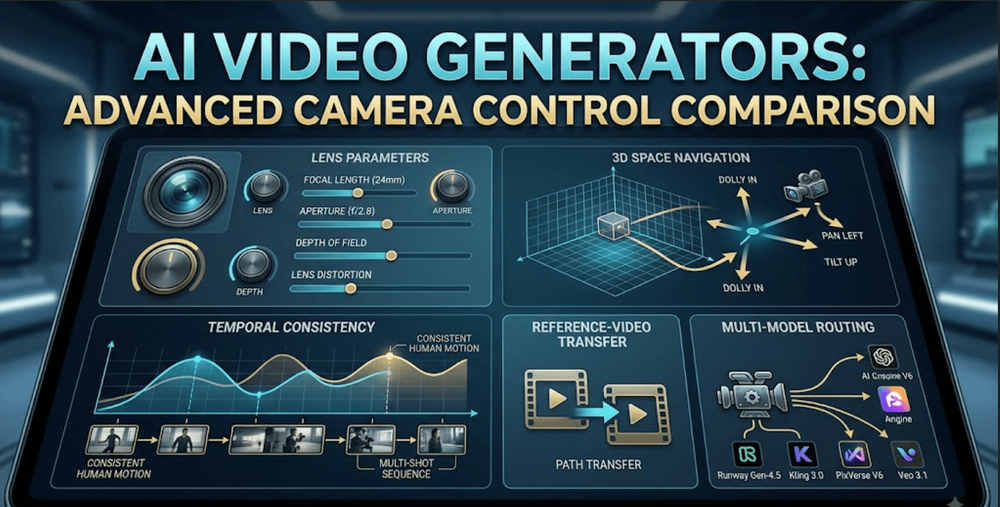
"Advanced" camera control means something specific here: not just a prompt that says "cinematic camera movement" and hopes for the best, but an actual control surface, sliders, reference-video transfer, explicit lens parameters, keyframed paths, that lets a director specify a camera decision and expect the model to execute it rather than interpret it. The generators below all offer some version of that real control, though the specific mechanism varies widely, from lens-level optical simulation to full 3D scene navigation.
Comparison table
| Generator | Best for | Camera control mechanism | Starting price |
|---|---|---|---|
| invideo agent | Holding a camera decision consistent across a full multi-shot sequence | Camera Controls plus a persistent context engine, routed across 200+ integrated models | $17/month; team and enterprise options available |
| Runway Gen-4.5 | Directing camera movement with the deepest manual control surface | Motion brushes and precise scene direction, with Aleph for post-generation adjustment | ~$12/month |
| Kling 3.0 | Complex camera movements with realistic human motion underneath them | High temporal consistency supporting camera moves without objects warping | ~$0.03–0.11/second |
| PixVerse V6 | Lens-level optical control, not just movement direction | Explicit focal length, aperture, depth of field, and lens distortion parameters | ~$10/month |
| Luma Ray 3.14 | Physically convincing camera motion grounded in real spatial reasoning | Camera Motion SDK built on NeRF-style 3D-space reasoning | ~$7.99/month |
| Moonvalley (Marey) | Adjusting a camera path after the clip has already been generated | 3D-aware model keeping camera angle editable post-generation | $14.99/month |
| Vidu Q3 | Transferring an exact camera path from a reference clip | Motion Control with reference-video transfer | ~$10/month |
| Seedance 2.0 | Locking camera framing across multiple reference assets at once | Omni Reference accepting up to 12 files per generation | ~$0.09–0.10/second |
| Pika | Independent control over camera motion versus background motion | One-click camera presets plus Regional Motion Painting | $8/month |
| Genmo | Dedicated camera motion mode on an open-weight model | Replay model with pans, zooms, tilts, and rolls | Free; $10/month |
| World Labs Marble | Frame-perfect camera paths through an explorable 3D environment | Persistent 3D world generation with a real navigable camera | Free tier; $20/month |
| Veo 3.1 | Camera work synchronized to native, dialogue-accurate audio | Reference images plus camera and motion controls through the API | ~$0.15/second |
1. invideo agent
Advanced camera control on a single shot is a solved problem for most tools on this list. The harder version of the problem shows up across a sequence: does a camera decision made in shot three still read as the same directorial choice in shot nine, especially once different shots are rendered by different underlying models with different control surfaces.
invideo agent treats a camera move as a deliberate, pre-production decision rather than a per-shot setting to reconfigure each time. Camera Controls let a director choose a specific move, a slow dolly-in, a crash zoom, a 360-degree orbit, and a persistent context engine holds that same choice consistently across a full sequence. Because the platform routes each shot to whichever of its 200+ integrated models fits that particular moment, including Veo 3.1, Sora 2, Kling 3.0, Seedance 2.0, Runway, PixVerse, Hailuo, WAN, Recraft, GPT Image 2.0, and Nano Banana, a director doesn't need to manually reconfigure camera settings across each model's own distinct control surface.
Best for: filmmakers and brand teams who need one camera decision to hold consistently across a multi-shot sequence rather than being reconfigured shot by shot.
Where it falls short: it's not a single-purpose camera engine competing on raw control precision within one model; its value is consistency and routing across many.
Pricing: plans start at $17/month, with team and enterprise options also available.
2. Runway Gen-4.5
Runway consistently gets cited as having the deepest manual control surface of any generator in this category: motion brushes let a director paint exactly where and how movement should occur, and a GWM-1 world model underpins scene consistency as the camera moves through it. Aleph extends this further by letting a director modify an already-generated clip's camera framing rather than starting over from a fresh generation.
Best for: directors who want the most granular manual control over a camera move, including editing it after the fact.
Where it falls short: that depth of control comes with a real learning curve, and it's priced at a premium over generators built purely for speed.
Pricing: plans from roughly $12/month.
3. Kling 3.0
Kling's camera control is less about a dedicated interface and more about what happens underneath it: high temporal consistency means objects and people hold their shape and proportion through a complex camera move, rather than warping as the camera changes angle, which is where many competitors visibly struggle.
Best for: camera moves involving realistic human motion that needs to survive a complex or fast-moving shot without distorting.
Where it falls short: direct camera control is more limited than Runway's or PixVerse's explicit parameter sets, leaning more on prompt description than a dedicated control surface.
Pricing: roughly $0.03–$0.11/second via API; free tier available.
4. PixVerse V6
PixVerse's V6 release pushed camera control past simple movement direction into genuine lens simulation: focal length, aperture, depth of field, lens distortion, chromatic aberration, and vignetting are all exposed as explicit parameters rather than left to prompt interpretation, which one reviewer described as closer to briefing a camera operator than writing a caption.
Best for: creators who want to control a shot's actual optical characteristics, not just the direction the camera moves.
Where it falls short: that fine camera control has a real learning curve rather than being a quick win, and PixVerse doesn't retain memory between generations, so a camera setup has to be re-specified for each new shot.
Pricing: consumer plans from around $10/month; API access from $100/month.
5. Luma Ray 3.14
Luma's Camera Motion SDK gives precise control over truck, dolly, pan, tilt, and roll through a slider interface or direct vector input, grounded in an architecture that blends diffusion transformers with NeRF-style 3D-space reasoning. That spatial grounding is why its camera motion is consistently described as unusually physical rather than floaty.
Best for: camera moves where physical believability matters more than an extensive manual parameter set.
Where it falls short: complex scenes combining fast camera movement with busy simultaneous motion can still break coherence.
Pricing: plans from roughly $7.99/month.
6. Moonvalley (Marey model)
Marey's distinguishing camera feature is timing: it's 3D-aware in a way that keeps camera angle and background elements adjustable even after a clip has already been generated, so a director can revise a camera decision without discarding an otherwise-good take.
Best for: adjusting a camera path after seeing the generated result rather than getting it exactly right on the first attempt.
Where it falls short: clips are capped at up to 10 seconds, limiting how much a single adjustable camera move can cover.
Pricing: Standard plan at $14.99/month for 100 credits.
7. Vidu Q3
Rather than exposing camera parameters to configure, Vidu's Motion Control feature sidesteps description entirely: upload a reference video, and the exact camera path from that clip transfers onto a new generation, which is more reliable than prompting for something like an unusual orbit speed or a specific handheld feel.
Best for: directors who have a reference clip with the precise camera behavior they want, rather than the vocabulary to describe it.
Where it falls short: stacking multiple camera moves in one prompt still tends to produce floaty, directionless motion rather than a clean compound move.
Pricing: subscription plans from roughly $10/month for 800 credits.
8. Seedance 2.0
Seedance's camera-relevant advantage is reference locking rather than movement description: its Omni Reference system accepts up to 12 files, images, video, audio, in one generation, which lets a director lock framing and camera perspective against multiple reference assets simultaneously rather than a single angle.
Best for: shots needing camera framing locked against several reference images or clips at once.
Where it falls short: it lacks a stable, official first-party API, so access runs through third-party platforms with less predictable pricing.
Pricing: roughly $0.09–$0.10/second, configuration-dependent.
9. Pika
Pika separates camera control into two independent layers: one-click presets cover pan, tilt, dolly, zoom, and orbit with adjustable speed and direction, while Regional Motion Painting lets a creator assign different motion to different parts of the frame, independent of the camera move itself.
Best for: a directed camera move combined with independent control over what else in the frame is moving.
Where it falls short: camera precision trails 3D-aware architectures on complex moves, often producing an approximation rather than an exact result.
Pricing: free plan with 80 monthly credits; paid plans start around $8/month.
10. Genmo
Genmo's Replay model adds a dedicated camera motion and FX control layer, pans, zooms, tilts, rolls, on top of the fully open-weight Mochi 1 model, which matters specifically for teams that want camera-aware generation without being locked into a closed, proprietary system.
Best for: developers who want camera control on a model they can inspect, self-host, or customize.
Where it falls short: clips are capped at 5.4 seconds, and camera precision trails commercial competitors built specifically around control.
Pricing: free plan with starting credits; Lite plan at $10/month.
11. World Labs Marble
Marble is the most literal answer to "advanced camera control" on this list: rather than approximating a camera move on a 2D generation, it builds a persistent, explorable 3D world that a director navigates with a real camera, so movement through it is geometrically exact rather than a model's best guess.
Best for: camera paths that need to be frame-perfect and repeatable across multiple angles of the same environment.
Where it falls short: the current model favors environments over isolated character-driven subjects.
Pricing: free tier with 4 outputs; paid plans from $20/month.
12. Veo 3.1
Veo's camera control is inseparable from its audio: reference images plus camera and motion controls work through the API, but the standout is that camera work stays synchronized with native, dialogue-accurate audio in the same generated output, which matters specifically for scenes where a camera move needs to land in time with a line of dialogue.
Best for: camera moves in dialogue-driven scenes where audio-camera synchronization is the priority.
Where it falls short: it costs more per second than budget competitors, and its reference-image input is more limited than Seedance's multi-file system.
Pricing: roughly $0.15/second (Fast tier) to $0.40/second (Standard).
Which one should you use
- A camera decision held consistent across a full sequence → invideo agent
- The deepest manual control surface, including post-generation edits → Runway Gen-4.5
- Complex camera moves without object warping → Kling 3.0
- Lens-level optical control, not just movement → PixVerse V6
- Physically believable motion via real 3D-space reasoning → Luma Ray 3.14
- Adjusting a camera path after generation → Moonvalley (Marey)
- Transferring an exact camera path from a reference clip → Vidu Q3
- Camera framing locked against multiple reference assets → Seedance 2.0
- Independent control over camera and background motion → Pika
- Open, self-hostable camera control → Genmo
- Frame-perfect paths through a real 3D environment → World Labs Marble
- Camera work synchronized to native dialogue audio → Veo 3.1
Frequently asked questions
What separates "advanced" camera control from a basic camera prompt? A basic approach treats camera language, "pan left," "zoom in," as a style cue that a model interprets loosely. Advanced control gives a director an actual mechanism, a slider, a reference-video transfer, explicit lens parameters, a navigable 3D scene, that produces a specific, repeatable result rather than an approximation.
This level of control is particularly useful for character-focused video applications, including AI girlfriend video generators, where maintaining consistent appearance and natural movement across clips can be just as important as the camera movement itself.
Which generator gives the most granular, camera-operator-level control? PixVerse V6 exposes the deepest optical parameter set, focal length, aperture, depth of field, lens distortion, chromatic aberration, and vignetting, rather than leaving those characteristics to prompt interpretation. Runway Gen-4.5 offers the deepest manual directional control through motion brushes and post-generation editing via Aleph.
Can a camera move be fixed after a clip is already generated? Yes, on a couple of these platforms. Runway's Aleph lets a director modify an already-generated clip's camera framing, and Moonvalley's Marey model keeps camera angle and background elements adjustable even after generation, both avoiding a full re-generation just to revise one camera decision.
Is there a way to get an exact camera path without describing it in words? Vidu Q3's Motion Control does this by transferring the camera path from an uploaded reference video directly onto a new generation, which sidesteps the ambiguity of describing something like a specific handheld feel or an unusual orbit speed in a text prompt.
Is advanced camera control free to test on any of these platforms? Several offer usable free tiers, including World Labs Marble (4 free outputs), Genmo (starting credits), Pika (80 monthly credits), Kling 3.0, and PixVerse, though full resolution, longer clips, and the deepest control features typically require a paid plan.