Investigating the Internet Safely: A Beginner’s Privacy Toolkit Featuring Surfshark VPN

Spybroski Team
Safely using the internet is no longer a choice; it's a necessity in today's connected world. Cyber threats are always present, no matter if you're a webmaster managing sensitive client data, a digital entrepreneur building an online empire, or a marketing professional running campaigns.
Cyberattacks, data breaches, and invasive tracking tools can all put people's privacy at risk, stop operations, and hurt trust.
This guide will give you tips and tools to keep your online actions safe. It will focus on Surfshark VPN, a top privacy tool that provides you with privacy, safety, and peace of mind while you browse the web.
Understanding Privacy Threats
Many potential privacy threats in the digital world put personal and professional data at risk. Cybercriminals are always coming up with new ways to exploit weaknesses, and data breaches have become increasingly common.
Financial records, customer data, and intellectual property are just a few examples of sensitive information that can get into the wrong hands. All of these risks lead to "severe consequences," including financial losses and damage to your image.
Tracking mechanisms are another big concern. Websites, advertisers, and even governments use complex tools to watch what you do online, and they often do it without your permission, which is known as a direct invasion of your privacy.
All of these tactics put you at risk for targeted ads, manipulation, and monitoring. In the digital age, this has a tremendous impact on your freedom.
Lastly, cyberattacks such as phishing schemes, ransomware, and others are evolving rapidly. They go after people and companies that don't know what's going on. Protecting data isn't just about keeping yourself safe for webmasters, digital entrepreneurs, and marketing pros; it's also about keeping your business honest and keeping clients' trust.
Introduction to Privacy Tools
In the digital age, privacy tools are essential for combating these threats. They make your defenses stronger against online risks with features like password managers and encryption software. Using a password security checker is a simple but effective way to evaluate the strength of your credentials and identify weak or reused passwords before attackers can exploit them. One of the best options is a Virtual Private Network (VPN), which encrypts your internet traffic and routes it through a secure tunnel. It encrypts your data and hides your IP address, giving you the security you need.
Surfshark VPN stands out as the best option for safe internet browsing. It offers a robust set of features to protect sensitive information, making it a fantastic choice for privacy-conscious professionals.
By encrypting online traffic, Surfshark prevents third parties from reading data and gets around geo-blocks. These features make it a must-have for digital marketers who want to access global content easily.
Key Features of Surfshark VPN
A thorough Surfshark review shows why this VPN is so popular with people who care about their privacy. Its success is due to a few key features:
-
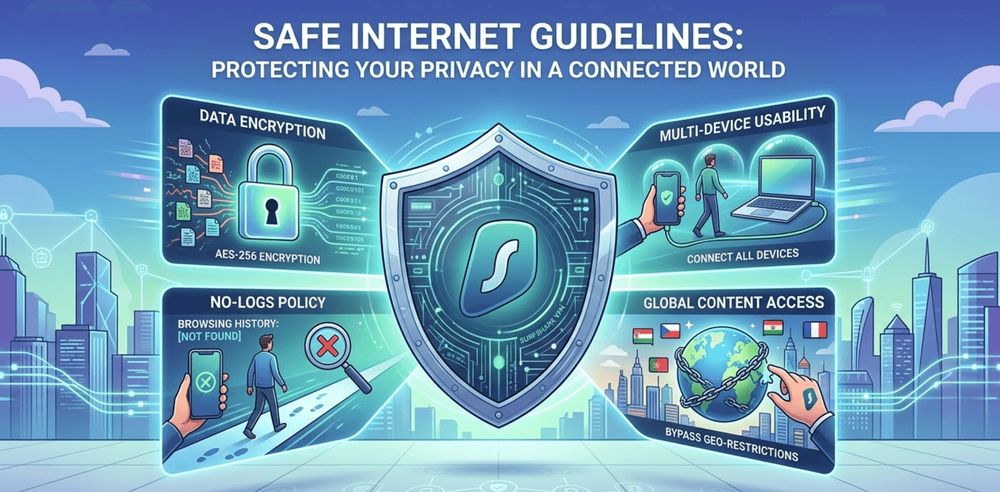
Surfshark protects your data with AES-256 encryption, which is the best in the business. This ensures that hackers and trackers can't access it.
-
Surfshark has a strict "no-logs" policy, meaning your browsing history is not logged or recorded. This ensures you are truly anonymous.
-
Multi-Device Usability: Surfshark lets you protect all of your devices, like your phone, laptop, or tablet, under a single account by letting you connect them all at the same time. This makes things easier and ensures you're completely covered.
-
Bypassing Geo-Restrictions: Surfshark's ability to bypass geo-restrictions is a game-changer for digital marketers and business owners. It lets you access materials and tools available only in certain regions, enabling you to reach more people worldwide.
Surfshark is more than just a privacy tool; it's a complete solution that helps workers improve security and get more done.
Step-by-Step Guide to Set Up and Use Surfshark VPN
Surfshark VPN is easy to use, even for first-timers. Just follow these steps to set up the tool and make it work the way you want.
-
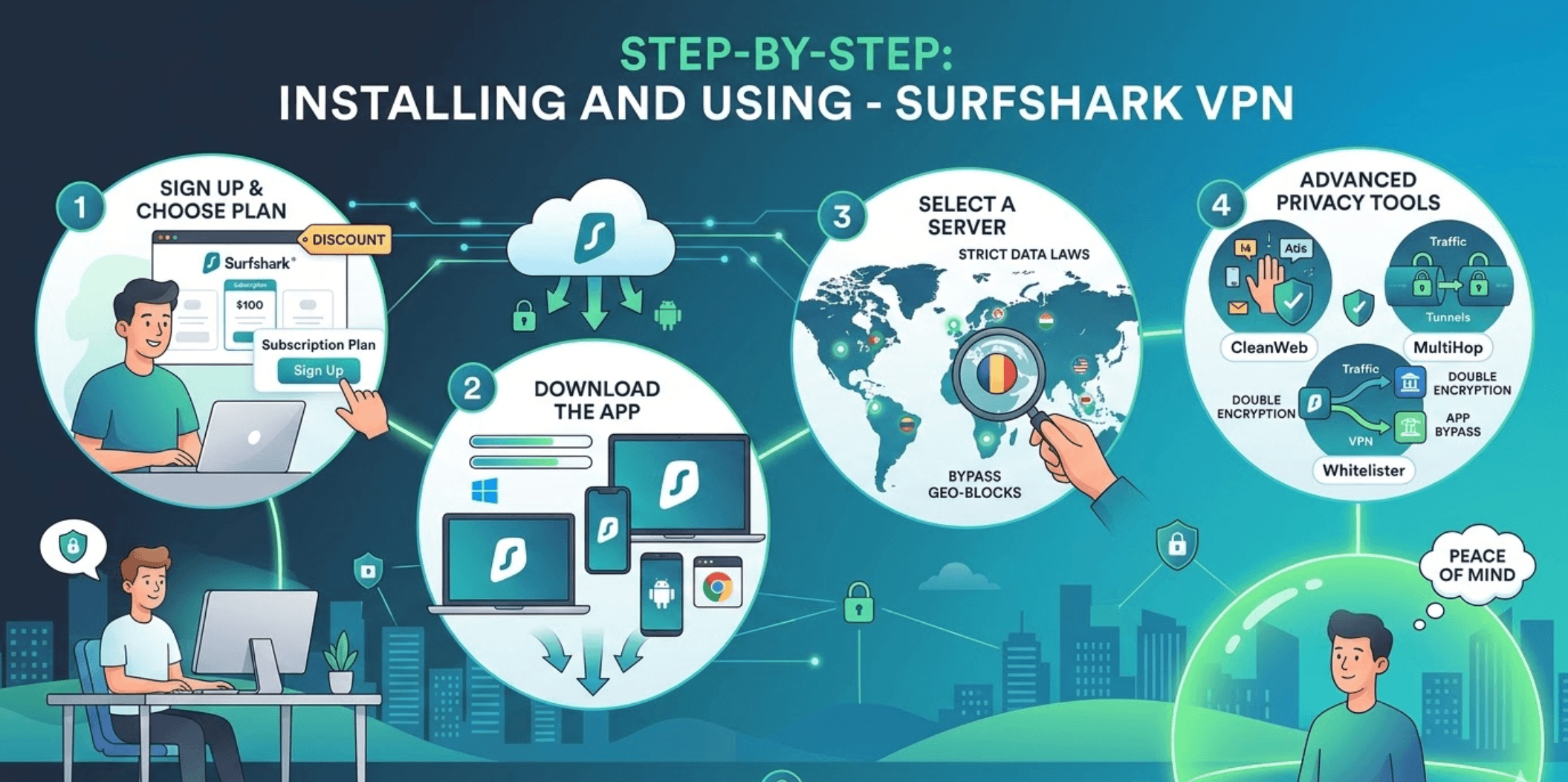
Visit Surfshark's official website to sign up and choose a subscription plan that fits your needs. The platform offers affordable pricing options, and long-term plans often include discounts.
-
Download the App: Once you're done signing up, download the Surfshark app. It's made to work smoothly on Windows, macOS, iOS, Android, and even browser extensions.
-
After installing and opening the app, you'll be asked to enter your passwords and guided through a user-friendly interface.
-
Pick a server location that works for you. To protect your privacy, pick sites in countries with strict data protection laws. To get around geo-blocks, choose a computer in the area you want to access.
-
Explore Surfshark's more advanced features, such as CleanWeb, which blocks ads; MultiHop, a dual VPN; and Whitelister, which splits your traffic. All of these features let you customize your private settings.
Setting up Surfshark protects your data from prying eyes, giving you peace of mind while you browse the web.
Additional Tips for Internet Safety
Surfshark VPN is a strong tool, but it's important to use other privacy practices alongside it to build a "comprehensive safety toolkit."
Even simple logo tools like Zoviz or other good logo maker can help maintain a consistent and professional brand identity across your online platforms, reducing the risk of impersonation and strengthening trust with your audience.
If you’re running a law practice with remote support, the same habits apply: treat client intake details, case notes, and shared documents as high-risk data. A virtual legal assistant should be working inside a secure workflow—VPN access, strong passwords, and 2FA—so your team can move fast without exposing confidential information.
For each account, use a strong, unique, and complicated password. You might want to use a password manager to keep them all safe.
Turn on Two-Factor Authentication (2FA) to add an extra layer of security to your accounts. Set on 2FA, which requires more than just entering your password for verification.
It is critical to keep your operating system, websites, and apps up to date. This fixes vulnerabilities, which are holes that hackers can use.
Be Careful with Links and always check twice before clicking, especially in emails or messages, because they could take you to phishing websites. Furthermore, make sure the writer is real before you do anything.
Keep up with new privacy risks and best practices by learning about them. Knowledge is your first line of defense.
When you use Surfshark VPN alongside these other steps, you can build a strong privacy system that keeps your online activity safe.
Conclusion
In today's constantly changing digital world, protecting your privacy is not only important but essential. As webmasters, digital entrepreneurs, or marketing professionals, your online profile directly represents your business, so you must protect it at all costs.
With advanced encryption, a "no-logs" policy, and support for multiple devices, Surfshark VPN offers a reliable option for safe browsing and anonymous browsing.
To protect your privacy, you need to take a step back and look at the big picture. Combining Surfshark with other security measures, such as strong passwords, two-factor authentication, and regular updates, makes your defenses against online risks even stronger.
Take control of your privacy right now. With the right tools and methods, changing how you interact with technology is not only possible but also empowering.