How to Create a Newsletter: Core Principles and Steps
Spybroski Team
How to Create a Newsletter From Scratch: A No-Fluff Guide
The average email marketing open rate is 35.63%. This number can vary significantly depending on the industry and sending time. Yet, the main pain point remains the same for all marketers: many emails end up ignored. And this directly hurts campaign performance.
When looking for ways to cut through the noise in the inbox, marketers, freelancers, and business owners typically face loads of questions:
- How to make emails engaging
- When to send your messages
- How often to send them
- And what actually makes a newsletter worth opening
So, how to create a newsletter from scratch? Here’s how it works. This guide covers everything from effective structures and strategy-building to helpful tools. Let’s begin with essentials.
What Makes a Newsletter Good?
To create a newsletter strategy that works, you need to know what works and doesn’t work for recipients. Below are the principles that drive engagement.
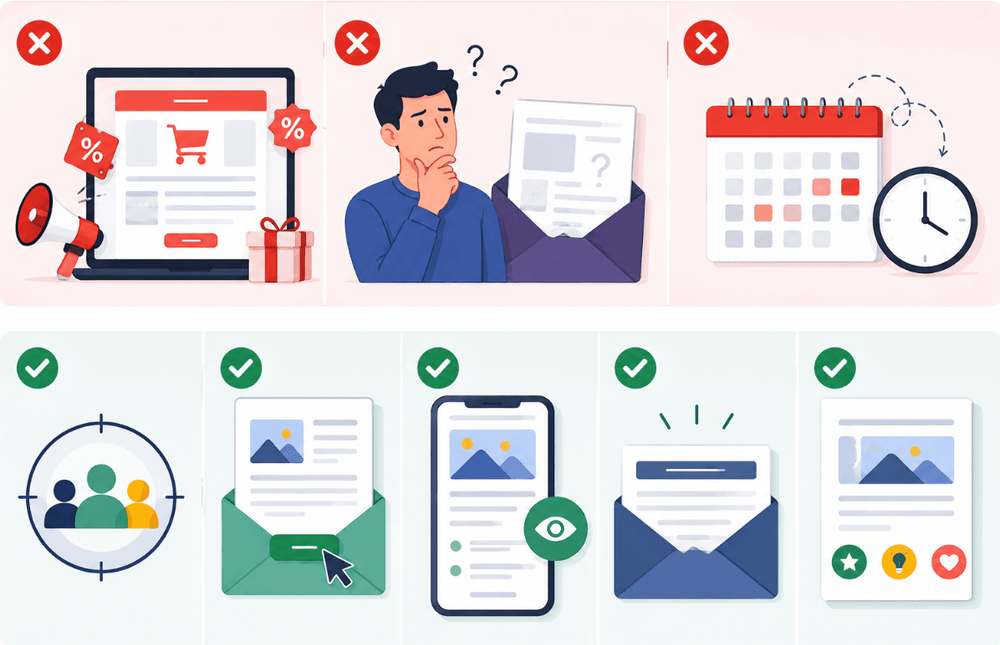
Why Most Newsletters Fail:
- Too sales-heavy. An overly promotional tone doesn’t work on modern consumers anymore. It creates pressure. Instead, users appreciate timely value. Authenticity works better than promotional tone.
- No clear value proposition. When the recipient doesn’t see explicit benefits, they don’t feel the need to read your newsletter and interact with it.
- Inconsistent scheduling. Often, getting the recipient to read and click requires catching them at the right moment**.** Open rates on Mondays, Tuesdays, and Wednesdays tend to be higher than at the end of the week. This is because people are in a more work-focused mindset at the beginning of the week. In this state, they are more open to propositions.
Key Elements of a High-Performing Newsletter
- Clear audience focus. To convert the recipient, you must know who you are appealing to. This lets you personalize the message for maximum relevance and engagement.
- One main goal per email. The best way to make a newsletter is to keep it focused. A defined goal helps avoid confusion. It also lets you include a clear call-to-action.
- Skimmable format. Use short paragraphs. Also, include lists and bullets. This lets readers quickly skim through your emails. As a result, they save time, yet grasp the message.
- Strong subject line relevance. A subject line is the first thing a recipient sees. Based on it, they decide whether to open an email or not. It has to be highly relevant and personalized to capture attention.
Creating a Newsletter Strategy Before You Write
A big mistake that can result in a newsletter failure is writing your emails without a clear plan. This leads to a lot of guesswork and inconsistencies in your efforts. So before you get to writing, follow the steps below to create a strategy:
Define Your Audience and Goal
First, identify an audience focus and the goal of writing. Pick a narrow segment of recipients with a specific pain point. And align your goal to their specs. For example, you can target non-returning customers. In this case, your goal is to encourage them to make a repeat purchase. This choice defines the tone, content, and CTA.
Choose the Right Newsletter Type
Next, align your audience and goal to the right email type. There are four choices that you have:
| Newsletter Type | Explanation | Audience | Works Best For |
|---|---|---|---|
| Educational | Share practical advice, how-to’s, guides, and other types of content aimed at problem-solving. | Recipients who are looking to solve a problem or learn more on the topic. | Educating and nurturing top-of-the-funnel leads who are not ready to buy yet. |
| Promotional | Inform recipients about product updates/launches, discounts, special deals, etc. | Warm leads and existing clients. | Providing more information and building trust to encourage warm leads to make a purchase decision during the interest or consideration stage (middle of the funnel). Making targeted conversions at the bottom of the funnel. Driving repeat purchases and building loyalty among existing customers. |
| Curated | Share industry news, helpful links, and other resources that might be of interest to recipients. | Professionals seeking to stay updated on the topic. | Educating B2B audiences at the consideration stage. Keeping the audience engaged at the retention stage. |
| Hybrid | Combines educational, promotional, and curated emails in a single strategy. | Recipients with diverse needs and interests. | Aligning your email communication to each recipient’s needs. |
Decide on Frequency and Format
Lastly, your strategy needs to define the sending frequency. Often, the choice comes down to weekly and monthly newsletters. Monthly delivery is effective for most businesses for retaining the audience without overwhelming it. Weekly newsletters can work well for building engagement and staying top-of-mind. But only if you deliver relevant and valuable content. There are also daily and quarterly newsletters. Daily formats suit news-driven niches, while quarterly works for B2B with long sales cycles.
Additionally, you need to set clear length expectations before you create an email newsletter. For most newsletters, you want to stay somewhere in the 150-200 word range. This is perfect for quick, no-fluff updates and offers. However, sometimes, you may go longer. This works for insight-heavy content.
Instead of attaching large PDFs files to a newsletter, you can learn how to make a flipbook using Publuu and share it with a simple link.
How to Make an Email Newsletter
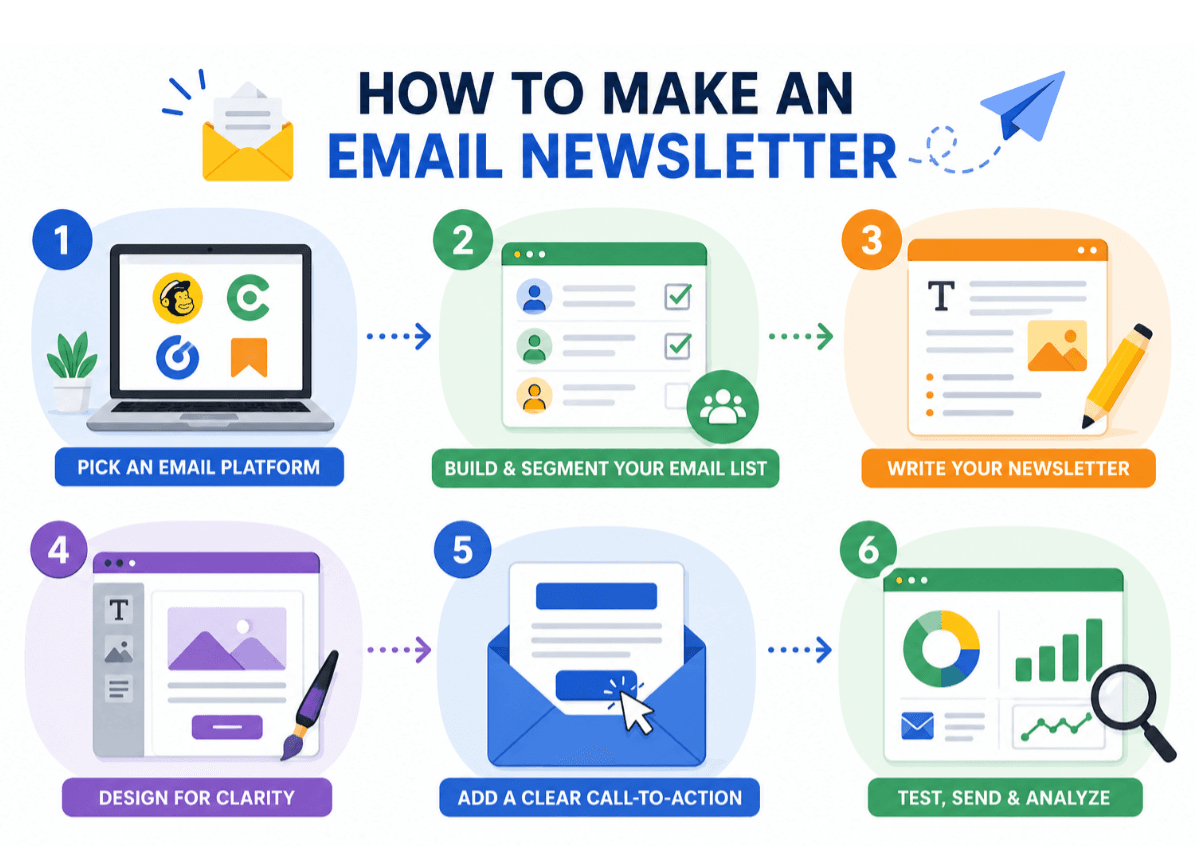
Step 1: Pick an Email Platform
Before you start writing your content, choose your platform. Some popular options include:
- Mailchimp: Best for SMBs
- ConvertKit: Best for independent creators, bloggers, and other professionals
- Brevo: Best for service-based companies, SMBs, and entrepreneurs
- Substack: Best for creators seeking direct monetization
Platforms like these give you access to dozens of email templates to simplify newsletter creation. Further down the road, they also provide automation features to send your emails in bulk. And they also come with handy analytics features for tracking the outcomes of your strategy.
Step 2: Build and Segment Your Email List
Next, build an email list that you will be delivering your newsletters to. The best organic list-building methods include:
- Creating lead magnets. In this case, leads will exchange their email addresses for valuable, free content or tools.
- Using sign-up forms. In this case, interested (warm) leads will opt into your email list themselves.
After you grow your list, you need to segment it. Divide the list into groups that share similar behavior and features. For example, you can segment based on:
- Demographics
- Engagement
- Purchase history
- Cart abandonment, etc.
Step 3: Create a Strong Subject Line
When you’re ready to create an email newsletter, start with a subject line. Follow these best practices to do it right:
- Make it 30-50 characters long. This ensures that recipients will see it in full.
- Personalize. Include the name of the recipient/company, location, or other details to show relevance.
- Keep it descriptive. The recipient must instantly understand what they will get from opening an email.
- Spark curiosity. Address a specific pain point or knowledge gap to get the recipient hooked.
- Avoid spam triggers. Minimize unnecessary punctuation and emojis, and avoid high-pressure words like “act now” or “free” to prevent going to spam.
What does a strong subject line look like in real life? Let’s consider a few examples:
- “[Name], Looking to Boost Workspace Productivity? These 5 Tricks Help.” – Suitable for an educational newsletter. Why it works: Personalized with the recipient’s name; addresses a specific issue (productivity); descriptive.
- “[Name], Ready to Boost Your Conversions by 20%? Find Your Special Offer Inside!” – Suitable for a promotional newsletter. Why it works: Personalized with the recipient’s name; addresses a specific issue; offers a targeted solution with a special deal.
- “This Week’s Best [Industry] Insights | Curated for You.” – Suitable for a curated newsletter. Why it works: Personalized for a specific industry; simple; clearly states what the recipient will find inside.
Step 4: Structure Your Newsletter Content
When writing the main content of your email, most importantly, you need to make it well-structured. Follow this layout for maximum clarity:
- Start with an opening hook. It should include the elements of personalization to create a sense of relevancy.
- Continue with a clear value proposition. Give the recipient something that benefits them to boost engagement.
- Make a CTA. Encourage the recipient to perform your target action.
- Close with a structured footer. Include additional helpful links and an unsubscribe button.
Step 5: Design for Readability
Email design must be appealing. Yet, it should be clean and functional. For maximum readability, use sufficient whitespace and clear heading hierarchy. Use a minimal amount of visuals to prevent slow loading. And most importantly, implement a mobile-first layout to make your email look good on different devices.
Step 6: Test and Send
After creating a newsletter, preview it on different devices. You want to ensure that it preserves the design, layout, and readability across all screen sizes. Display errors can make you look unprofessional and cause recipients to bounce.
Next, A/B test several subject lines. Given the massive role of the subject line in engagement and open rates, you want to analyze the metrics of different options and pick the most effective one.
Next, detect the optimal sending time. Define it based on user behavior. You can do this with the help of Send Time Optimization (STO) algorithms. This is a data-driven technique that involves analyzing each subscriber’s history of opens and clicks over the past 90 days. Based on this data, you can predict the dates and times when a user is the most active and adjust your sending time for maximum efficiency.
Lastly, don’t forget about the post-send analysis. Further in this guide, we’ll look at the key metrics that will help you assess your newsletters’ performance and improve it.
How to Improve Newsletter Performance Over Time
After you create an email newsletter and hit send, use performance data to refine your approach. Focus on the following key metrics:
| Metric | Explanation | When to Check | Benchmark | Issues to Fix |
|---|---|---|---|---|
| Open rate | Percentage of subscribers who read your emails. | 2–4 hours after delivery (first check); then, after 24 hours (follow-up check) | 20-25% | Weak subject lines Spam filters Bad sending time Bad sender reputation Unengaged list |
| Click-through rate (CTR) | Percentage of users who click on a link (button) in the newsletter. | 6-12 hours after sending (first check); then, after 24-48 hours (follow-up check) | 2-5% | Irrelevant content Low value for recipient Overwhelming design Unclear or weak call-to-action |
| Unsubscribe rate | Percentage of users who unsubscribe from your list. | 24-48 hours after delivery | ≈0.17% | Irrelevant content Lack of personalization Misleading subject lines A too-intrusive, salesly tone Too frequent newsletters |
| Bounce rate | Percentage of newsletters that never get delivered. | Immediately (a few minutes to 1 hour after sending) | <2% | Outdated or purchased email list Invalid addresses Issues with server or delivery |
Checking these metrics and using them to optimize your newsletters can greatly help you improve the impact. And if you’re wondering how to make an email newsletter even more impactful, here are a few additional tips:
- Clean your email list every 3-6 months. What to do: Instantly remove hard bounces (addresses with a permanent delivery failure) and invalid emails. Separate inactive users who haven’t opened or clicked on your emails in the last 180 days from your main list. Then consider running a re-engagement campaign on inactive subscribers. For example, offer them exclusive content or deals to win them back.
- Experiment with formats and content types. What to do: Try changing the layout from single column to multi-section. Try static and interactive formats (e.g., surveys or quizzes). Experiment with text length and, on the contrary, try sending visual-driven newsletters instead of text-based ones. And don’t forget switching between different newsletter types. Perform A/B tests to see which approaches show the best results.
- Work with different personalization strategies. What to do: Go beyond simply including the recipient’s name in emails. Test dynamic content. For example, if you are selling clothing, you can set up your newsletters to adjust the offering of items based on the recipient’s gender. Also, try personalized timing. For example, send tailored promotional emails on subscribers’ birthdays.
- Reuse top-performing content. What to do: Identify what content pieces drive the most clicks, shares, and other engagement metrics on your website/social media profiles. Then, rework them into different formats. For example, you can turn a high-converting long-form blog article into a bite-sized email summary.
Tools for Simplified Workflow
Now that you know how to make an email newsletter, let us share a few handy tools that can assist you in the process:
- Notion or Google Docs. A document management tool is the first solution your tech stack must include. Notion and Google Docs are cloud-based options perfect for drafting your content.
- Grammarly. After drafting, follows proofreading. This is crucial for eliminating errors and ensuring readability. Grammarly is a good proofreading tool to choose for these purposes.
- Canva. To make your emails look appealing, you need to design them. Canva is a simple, user-friendly solution with loads of newsletter design templates you can adapt in minutes.
Some emails may also contain downloadable resources. This includes reports, guides, and other attachments. In this case, you want to have additional file management tools at hand:
- PDF House You must optimize your attachments so that they pass through email servers. Since PDF is a common attachment format, thanks to preserving the layout and formatting, you need a reliable tool to compress PDF files. PDF House is a solution that lets you reduce file size in a few clicks. It’s also a powerful PDF editor that lets you crop, sign, and otherwise edit your attachments.
- Adobe Acrobat. This tool also offers advanced editing options. Unlike lightweight online editors, it is better suited for heavy-duty and business use cases.
Conclusion
The success of a newsletter depends on multiple factors. This includes audience targeting, list accuracy and segmentation, sending time, subject line, and, of course, the design and content of your emails. A data-driven approach that personalizes the newsletter type, content, and other elements for each recipient is what eventually yields.
Now, you know how to make a newsletter email that actually engages. Let’s quickly recap:
- Focus on value instead of being overly promotional.
- Implement a clean structure and aim for skimmability.
- Create effective subject lines and test them before sending.
- Use tools for productivity.
Use these tips to get started. And don’t forget to track your performance. Test different approaches and use metrics to optimize the result.