Hardware Inventory Management Software: Selection Guide + Implementation Plan

Spybroski Team
Hardware Inventory Management Software: Selection Guide + Implementation Plan
Effective hardware inventory management is essential for businesses to operate efficiently. It involves tracking and managing physical assets, such as computers, tools, machinery, and office equipment.
Proper management ensures that businesses can monitor their assets, reduce waste, prevent losses, and optimize resource allocation. Without accurate tracking, businesses may face issues like stockouts, over-purchasing, or even legal and compliance risks.
As businesses grow and become more dependent on technology, the need for robust inventory management systems increases. A well-implemented hardware inventory management software can simplify tracking, improve accuracy, and save time.
The right software can provide real-time visibility into the status of your hardware, helping you make informed decisions and improve overall efficiency. This guide will help businesses choose the right hardware inventory management software and provide insights on how to implement it effectively.
Barcode vs QR vs RFID: What’s Worth It?
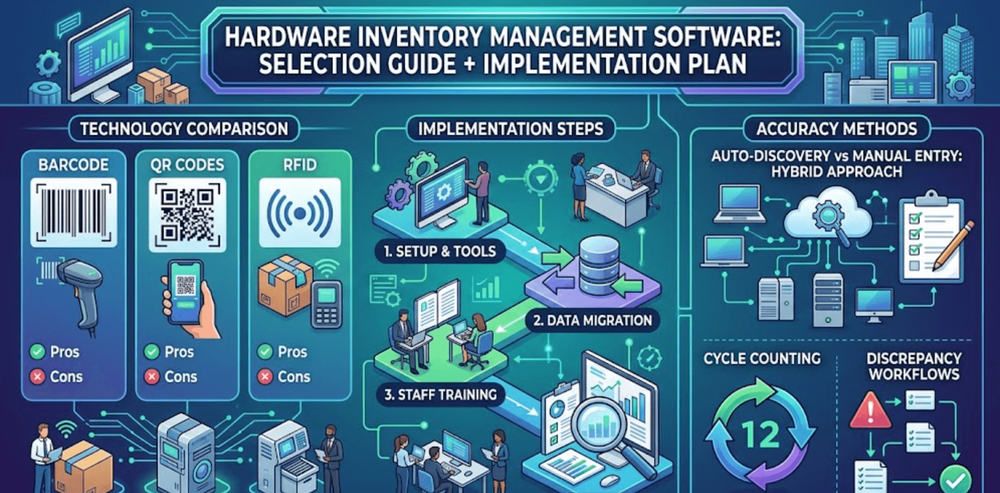
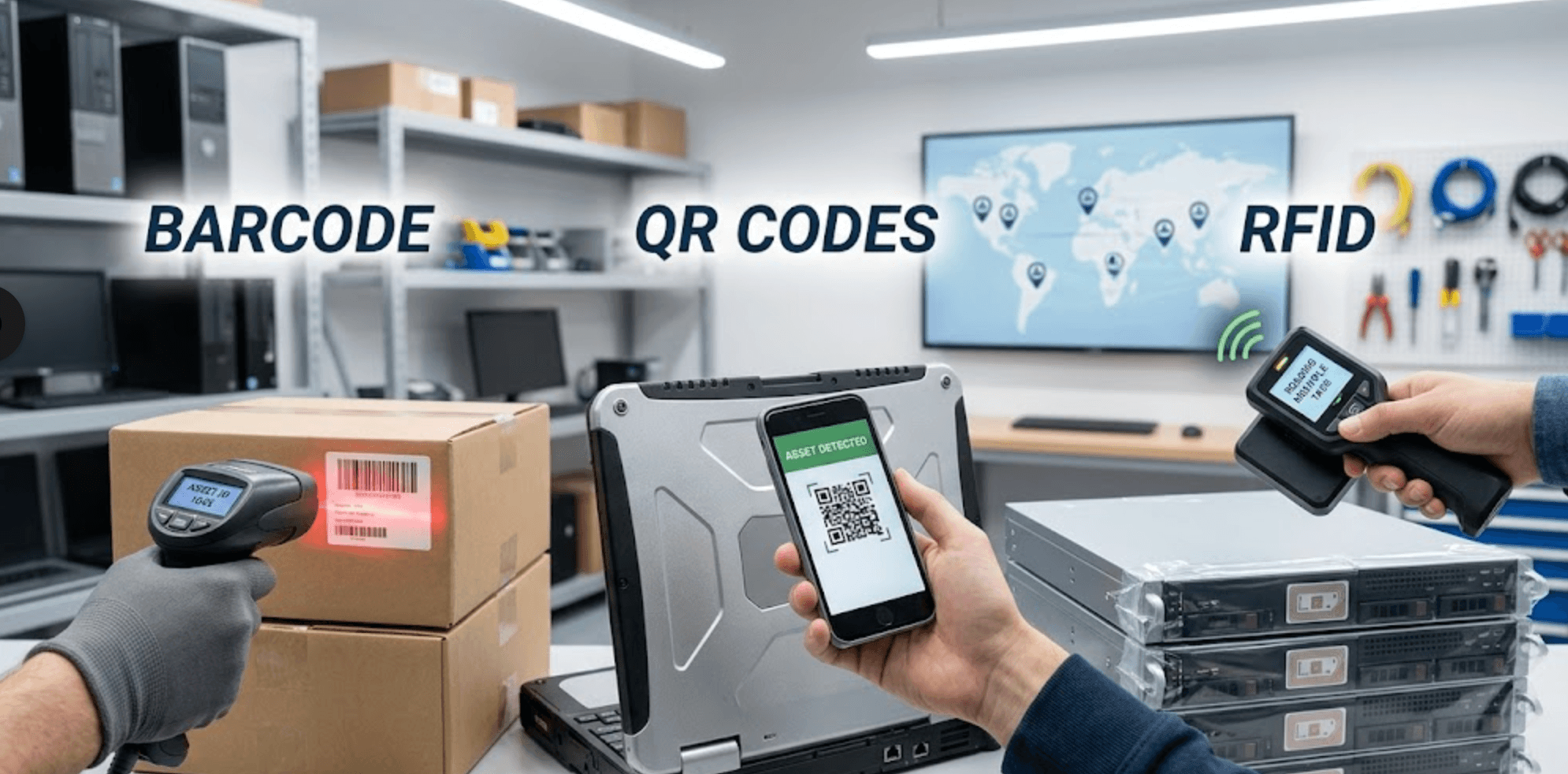
When choosing the right technology for inventory management, businesses often face the decision between Barcode, QR Codes, and RFID. Each of these technologies has its own strengths and weaknesses, making them suited for different use cases.
Barcode:
A barcode is a cost-effective technology that has been widely used for many years. It consists of a series of vertical lines (or "bars") that represent data, which can be scanned with a barcode reader.
Barcodes are easy to print and inexpensive, making them ideal for basic tracking needs. However, they require a direct line of sight to be scanned and typically have limited data capacity.
Pros:
- Low cost and easy to implement.
- Ideal for basic inventory needs.
- Widely used and supported.
Cons:
- Requires line-of-sight to scan.
- Limited data storage capacity.
- Slower scanning compared to QR or RFID.
QR Codes:
A QR Code (Quick Response Code) is an upgraded version of the barcode, capable of holding much more information, including text, links, and more. QR Codes can be scanned with a smartphone or QR reader, offering faster and more flexible scanning, especially when created using tools like Uniqode's QR code Generator. Unlike traditional barcodes, QR codes can be scanned from any angle, not just in a straight line of sight.
Pros:
- Faster and more flexible scanning (no need for line-of-sight).
- Higher data capacity than barcodes.
- Can be scanned using smartphones, which many businesses already own.
Cons:
- Still requires visual scanning (although less restrictive than barcodes).
- Printing QR codes can be more expensive than barcodes.
RFID:
Radio Frequency Identification (RFID) technology uses radio waves to automatically identify and track tags attached to objects. RFID does not require line-of-sight scanning, and it can track items in real-time as they move through different locations. RFID is ideal for high-volume environments and provides the most comprehensive tracking, but it tends to be the most expensive option.
Pros:
- Real-time tracking of devices, even without direct line of sight.
- Increased efficiency in high-volume or high-traffic areas.
- Ideal for tracking multiple items at once (e.g., items in a pallet or a box).
Cons:
- High upfront cost for RFID tags and readers.
- Requires a more complex setup and infrastructure.
- May not be necessary for smaller operations or simpler inventory needs.
Decision Factors:
When deciding between barcode, QR, or RFID technologies, consider the following factors:
1. Cost:
Barcodes are the least expensive option, followed by QR codes. RFID comes with higher costs for tags and readers, which can be a barrier for smaller businesses or those with limited budgets.
2. Usage Scenario:
- For businesses with large-scale operations or complex inventory needs, RFID might be the best choice due to its ability to track items in real time and without the need for line-of-sight.
- QR codes are a good middle-ground, offering more data capacity and faster scanning than barcodes without the expense of RFID.
- Barcodes are ideal for smaller businesses or those with less complex inventory management needs, where simplicity and cost-effectiveness are key.
3. Scale of Inventory Operations:
- Smaller businesses with fewer items might find barcodes or QR codes sufficient for their needs, as these options are easier to implement and maintain within computer inventory management software.
- For larger operations with high volumes of inventory that require real-time tracking, RFID may be worth the investment, offering the most efficient and scalable solution.
Ultimately, the best choice depends on your business’s specific needs, budget, and the scale of your inventory operations.
Auto-Discovery vs Manual Entry: Hybrid RealityAuto-Discovery
Auto-discovery refers to the process where hardware inventory management software automatically detects and records devices on the network. This feature is a great benefit for businesses, particularly those with large numbers of devices.
The biggest advantage of auto-discovery is that it is faster and more accurate than manual entry. Since the software scans the network, it can quickly identify and catalog new devices, updating inventory records in real time. This reduces the chances of human error, which can occur during manual data entry, and eliminates the need for time-consuming physical audits.
How Auto-Discovery Works for Tech-Heavy Environments:
Auto-discovery can seamlessly detect assets as they join the network In environments where devices are connected to a network, such as IT devices, servers, or workstations. For example, in a company with hundreds of computers, servers, or IoT devices, auto-discovery automatically pulls the device's details (like model, serial number, IP address, and software version) and updates the inventory. This is especially useful for businesses that frequently add or remove devices from the network.
Manual Entry
While auto-discovery offers significant benefits, manual entry still has a place in inventory management. There are situations where manual entry is required. This is especially true for non-networked assets, like office furniture, tools, or standalone devices that don’t connect to a network.
Additionally, some companies might need manual oversight to ensure certain assets are accurately recorded, especially if they have unique conditions (such as custom-configured devices) or need to include additional details not captured by auto-discovery.
Manual entry allows human judgment to verify the accuracy of the data and add any necessary notes, such as warranty information or maintenance records, which may not be included in the automated discovery process.
Hybrid Approach
For most businesses, a hybrid approach that combines both auto-discovery and manual entry offers the best results. A hybrid approach leverages the speed and efficiency of auto-discovery for networked devices while utilizing manual entry for non-networked assets or specific situations where detailed oversight is required.
For instance, you can use auto-discovery to track computers, servers, and mobile devices that are connected to the company network, while using manual entry to track assets like office furniture, printers, or other non-digital items.
Inventory Accuracy: Cycle Counting and Discrepancy WorkflowsCycle Counting
Cycle counting is an ongoing process of regularly counting a portion of your inventory on a set schedule, rather than conducting a full physical inventory count all at once. This approach helps businesses maintain better inventory accuracy throughout the year.
Cycle counting offers several advantages:
- More Accurate Records: By continuously counting smaller sections of inventory, businesses can quickly identify discrepancies and correct them before they escalate.
- Reduces Errors: Frequent counting reduces the likelihood of large-scale errors that can occur when performing only annual or infrequent full physical counts.
- Less Disruption: Because cycle counting occurs on a regular basis rather than all at once, it has minimal impact on daily operations. Teams can count smaller groups of items at a time without shutting down the business or disturbing workflows.
How Cycle Counting Differs from Full Physical Inventories:
Unlike full physical inventories, which count all items at once, cycle counting focuses on specific items or sections of inventory at different intervals. A full inventory may be done annually or semi-annually, which can lead to long periods of inaccurate data between counts. Cycle counting, however, ensures that the inventory data stays up-to-date and accurate year-round by breaking the process into manageable parts.
Discrepancy Workflows
In any inventory system, discrepancies between physical counts and recorded data are bound to occur. Discrepancy workflows are essential for addressing and resolving these issues quickly.
When discrepancies arise, such as missing or extra items, the first step is to identify the root cause. A discrepancy workflow should be in place to handle this process systematically:
- Immediate Flagging: Once a discrepancy is found during cycle counting, it should be flagged immediately in the inventory management system.
- Investigation: The next step is to investigate the cause. This might include reviewing transaction logs, checking security footage (if applicable), or examining inventory storage practices.
- Resolution: After identifying the cause, take corrective action, whether it’s updating inventory records, physically locating missing items, or addressing issues with the receiving or shipping process.
- Document the Issue: Ensure that the discrepancy is logged with a clear record of the findings and corrective actions taken to prevent similar issues in the future.
Best Practices for Investigating and Resolving Inventory Discrepancies:
- Trace the Issue: Always trace the discrepancy back to its source, whether it’s due to human error, theft, data entry mistakes, or issues with suppliers.
- Cross-Check Documentation: Use receipts, shipping records, and transaction logs to verify whether the discrepancy occurred during a shipment, return, or internal move.
- Communicate with Teams: Ensure that all relevant teams (e.g., warehouse, receiving, and inventory control) are notified and involved in resolving discrepancies.
- Take Preventive Actions: Once resolved, implement measures to prevent similar issues, such as better training, process improvements, or updated controls.
Improving Accuracy
The accuracy of your inventory depends heavily on how well you manage both the counting process and discrepancies. Asset Tracking Software plays a key role in maintaining accuracy by automating much of the process:
- Real-Time Data: Software can instantly update inventory records as items are counted, reducing the time it takes to reconcile discrepancies and ensuring the data is always current.
- Automated Alerts: Many systems can automatically flag discrepancies when they occur, prompting immediate action. This helps businesses stay proactive rather than reactive.
- Tracking History: Inventory management software can store detailed records of past counts, discrepancies, and resolutions, helping identify patterns that can be addressed to prevent future errors.
- Integrations: By integrating with other systems (e.g., point-of-sale or purchasing systems), inventory software can help ensure that all transactions are accurately reflected in inventory records, preventing discrepancies from arising in the first place.
A well-implemented inventory management system, combined with regular cycle counting and a structured discrepancy workflow, is essential for maintaining high levels of accuracy and improving operational efficiency.
Selection Criteria for Hardware Inventory Management Software
Choosing the right hardware inventory management software is crucial for ensuring that your business’s assets are tracked accurately and efficiently. When evaluating software options, consider the following key factors:
Scalability:
Your software should be able to grow with your business. As your inventory needs expand, the system should handle increased volumes of data, more locations, and additional users without performance issues. Scalability ensures that you don’t need to replace your system as your business grows.
Ease of Use:
A user-friendly interface is essential for quick adoption by your team. The software should have an intuitive design, easy-to-understand navigation, and simple workflows to avoid confusion and reduce training time.
Integration with Other Systems:
The software should integrate seamlessly with your existing tools, such as accounting software, MDM (Mobile Device Management) systems, or Enterprise Resource Planning (ERP) systems. Integration ensures that data flows smoothly between platforms, reducing the chances of errors and providing more accurate real-time insights.
Cost:
While it’s tempting to choose the cheapest option, it’s important to consider the overall value the software provides. Evaluate the total cost of ownership, including upfront costs, licensing fees, training, and ongoing maintenance. Choose a solution that fits your budget while offering the features and scalability your business requires.
Implementation Plan
Once you've selected the right hardware inventory management software, it's time to implement it in your business. Here's a step-by-step plan to ensure a smooth rollout:
Step-by-Step Plan:
- Initial Setup: Choose the right software and any necessary hardware tools (e.g., barcode scanners, RFID readers). Ensure your systems are compatible and set up the software environment, including user roles, permissions, and access settings.
- Data Migration: Transfer your existing inventory data from old systems or spreadsheets into the new software. This step is crucial for ensuring that the data in your new system is accurate and up-to-date. Take time to clean and organize your data before the migration to avoid errors.
- Training Staff: Ensure all team members understand how to use the new system. Provide training on how to log items, use the tracking features, and resolve any issues that may arise. Well-trained staff can quickly adapt to the new software and use it to its full potential.
- Testing: Run tests to ensure the system works as expected. Test key workflows, such as adding new inventory, conducting stock counts, and generating reports. Fix any bugs or issues before full deployment.
Post-Implementation:
After the system is fully deployed, provide ongoing support to address any issues that may arise. Regular maintenance, updates, and troubleshooting are key to ensuring your system continues to function smoothly.
As your business evolves, the system should adapt to meet new needs. Regularly review the software to identify any features you may need to update or add, such as handling new inventory categories, locations, or integrations.
Conclusion
To sum up, selecting and implementing the right hardware inventory management software is essential for maintaining accurate and efficient tracking of your assets. Key factors such as scalability, ease of use, integration capabilities, and cost should guide your decision-making. Prioritize features based on your business’s specific needs, and make sure to choose a system that can grow with your company.
With the right inventory management system in place, you can improve operational efficiency, reduce errors, and ensure that your assets are accurately tracked, ultimately supporting the growth and success of your business.